
ShareChat Video Downloader
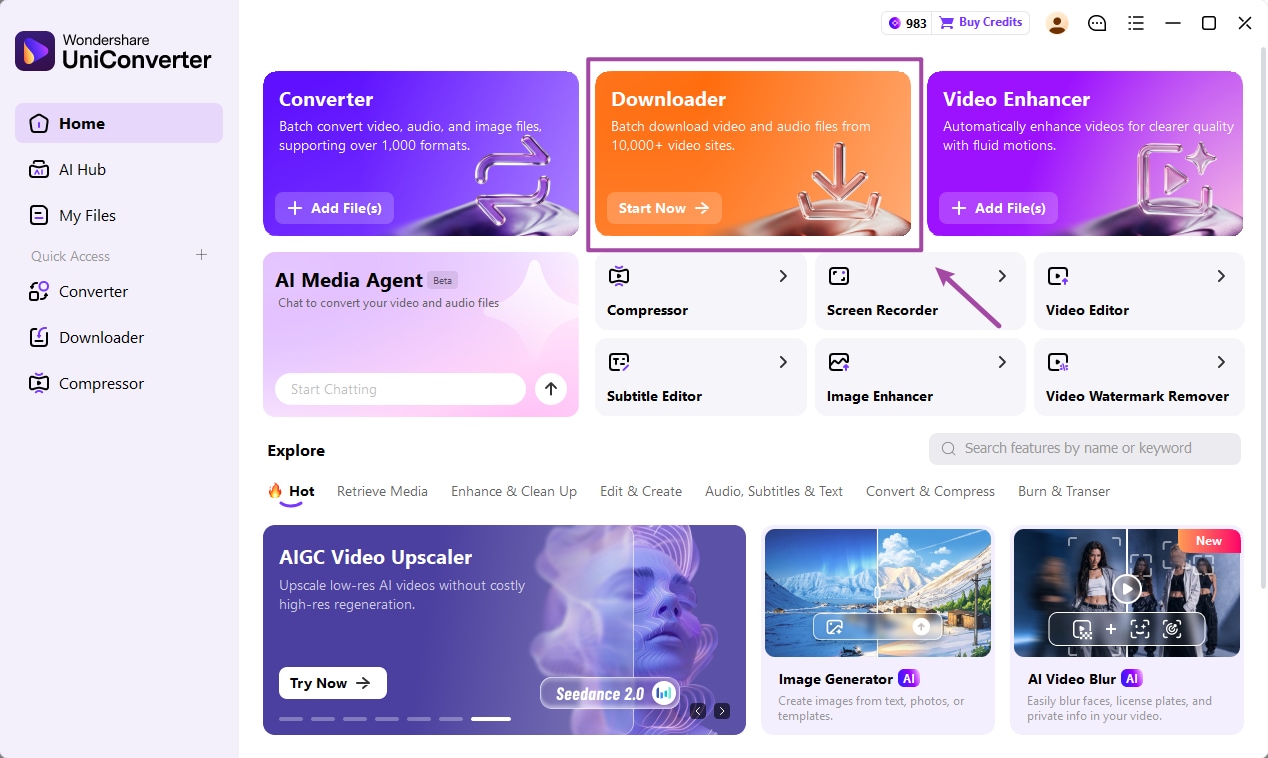
Save a ShareChat video for offline viewing or WhatsApp Status. Copy the individual post link, then use a compatible download method. For videos already on your computer, UniConverter helps you convert them for your next share.
Download for WindowsDownload for MacUniConverter is desktop software. ShareChat link compatibility has not been verified.
What Is a ShareChat Video Downloader?
A ShareChat video downloader helps you save a video from a post when a suitable download is available. For a quick phone download, try the post’s own save option first; a compatible browser tool is another option. UniConverter is a desktop app for working with supported links and saved video files.
Save and share content you own or have permission to use.
How to Download Videos from ShareChat
For a phone-friendly browser method, try AnySaver’s ShareChat downloader, an independent third-party service. Link support and results can change.
Find the video
Open the individual ShareChat post. If a save or download option appears, you can try it first.
Copy its link
Tap the post’s Share button and choose Copy link. Copy the video post, not the profile page.
Paste and save
Open the downloader in your browser, paste the link and select Download. If a video option appears, save it and check playback.
The third-party method has not been independently tested for every post. Avoid entering your ShareChat password into third-party download pages.
Use UniConverter on Windows or Mac
Have a video saved on your computer? Open it in UniConverter to convert it to a format suitable for your device. For supported video links, the desktop Downloader lets you paste a URL and check the options returned.
- Install and open UniConverter on Windows or Mac.
- For a saved file, open Converter and add the video. For another supported link, choose Downloader and paste the individual URL.
- Choose from the available options and check the completed file.
ShareChat URLs have not been verified in UniConverter, so use a compatible method above if your link is not recognised. See the guide to downloading video from a link for supported-link workflows.
Get UniConverter for WindowsGet it for Mac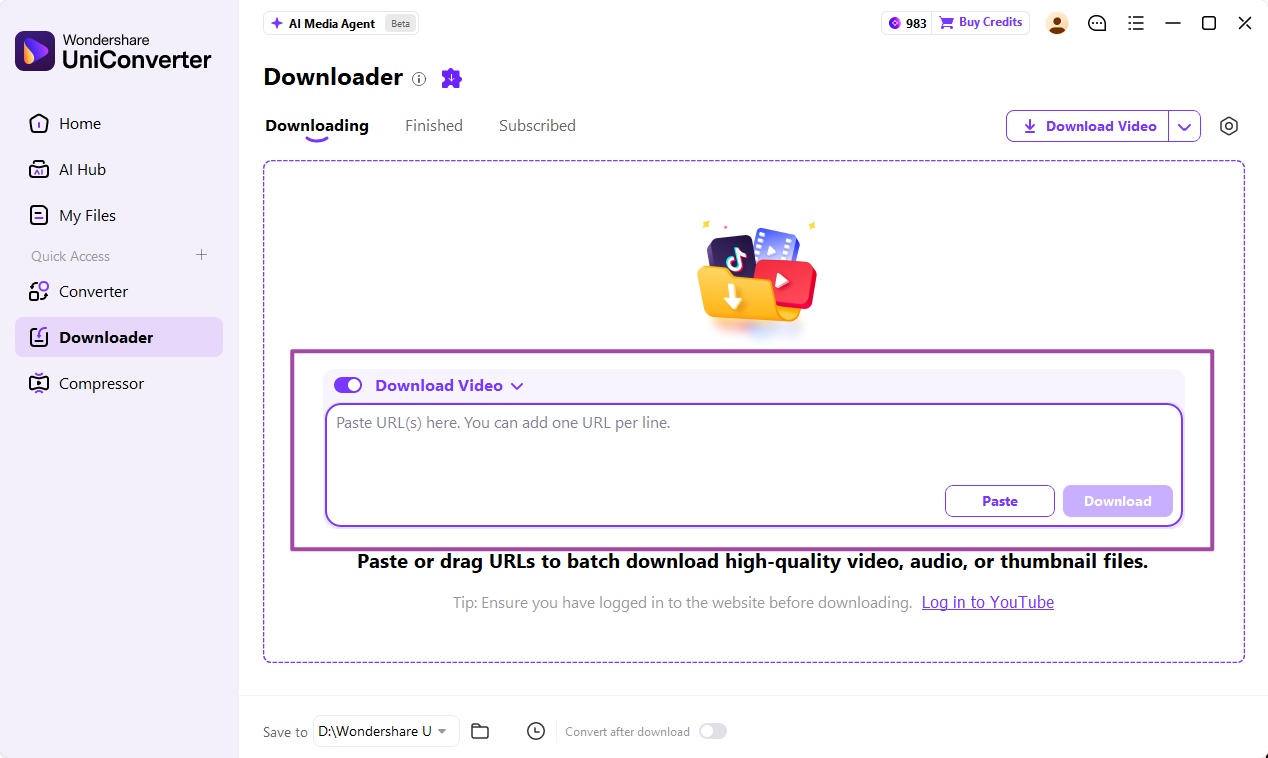
Download ShareChat Status Videos for WhatsApp
Once you have saved a video you own or have permission to share, upload the file to WhatsApp Status:
If WhatsApp asks you to trim the video, select the part you want before posting. If the video is on your computer, transfer it to your phone first.
Funny clips, love and attitude status, devotional videos, and Telugu or Tamil ShareChat videos follow the same process when a downloadable video file is available.
Save ShareChat Videos on Android and iPhone
Android
After downloading, check your browser’s Downloads list or Files app. Open the video to confirm it plays; it may also appear in your gallery.
iPhone
In Safari, check the Downloads list or open Files → Downloads. To add a compatible video to Photos, open it and tap Share → Save Video if the option appears.
Why Can’t I Download a ShareChat Video?
| Problem | What to try |
|---|---|
| Link isn’t recognised | Open the individual video and copy the complete share link again. |
| Post is unavailable | Check that the original post still opens. Private or deleted posts may not be accessible to a downloader. |
| Unsupported link | Try the post’s own save option or another compatible service; no tool supports every link. |
| Download doesn’t start | Check your connection, storage and browser download permissions, then retry. |
| File won’t play or share | Find the file in Downloads or Files and check that it plays. If needed, convert a compatible saved file on your computer. |
Looking for another method? Compare options in our ShareChat downloader guide.
Frequently Asked Questions
How do I download a ShareChat video to my phone?
Open the video post, tap Share and copy its link. Try the post’s own save option or paste the link into a ShareChat-compatible browser downloader. Find the saved file in Downloads or Files.
Can I download ShareChat videos without a watermark?
The result depends on the source file and the downloader. A tool may avoid adding its own logo but cannot necessarily remove a logo already in the video. Check the saved file before sharing.
Why does my ShareChat video link not work?
Open the individual video and copy its complete share link again. The post may be private, deleted or unsupported. Try the original post’s save option when available.
Where are ShareChat videos saved on Android or iPhone?
On Android, check your browser downloads or the Files app. On iPhone, check Safari’s Downloads list or Files > Downloads; open the video and choose Share > Save Video if available.
Can I use a ShareChat video for WhatsApp Status?
After saving a video you own or have permission to share, open WhatsApp, go to Updates > My status, choose the video and post it. Trim it in WhatsApp if prompted.
Can UniConverter download ShareChat videos?
ShareChat link compatibility has not been verified. UniConverter is a Windows and Mac desktop app for supported video links; it can also convert compatible videos already saved on your computer.