

Searching for an iStock downloader or iStockphoto downloader usually means one of three things: downloading a file you already licensed, saving a watermarked preview for a draft, or finding a legal free alternative. These options do not provide the same file quality or usage rights.
This guide explains how to download licensed iStock images and videos from your account, how iStock free files and preview downloads work, what third-party downloader sites typically provide, and why a watermark-free file still requires a valid license.
In this guide
- Quick Answer: Is There a Safe iStock Downloader?
- What Can You Download from iStock?
- How to Download Licensed iStock Files
- How to Download Free iStock Images and Videos
- Third-Party iStock Downloaders Compared
- Why Is My iStock Download Not Working?
- What Are the Risks of Using an Unofficial iStock Downloader?
- Convert or Enhance Licensed iStock Media
- Legal Free Alternatives to iStock
- iStock Downloader FAQs

What Can You Download from iStock?
| Download Option | Typical Output | Watermark | Publishing Rights | Best For |
| Licensed iStock account download | Purchased resolution and file type | No preview watermark | Included under the applicable iStock license | Websites, ads, videos, client projects |
| Official iStock free file | Original downloadable file | No preview watermark | Included under the free file license terms | Uses permitted by the applicable iStock license |
| Official preview or comp | Lower-resolution preview | Usually yes | Not intended as a final published asset | Mockups, rough cuts, internal review |
| Third-party downloader | Often a preview, cached file, or externally sourced copy | Varies | Not automatically included | Risk evaluation only |
How to Download Licensed iStock Images and Videos
If you have already purchased an image, illustration, vector, or video, you do not need a third-party iStock downloader. Download the licensed file directly from the account used to make the purchase.
- Sign in to the correct iStock account. Use the email address connected to your subscription or credit purchase.
- Open your downloads or purchase history. Locate the image or video you previously licensed.
- Select the available size or resolution. Available options may depend on the asset and the license or plan used to obtain it.
- Download the original file and keep the license record. Save the receipt, invoice, asset ID, and download confirmation with the project files.
How to Download Free iStock Images and Videos Legally
iStock offers selected files at no charge through its official free content pages. At the time of review, iStock promotes a free photo each week, while free illustrations and video clips are offered monthly. Availability can change, so check the current official page before relying on a specific asset.
Download an Official Free iStock File
- Sign in to iStock. Sign in to your existing account or create a free account.
- Open the relevant official free content page. Choose free stock photos, free stock illustrations, or free stock video clips.
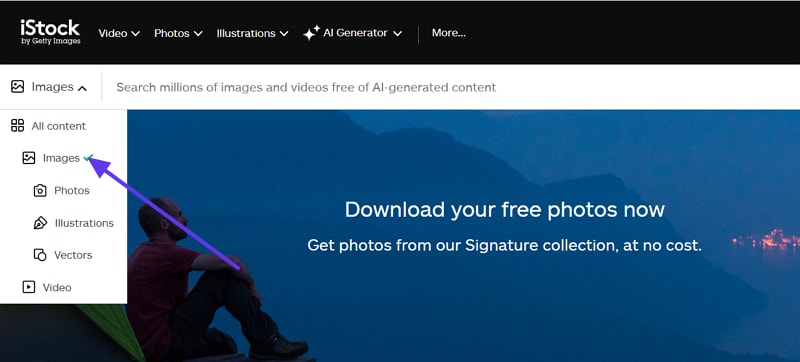
- Select the currently available asset. Review the file information and applicable license before downloading.
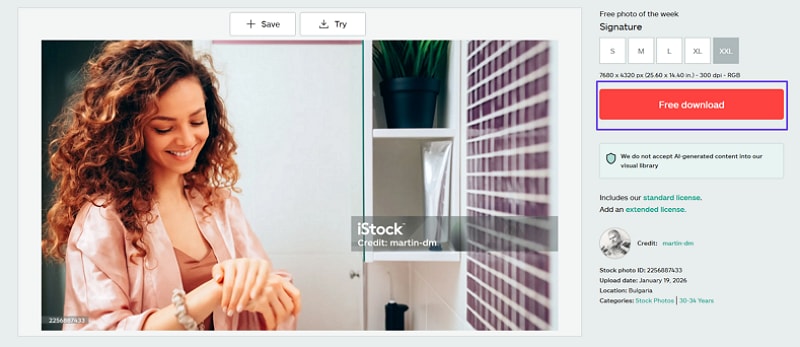
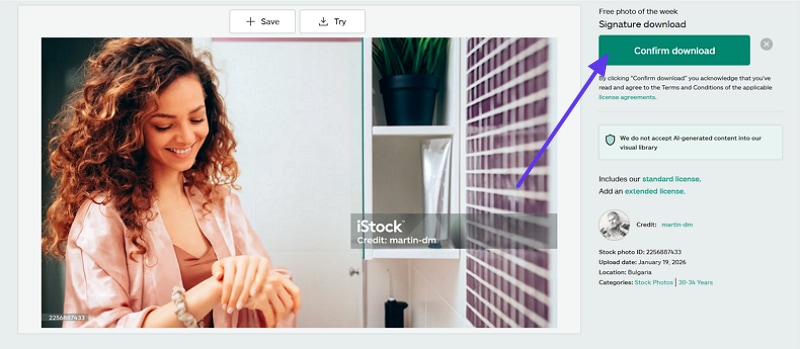
- Confirm and save the download record. Download the file and keep its asset ID, confirmation, or license record.
Third-Party iStock Downloaders Compared
Some websites advertise themselves as free iStock image or video downloaders. Their output, availability, advertising, and security practices may change without notice. The following comparison describes their typical positioning; it is not an endorsement or a confirmation that a downloaded file includes an iStock license.
| Option | Common Use | Likely Output | Main Limitation | Recommended Use |
| iStock account download | Retrieve purchased assets | Licensed file in an available size | Requires a completed license or eligible free file | Final publishing |
| Official iStock preview | Test an image or clip before licensing | Watermarked or reduced-quality comp | Not a final publishing file | Drafts and internal review |
| StepToDown | Paste an iStock image URL | Site-processed image output | No automatic proof of license | Evaluate with caution |
| FetchPik-style services | Paste stock image or video links | Often a preview or externally processed file | Output and availability may change | Evaluate with caution |
Before using any third-party site, avoid installing unknown browser extensions, do not enter your iStock password outside the official domain, and scan downloaded files. A clean-looking or watermark-free file does not prove that commercial rights are included.
Using StepToDown for iStock Images Download
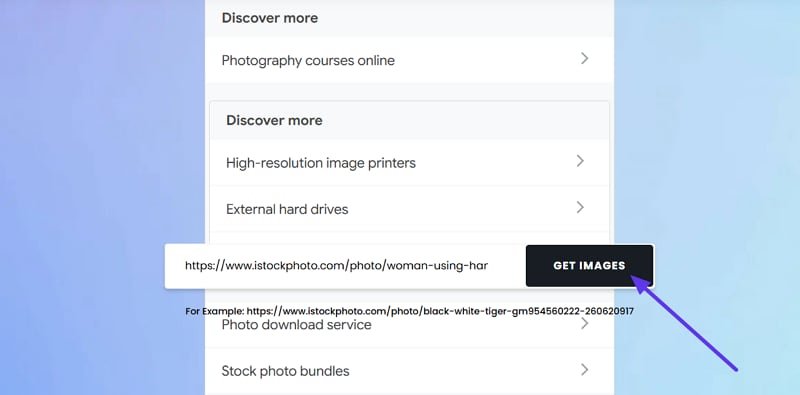
StepToDown is a third-party service that accepts an iStock image URL and attempts to return a downloadable image. The output may be a preview or processed copy, and the service does not provide proof that an iStock license is included. It may breach iStock terms, so avoid using it for publishing. Treat any download as a watermarked comp for internal layout checks only, then replace it with a licensed file before release. Keep receipts and comps labelled always, as these tools provide preview/comp versions only. Follow the steps below to try StepToDown for iStock Images:
How it works: Open StepToDown, paste the URL of the iStock image into the input field, and select “Get Image.” Review the downloaded file carefully, because the output does not automatically include an iStock license.
Using FetchPik for iStock Videos Download
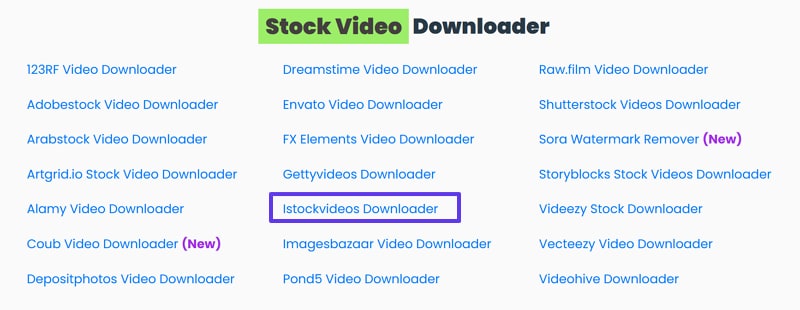
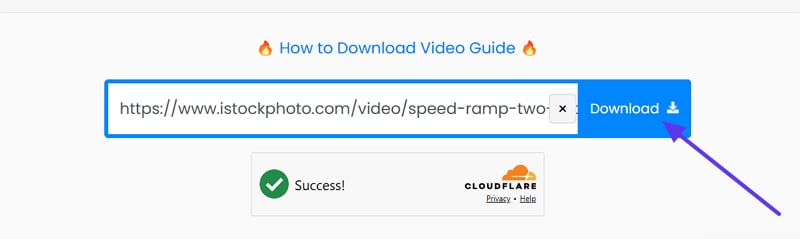
FetchPik is marketed as an iStock video downloader, but it usually extracts previews. Those preview files can be watermarked, low resolution, and have a limited duration. Thus, using third-party downloaders may violate iStock terms and local copyright laws. For publishing, buy the proper license and download from iStock directly. The following steps show how the third-party service processes an iStock video URL. Its output should not be treated as an officially licensed iStock download.
Step 1. Start by accessing the tool, and navigate to the “iStock Video Downloader” feature to proceed.
Step 2. Next, paste the “iStock Video Link” in the prompt box and press “Download”.
Use Reverse Image Search to Find the Original Source or a Licensed Alternative
Reverse image search can help identify an image's creator, original stock listing, or similar licensed alternatives. Uploading an iStock preview to Google Images, TinEye, or another reverse search service may reveal where the image has appeared online.
However, finding an unwatermarked copy on another website does not prove that the copy was uploaded with permission or that you have the right to reuse it. Use reverse search to verify the source, contact the creator, or locate a legally licensed alternative—not as a substitute for purchasing the iStock license.
Why Is My iStock Download Not Working?
| Problem | Likely Cause | What to Try |
| The download button is missing | You are signed out, using the wrong account, or have not licensed the asset | Sign in again and check your purchase or download history |
| Only a watermarked file is available | You are viewing the preview instead of a licensed download | Complete the license purchase or choose an eligible official free file |
| The purchased file is not in the account | The asset was licensed under another email address or team account | Check the invoice email and confirm the account used for payment |
| 4K video is not available | The clip may not have been uploaded or licensed in 4K | Review the resolution options on the original asset page |
| The file does not open in an editor | The format or codec may not be supported by the editing software | Keep the original file and convert a working copy to a compatible format |
| The browser download fails | Cache, extensions, network filters, or browser settings may interfere | Try a private window, another browser, or temporarily disable download extensions |
What Are the Risks of Using an Unofficial iStock Downloader?
Using an unofficial iStock downloader can create legal, security, and quality problems. Publishing an iStock asset without the required license may lead to copyright claims, takedown requests, account restrictions, or other legal consequences.
Copyright Infringement Consequences
Copyright problems can start when previews are used beyond the allowed purposes. Provided next are a few consequences one needs to keep in mind:
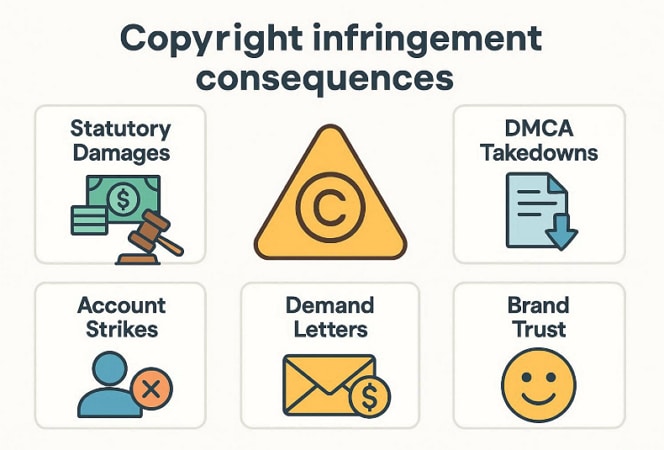
- Copyright Claims and Financial Liability: Unauthorized publication may lead to takedown requests, settlement demands, account restrictions, or legal claims. In the United States, statutory damages may be available in eligible copyright cases, but the amount and availability depend on factors such as registration, jurisdiction, and the facts of the case. This article does not provide legal advice.
- DMCA Takedowns: Rights holders may request the removal of unauthorized content. Repeated complaints can lead to account strikes, feature restrictions, or loss of monetization.
- Demand Letters: Some owners send demand letters asking for payment before filing lawsuits formally. Settlements can cost far more than a legitimate license purchase today.
- Brand Trust: Clients may question your professionalism if unlicensed assets appear publicly anywhere. It can damage trust and slow approvals for future creative work.
Malware and Security Risks
Unofficial downloader sites can expose users to misleading buttons, aggressive advertising, suspicious extensions, or malicious downloads. Potential risks include:
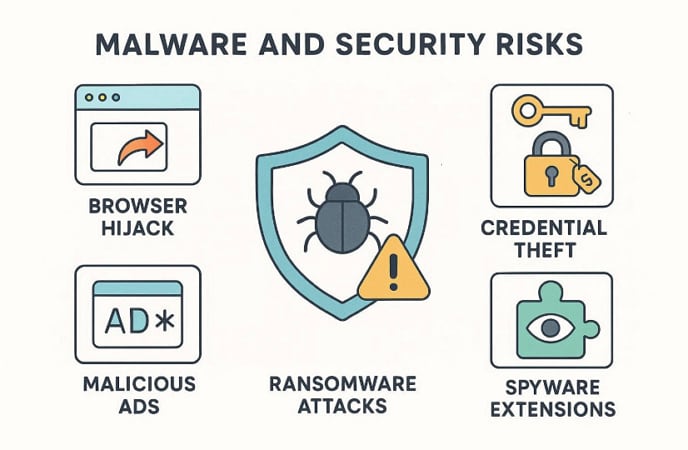
- Browser Hijack: Some sites hijack your browser, changing search and homepage settings silently. This can redirect you to scams whenever you open a tab.
- Credential Theft: Fake login pages can steal your iStock or email passwords. Attackers may reuse those credentials to access other accounts online later.
- Malicious Ads: Aggressive ads can push adware pop-ups that slow down your computer. Many free sites also fund themselves through these risky advertising networks.
- Spyware Extensions: Some tools ask you to install extensions that track browsing behavior. Remove suspicious extensions immediately, and run a trusted security scan afterward.
Quality Limitations of Preview Downloads
Preview files may use lower resolution, heavier compression, reduced video bitrate, or visible watermarks. These limitations make them suitable for evaluation and mockups, but not for final client delivery or public publishing.
When Can You Use an iStock Preview?
An iStock preview or comp should generally be limited to evaluation, internal review, rough edits, and mockups before licensing. Do not assume that personal, educational, or non-commercial use automatically permits public publication.
- Use watermarked previews to test layouts, crops, timing, and creative direction.
- Keep preview files inside internal or client review workflows.
- Clearly label preview files so they are not published accidentally.
- Replace every preview with the properly licensed file before launch or delivery.
How to Keep iStock Downloads Compliant
- Download licensed files through the correct iStock account.
- Keep invoices, asset IDs, license records, and download confirmations.
- Check whether standard, extended, or editorial restrictions apply.
- Track where each licensed asset is used.
- Review the current license terms before using an asset in merchandise or templates.
Convert or Enhance Licensed iStock Media After Download
After downloading an iStock file that you are licensed or otherwise authorized to use, you may need to convert it for an editor, reduce its file size, upscale a lower-resolution working copy, or process several files in a batch.

Process Licensed iStock Images and Videos
UniConverter does not provide an iStock license and should not be used to represent an unlicensed preview as an authorized original.
When Media Processing Helps After an iStock Download
Licensed iStock files may still need additional processing before they fit a specific editing, publishing, storage, or delivery workflow. Media processing can help create compatible working copies while preserving the original licensed file as a backup.
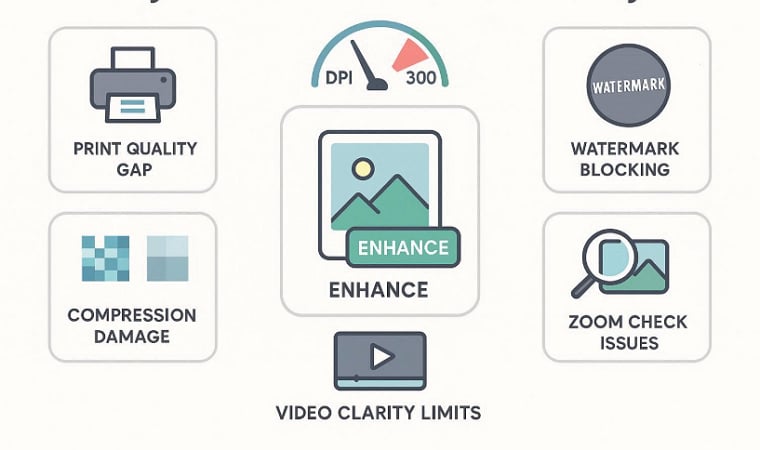
- Format Compatibility: Convert a licensed file into a format supported by your editor or publishing platform.
- Resolution Adjustment: Prepare an authorized working copy for a specific screen, presentation, or project size.
- Noise and Clarity Improvement: Improve older or compressed authorized media when the source quality needs cleanup.
- File Size Reduction: Compress working copies for easier transfer, review, or online publishing.
- Batch Processing: Convert or enhance multiple licensed images or videos in one workflow.
Using UniConverter to Enhance iStock Videos & Images
UniConverter provides AI-powered tools for upscaling, denoising, sharpening, format conversion, and batch media processing. It lets you adjust resolution, bitrate, and export formats before conversion. Furthermore, it allows users to batch process for upgrading multiple videos simultaneously. Now, adhere to the steps below to try UniConverter to enhance iStock images and videos:
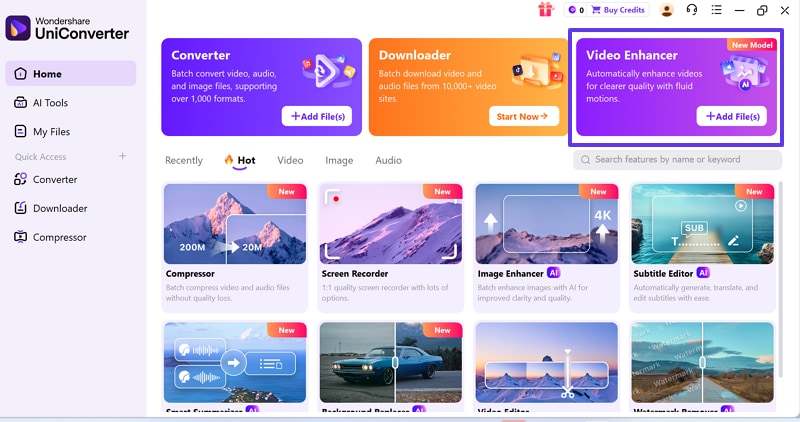
Step 1. Access the Video Enhancer Tool
First, on the Home screen, locate the “Video Enhancer” card. Next, select the “Video Enhancer” feature to open the enhancement workspace.
Step 2. Import the Licensed or Authorized iStock Video
In the Video Enhancer window, click “Add Video” or drag and drop the licensed or authorized working file into the workspace.
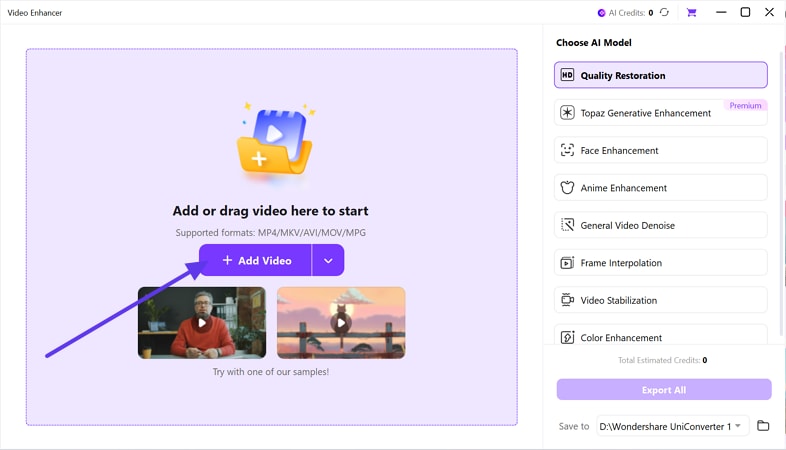
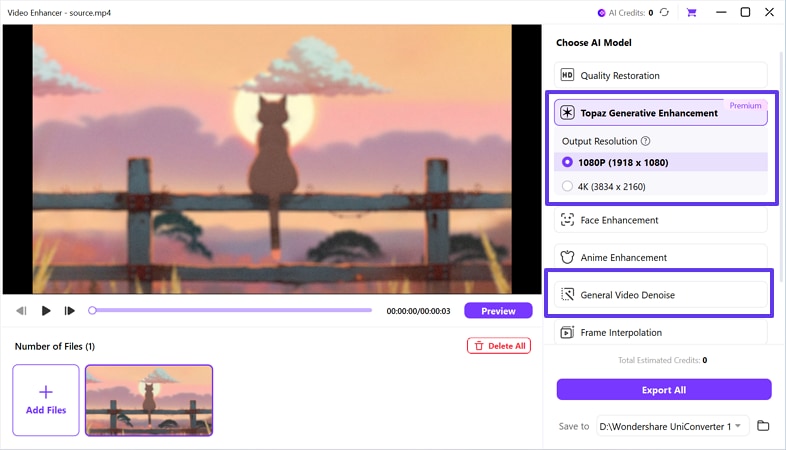
Step 3. Choose an AI Enhancement Preset
Next, from the right-side “Choose AI Model” list, pick “Topaz Generative Enhancement” if you want upscaling control. Then, under “Output Resolution”, choose “1080P or 4K” or switch to “General Video Denoise” for cleanup.
Step 4. Export the Finalized Video
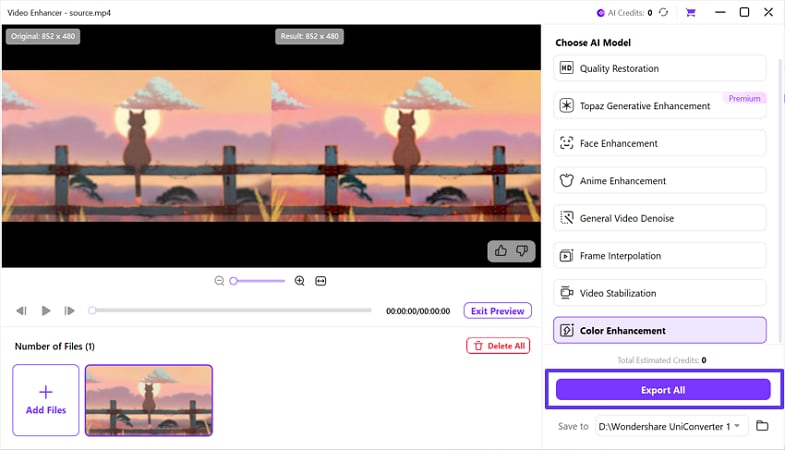
After making tweaks, press the “Preview” button to view before and after. When satisfied, choose your save location, then click “Export All”.


Legal Free Alternatives to iStock Downloader Tools
If you are searching for an iStock free image downloader, consider legal free stock platforms instead. These sites provide stock media under published licenses that may allow commercial use, subject to each platform's terms and any additional rights involving people, brands, property, or trademarks.
| Platform | Media Types | License | Useful For | Important Limitations |
| Unsplash | Photos and illustrations | Unsplash License | Websites, blogs, presentations, and creative projects | Review restrictions involving trademarks, people, and standalone resale |
| Pexels | Photos and videos | Pexels License | Social media, websites, video projects, and presentations | Additional rights may apply to people, logos, brands, or property |
| Pixabay | Photos, illustrations, vectors, videos, music, and audio | Pixabay Content License | Digital projects and multimedia production | Standalone resale and certain recognizable content uses are restricted |
Tip for Staying Safe: Even on free sites, watch for trademarks, logos, and recognizable people, because extra rights may still apply.
Conclusion
The safest way to download iStock images and videos is through the account that licensed the asset or through iStock's official free-file pages. Third-party iStock downloaders may provide previews or processed copies, but the downloaded file does not automatically include publishing rights. Use previews only for evaluation, replace them before launch, and keep the license record for every published asset. For licensed or otherwise authorized media, Wondershare UniConverter can help convert, compress, enhance, or batch-process working copies for your editing workflow.

