


Ever wondered how some AI Sway Dance videos go viral overnight? With the right tools, techniques, and creative approach, anyone can transform simple dance prompts into scroll-stopping content. This guide dives into the best generators, tips for lifelike movements, and methods to upscale your videos for maximum impact. Whether you’re a beginner or an experienced creator, you’ll discover how to craft AI-powered dance videos that captivate audiences and dominate feeds. Get ready to turn your AI Sway Dance ideas into viral sensations.
In this article
Part 1: Different Approaches for Creating AI Sway Dance
Creating AI Sway Dance videos can be approached in several ways, depending on your creative goals, input materials, and desired control. Each method has its strengths and limitations, which influence production speed, customization, and video quality. Below is a comparison of the main approaches:
| Method | Generation Material Required | pros | cons | Best For | Best Tool(s |
| One-click template generator | Pre-set templates | Fast, beginner-friendly, instant results | Limited customization, template repetition | Quick viral videos, beginners | TikTok, Media.io |
| Customizable template generator | Upload dancing video + dancer photo | High control, personalized outputs, editable | Requires media prep, slightly longer process | Branded content, influencers | Viggle |
| Text & image prompt generator | Text descriptions ± images | Full creative freedom, no prior videos needed | Slower, may need multiple tries, learning curve | Experimental or unique content | Gemini Veo3, Freepik.ai |
Choosing the right method depends on your priority: speed, personalization, or creative flexibility. For fast trends, one-click generators excel. For professional campaigns or branded content, customizable templates offer better control. Text-based generators are ideal for experimental or highly unique dance videos.
Part 2: Best Generators for Viral AI Sway Dance Videos
Creating viral AI Sway Dance videos requires the right tools to turn ideas into scroll-stopping content. From one-click templates to fully customizable generators, each platform offers unique features to suit different creative needs. Let’s explore the top tools that make viral AI dance videos a reality:
1. TikTok AI Sway Dance Template
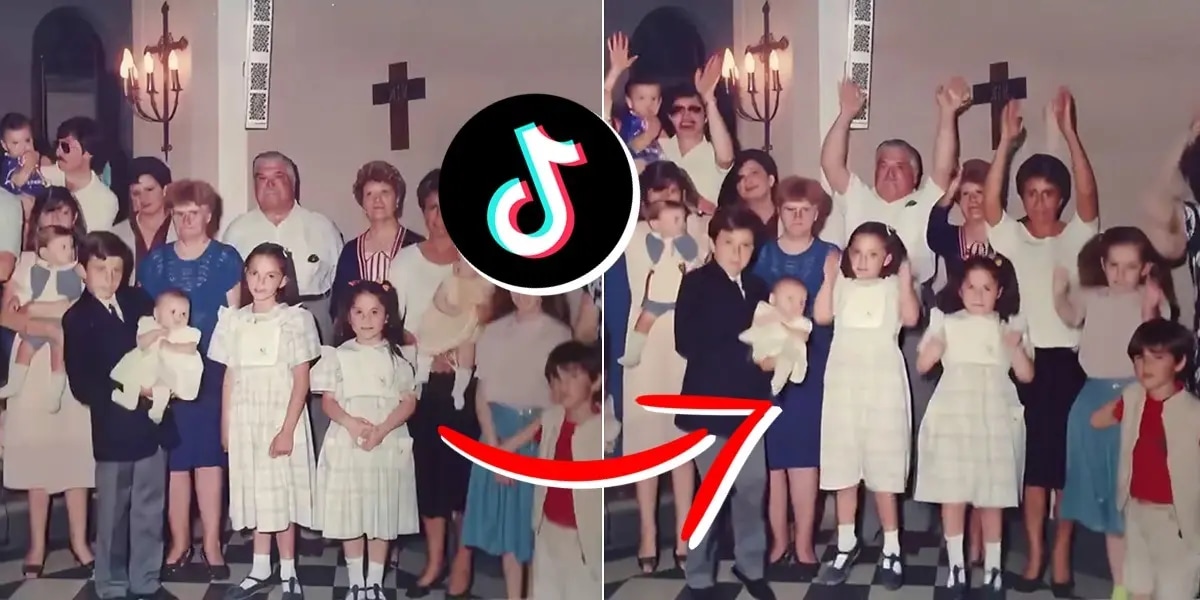
TikTok’s AI Sway Dance filter turns still images into animated dance videos effortlessly. By uploading a clear photo, the AI animates movements that sync with trending music tracks. It’s ideal for users looking to create quick, eye-catching content without prior video editing skills. The filter works directly within TikTok, ensuring seamless integration with your feed and Reels. Perfect for spontaneous creativity, it leverages TikTok’s AI to produce smooth, natural-looking dance animations. While it’s beginner-friendly, customization options are limited. Despite that, it remains one of the fastest ways to create viral AI Sway Dance clips.
How to Use:
Open TikTok and tap the '+' icon.
Select 'Effects' and search for "AI Sway Dance."
Upload a clear, full-body photo.
Apply the effect and adjust as needed.
Preview and post your animated dance video.
2. Media.io AI Sway Dance Template
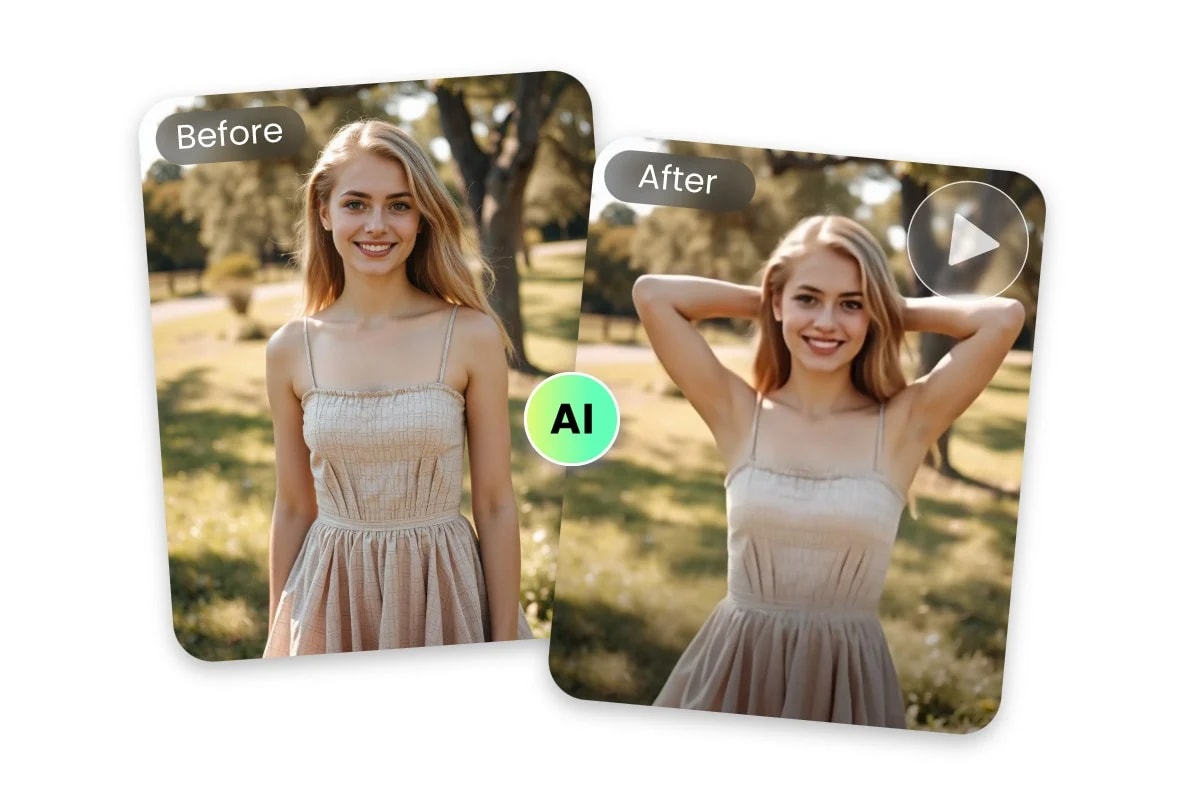
Media.io offers a browser-based AI Sway Dance generator that converts static images into animated dance sequences. Users can upload a photo and add text prompts to define the dance style, mood, and tempo. The platform supports various durations and resolutions, making it suitable for Instagram, TikTok, and YouTube content. Its AI engine ensures smooth and realistic motion, even for first-time users. Media.io is ideal for creators who want a balance of speed and customization without installing additional software. While producing high-quality outputs, it still allows prompt-based creativity. This makes it a versatile choice for both casual and professional creators.
How to Use:
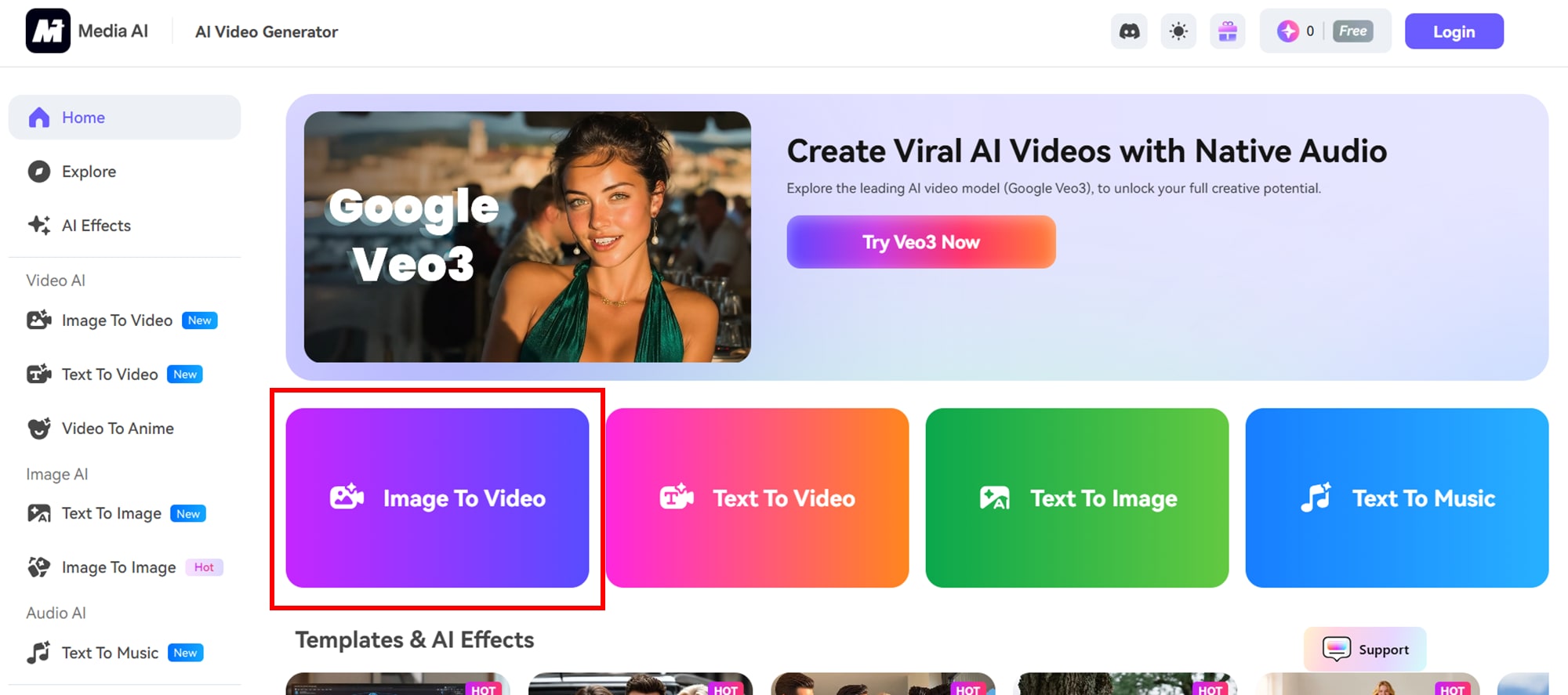
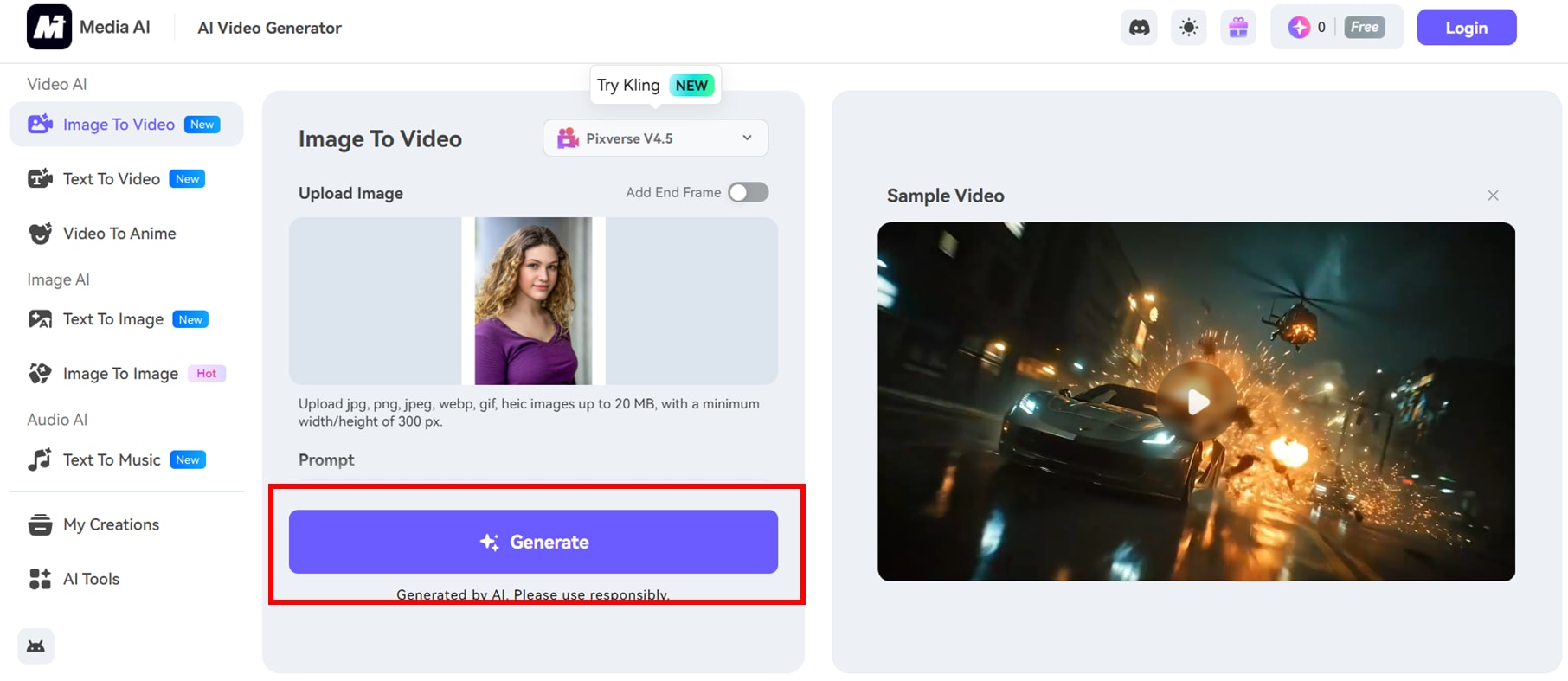
Step 1: Visit Media.io AI Dance Generator. Click on image to video.
Step 2: Upload a clear, full body photo and enter a descriptive prompt for the desired dance style. Set parameters like duration (5–8 seconds) and resolution (540p–1080p).
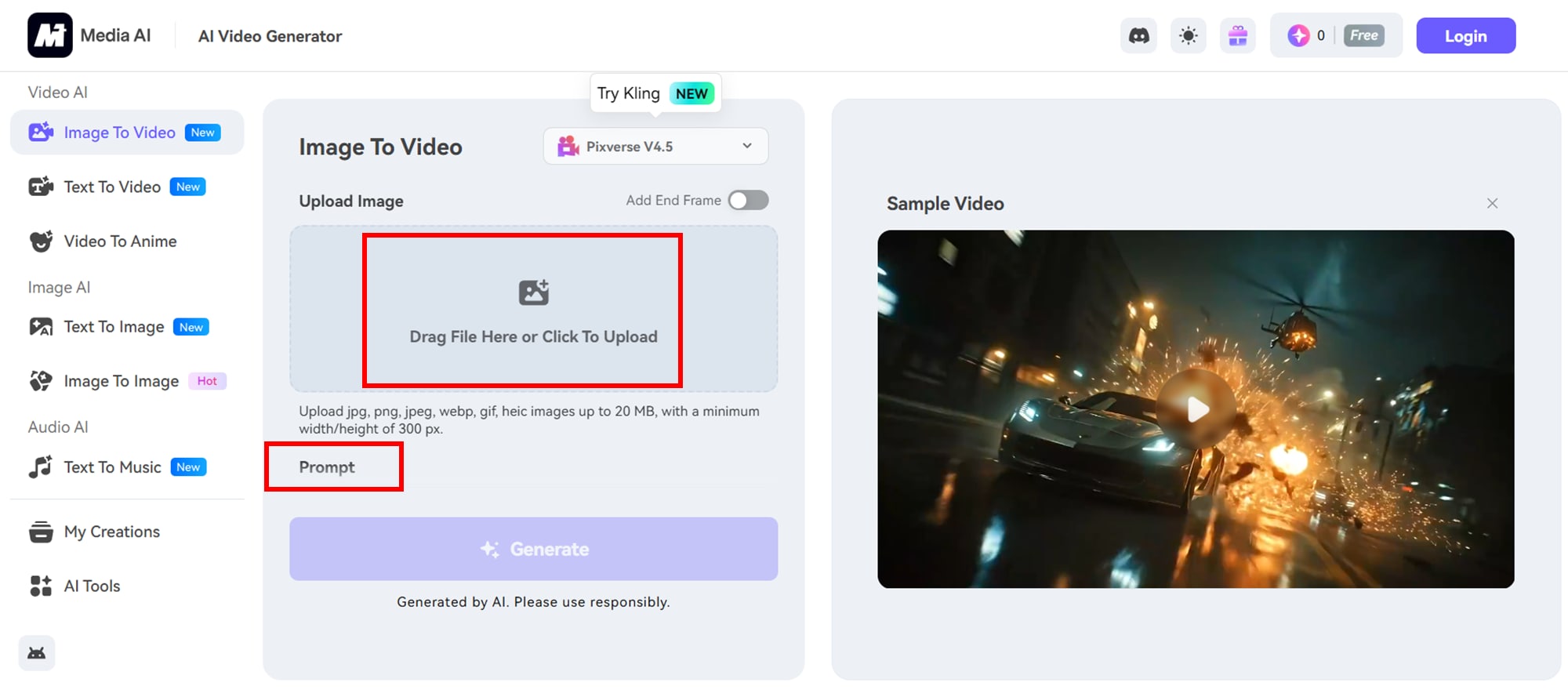
Step 3: Click 'Generate' to create your dance video.
3. Viggle AI Sway Dance Template
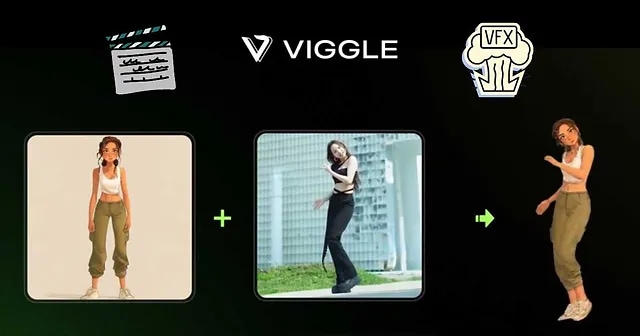
Viggle enables highly customizable AI Sway Dance videos by allowing users to upload a dancing video and a photo of the dancer. The tool combines user-provided content with AI motion synthesis to produce personalized dance animations. This method gives full control over poses, expressions, and movements while maintaining a realistic look. It’s perfect for influencers, brands, and content creators aiming for professional-quality videos. Viggle supports multiple dance styles and adjustable video settings for duration and resolution. While setup takes slightly longer than one-click tools, the creative flexibility it offers is unmatched. Users can achieve fully tailored AI dance videos that align with brand aesthetics.
How to Use:
Step 1: Visit Viggle AI Dance. Upload a video of the desired dance moves. Upload a photo of the person you want to animate.
Step 2: Adjust settings and click 'Generate' to create the dance video.
4. Veo3 AI Sway Dance Video Generator
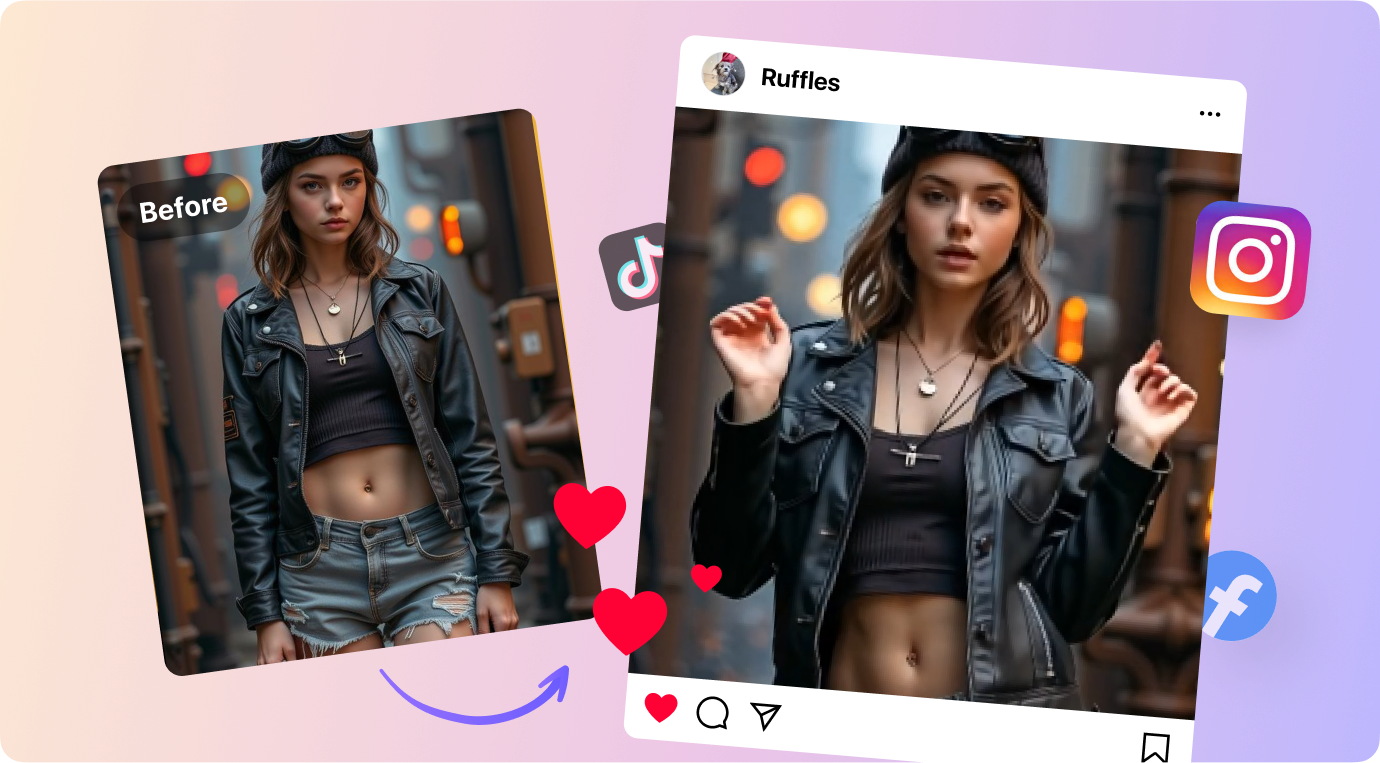
Veo3, accessible through Google Flow, lets users generate cinematic AI Sway Dance videos using text prompts. Creators can describe dance styles, environments, and camera angles to achieve detailed results. The AI combines visual synthesis with realistic movement patterns, producing professional-level outputs. It’s especially useful for experimental or highly creative content where conventional templates fall short. The platform supports audio integration and advanced scene customization for more immersive videos. While it requires some familiarity with prompt design, Veo3 offers near-total creative freedom. This makes it ideal for creators who want high-quality, unique AI dance visuals without relying on pre-set templates.
How to Use:
Step 1: Visit Veo3. On the home page, click on “generate”
Step 2: Enter a detailed text prompt describing the desired dance scene. Customize settings like video length and style.
Step 3: Click 'Generate' to produce the dance video.
Part 3: Viral AI Sway Dance Videos Textual Prompt Templates
Creating AI Sway Dance videos becomes effortless with ready-to-use templates. Below are a few sample dance templates you can try to create viral content. But different AI generators may have different comprehension of same prompts, so you would better may sutble changes and change different generators for the best result:
1. Sunset Groove Template
Capture the magic of the golden hour with this template. It transforms ordinary photos into smooth, flowing dance animations that feel cinematic and natural. Perfect for lifestyle creators and travel enthusiasts who want to showcase movement against scenic backgrounds. The AI brings subtle gestures and swaying motions that make the video immersive.
Style: Smooth contemporary dance in a golden hour outdoor setting.
Mood: Energetic, uplifting, and dreamy.
Music Suggestion: Chill pop or soft electronic beats.
Prompt Idea: "Animate a dancer swaying gracefully on a beach during sunset, flowing hair, and smooth arm movements with soft cinematic lighting."
2. Neon City Vibes Template
This template turns urban streets into a stage for energetic dance moves. Neon lighting and reflections make every motion pop, ideal for trendy, fast-paced social media content. It’s perfect for creators who want a modern, edgy aesthetic while highlighting their dynamic choreography. The AI ensures every movement syncs naturally with beats and lighting effects.
Style: Urban street dance with neon-lit city background.
Mood: Bold, energetic, and fast-paced.
Music Suggestion: Upbeat electronic or hip-hop.
Prompt Idea: "Create a dancer performing dynamic street moves under neon city lights with reflections and vibrant color pops."
3. Fantasy Ballroom Template
Step into elegance with this cinematic ballroom-inspired template. The AI animates dancers in flowing gowns or tuxedos, creating graceful and regal motions. Ideal for formal, artistic, or storytelling content that demands sophistication. Lighting, textures, and subtle camera movements enhance the magical, immersive quality of the scene.
Style: Elegant waltz or classical dance in a grand ballroom.
Mood: Regal, graceful, and cinematic.
Music Suggestion: Classical orchestral or soft piano.
Prompt Idea: "Generate an AI dancer in a luxurious ballroom, flowing gown, intricate movements, sparkling chandeliers, cinematic lighting."
For additional AI dance prompts and ideas, you can also check out DocsBot Dance Prompts.
Part 4: Extra Tips for Lifelike AI Sway Dance Videos
Creating realistic AI Sway Dance videos involves more than just uploading an image. The quality of inputs, background choices, and platform settings all significantly impact the final output. Paying attention to details can transform a simple animation into a scroll-stopping, lifelike performance. Here’s how to optimize your AI-generated dance videos:
Use high-resolution images
Crisp, detailed photos allow the AI to accurately detect features, edges, and contours, resulting in smoother and more natural swaying. Low-resolution images may lead to jittery movements or distorted limbs. High-quality inputs also enhance textures, facial expressions, and subtle gestures, giving your videos a more professional look.
Try group photos for synchronized effects
Platforms like Fotor or Media.io can animate multiple subjects simultaneously. Group animations create a sense of harmony and coordination, ideal for family videos, team campaigns, or influencer collabs. Ensure all subjects are clearly visible and evenly spaced to prevent overlapping motions or unnatural interactions.
Ensure clear shapes for non-human subjects
When animating pets, cartoon characters, or anime figures, clarity is key. The AI relies on defined outlines and distinct poses to generate accurate movement. Ambiguous shapes or partially cropped subjects can cause odd motions. Providing upright, well-framed images ensures the AI produces smooth, believable swaying and gestures.
Preview and edit your video
Most AI platforms allow you to add music, captions, stickers, or other effects. Always review the animation before final export. Adjust timing, transitions, and visual overlays to match the rhythm of your chosen track. Minor tweaks can prevent awkward pauses or jerky motion, improving viewer engagement.
Start with a full-body or waist-up image
AI tools perform best when the subject is fully visible, well-lit, and stands out from the background. Cropped, low-light, or cluttered shots reduce accuracy and may produce stiff or unnatural movements. A properly framed subject ensures each sway, arm movement, or head tilt looks fluid and realistic.
Choose simple backgrounds
Avoid clutter, heavy shadows, or complex scenes. Busy backgrounds confuse pose detection, often leading to distorted or glitchy animations. Plain or softly textured backgrounds allow the AI to focus on the subject, resulting in cleaner, more precise motion. You can always add creative backgrounds after the animation is complete.
Select your preferred dance style
Many platforms provide options like sway, hip-hop, freestyle, or ballroom. Choosing a style in advance helps the AI generate movements that match your creative vision. Some tools also allow adjusting motion intensity, tempo, or fluidity, so you can customize the animation to fit specific music, themes, or brand aesthetics.
consider motion exaggeration for impact
Slightly exaggerating arm swings, body tilts, or head movements can make the animation more expressive and engaging. This technique works especially well for social media clips where dynamic visuals capture attention quickly.
Sync movement with audio beats
If your platform allows, align dance motions with specific beats or rhythm points in your music. This makes the animation feel choreographed and professional, enhancing its appeal for viewers and increasing shareability.
By following these strategies, your AI Sway Dance videos will look polished, realistic, and ready to captivate audiences aconss TikTok, Instagram Reels, or YouTube Shorts.
Part 5: Upscale Your AI Sway Dance Videos to Next Level
Creating AI Sway Dance videos is just the first step—ensuring they look crisp and professional aconss all platforms is equally important. Low-resolution or compressed videos can lose the fluidity and detail of the original AI animation. UniConverter comes in as a powerful solution to upscale your videos effortlessly. With its AI-driven enhancement, you can increase resolution, improve color vibrancy, and optimize frame rates without losing quality. This ensures your dance videos remain scroll-stopping and polished whether posted on TikTok, Instagram, or YouTube Shorts.
Step by step guide to upscale video with Uniconverter:
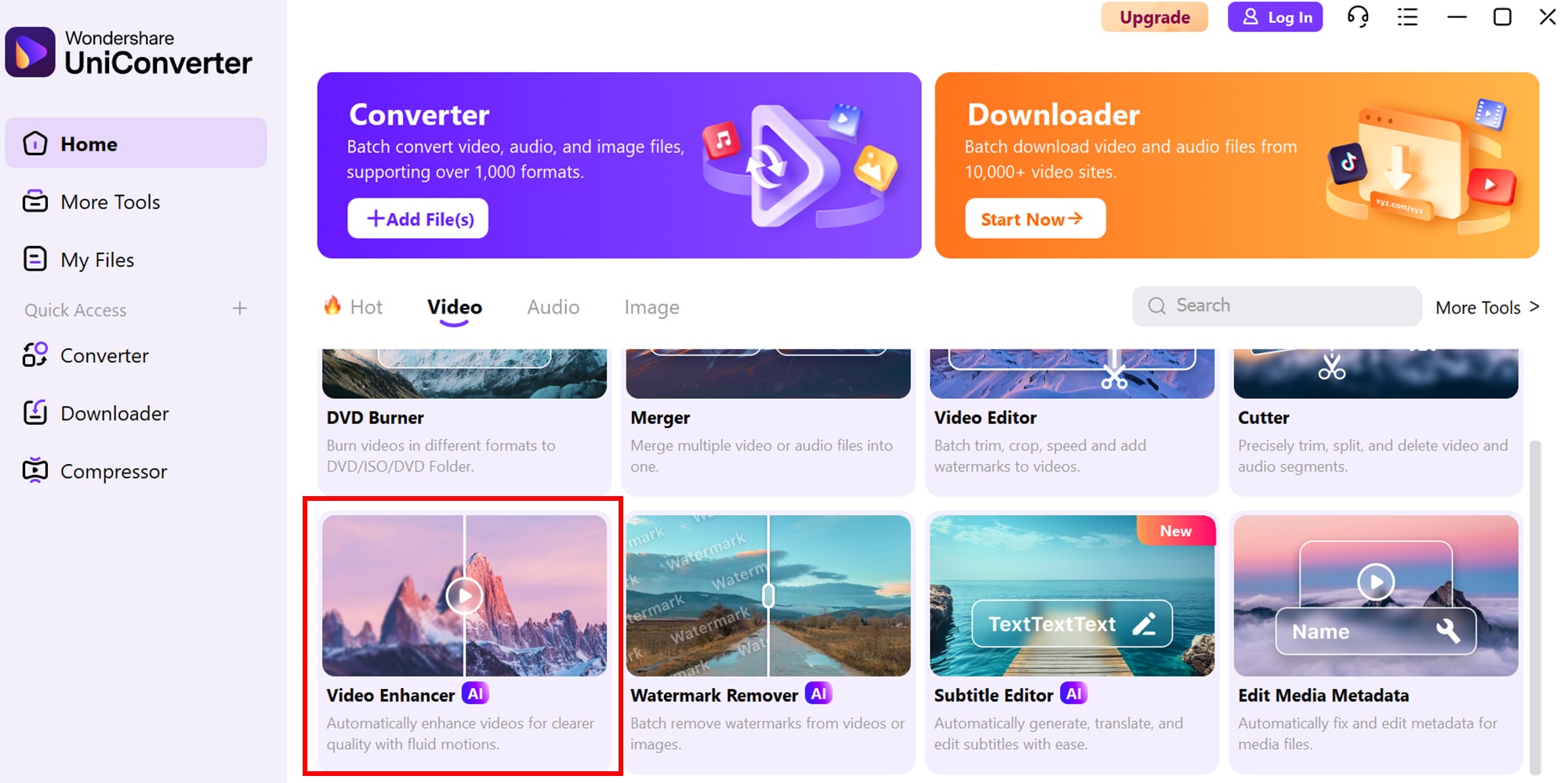
Step 1: Access AI Video Enhance
Start by navigating to UniConverter’s AI Lab. From the homepage, click on the AI Video Enhancer feature, or locate it under the Tools tab. This dedicated section is designed to make video upscaling seamless and user-friendly.
Step 2: Upload your video and select the AI model
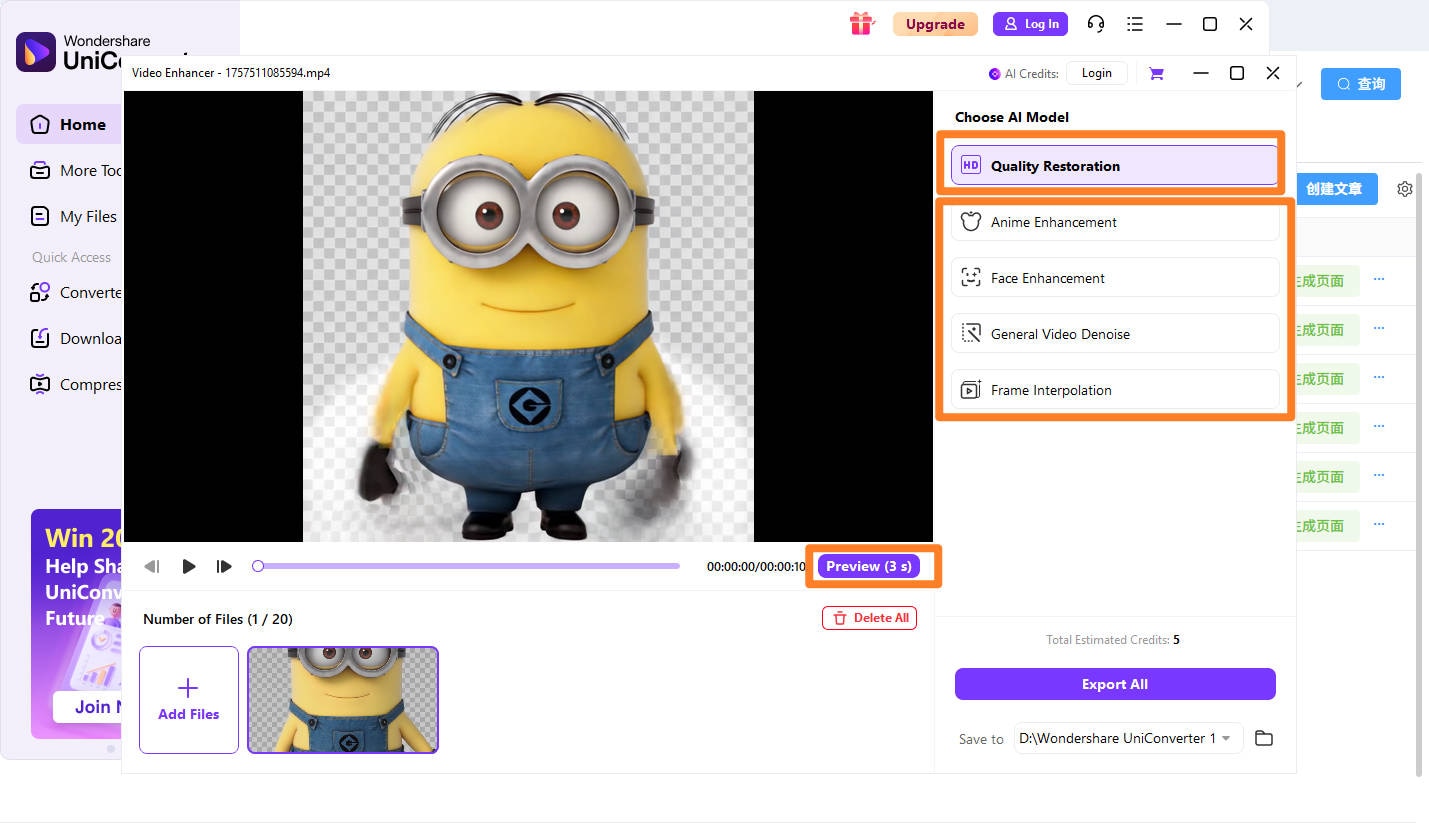
Upload your AI Sway Dance video directly into the platform. After uploading, select the most appropriate AI model for enhancement based on your video’s needs:
Quality Restoration: Improves overall video clarity and resolution.
Anime Enhancement: Optimizes colors, lines, and motion for anime or cartoon-style content.
Face Enhancement: Sharpens facial features, perfect for influencer or character-focused videos.
General Video Denoise: Removes grain, noise, and compression artifacts for smoother visuals.
Choosing the right model ensures your AI Sway Dance video retains natural motion, crisp details, and vibrant colors while enhancing the overall viewing experience.
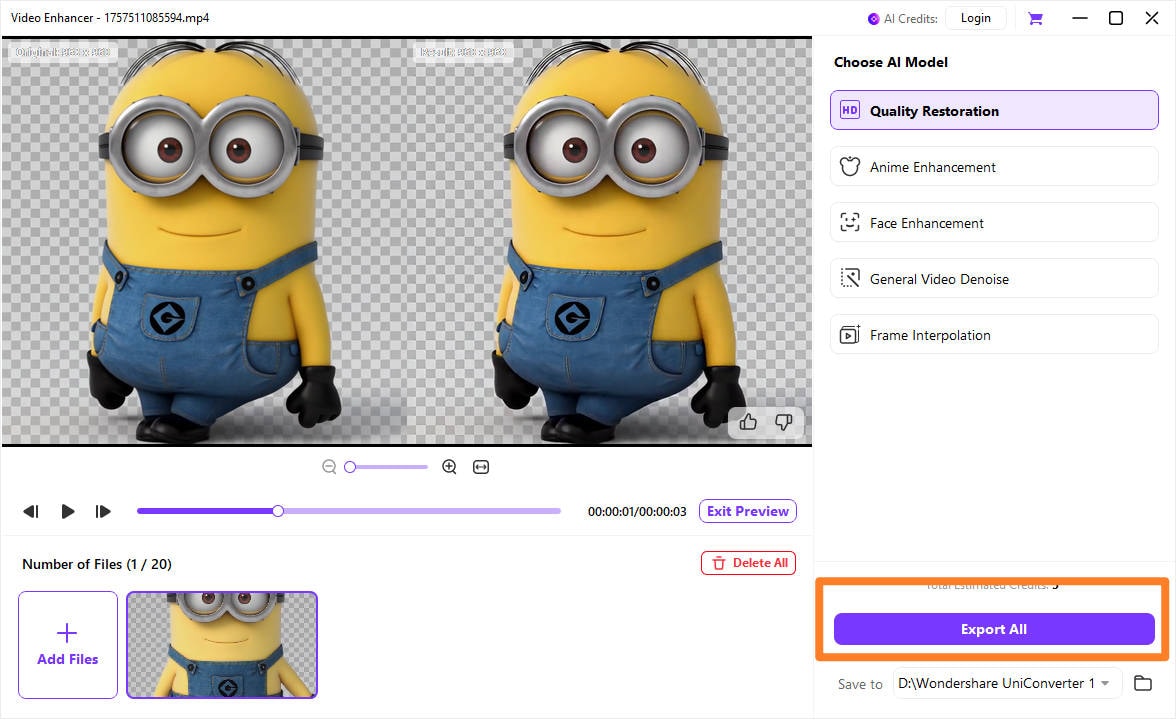
Step 3: Preview your video and export
Preview the enhanced video before exporting to ensure motion fluidity, color accuracy, and detail enhancement meet your expectations. UniConverter allows you to check frame-by-frame for smooth swaying movements and consistent visuals. Once satisfied, click Export to save your upscaled video. You can select output formats, resolutions, and frame rates tailored for TikTok, Instagram, or YouTube Shorts. The result is a polished, high-resolution AI Sway Dance video ready for social media or professional use.
Conclusion
Creating viral AI Sway Dance videos requires a combination of the right tools, high-quality inputs, and careful customization. From one-click templates to fully customizable generators, each method offers unique advantages for different creators and campaigns. Paying attention to details like resolution, background simplicity, and dance style ensures your videos appear lifelike and engaging. To take your content to the next level, UniConverter provides AI-powered upscaling, face enhancement, and denoising, helping your AI Sway Dance videos look crisp, smooth, and professional aconss all platforms.
CTA: Start turning your AI Sway Dance ideas into high-quality, scroll-stopping videos today. Click the link below to enhance, upscale, and share your creations with ease using UniConverter!
FAQs
-
1. What is an AI Sway Dance video?
An AI Sway Dance video is a digitally animated clip where a subject, character, or object is made to sway or dance using artificial intelligence. These videos can be created from photos, illustrations, or uploaded videos and are widely used on platforms like TikTok, Instagram, and YouTube Shorts for entertainment, trends, and social media engagement. -
2. Which tools are best for creating viral AI Sway Dance videos?
There are several effective tools depending on your level of customization: one-click template generators like TikTok and Media.io, customizable template platforms like Viggle, and text/image-based generators like Gemini Veo3 or Freepik.ai. Each tool offers unique features for different creators, from quick animations to fully tailored dance videos. -
3. How can I make my AI Sway Dance video look more lifelike?
To enhance realism, use high-resolution images, simple backgrounds, full-body or waist-up subjects, and clear poses. Preview animations before exporting, select the appropriate dance style, and consider subtle motion exaggeration or syncing movements to music beats for more expressive and natural-looking sways. -
4. Can I upscale or enhance my AI Sway Dance video after creation?
Yes! Tools like UniConverter allow creators to upscale AI Sway Dance videos effortlessly. You can improve resolution, sharpen facial details, reduce noise, and enhance colors without losing motion quality. This ensures your videos look crisp, polished, and professional across TikTok, Instagram, YouTube, or any platform. -
5. Are AI Sway Dance videos suitable for commercial use?
Absolutely. Brands and influencers use AI Sway Dance videos to create eye-catching content for social media campaigns, product highlights, or engagement challenges. They are versatile, scalable, and can be tailored for specific audiences, making them effective for marketing, promotions, and viral content strategies.

