


What is the best way to download Smule videos to MP4?
If you want a quick browser-based method, you can use an online tool like Sownloader to paste the Smule link and download the video as MP4. If you want a safer fallback when downloaders fail, you should use a screen recorder.
Downloading Smule videos to the MP4 format has become a popular need for users who want to save their favorite performances. Nowadays, the Smule community is creating engaging content of different musical collaborations. Many online tools and free downloaders enable quick and hassle-free conversion from Smule to universally compatible MP4 files.
This guide provides the latest strategies to download Smule videos to MP4 for free in 2025, focusing on effective, accessible, and free online solutions that work across devices. So, if you are eager to explore more about this topic, then go ahead and read the following article to the end.
In this article
Part 1. Why Do People Download Smule Videos as MP4?
Before diving into the tools, it is worth understanding why so many users choose to convert or download Smule free videos to MP4:
- Permanent Preservation & Backup: Online content is vulnerable to "digital decay," so saving it in MP4 format creates a permanent backup.
- Easy Sharing on Other Platforms: MP4 files are universally compatible, making it simple to share your favorite Smule performances on platforms like YouTube.
- Editing and Creating Compilations: Most video editing tools, such as Adobe Premiere and Final Cut Pro, can only handle the MP4 format, so it is necessary.
- Fluent and Smooth Offline Viewing: Converting Smule videos to MP4 enables fluent and reliable offline viewing, even on slower devices.
- Archiving in High Definition: Many Smule performances, especially those recorded in HD, can be preserved in their original quality for archiving.
Part 2. Is It Okay to Download Smule Videos? What You Should Know First
While a Smule video downloader makes it easy to save your favorite performances, you should always consider these ethical considerations:
- Respect Copyright: Users should only download Smule videos that they have created themselves or for which they have permission; otherwise, it will cause copyright claims.
- Use at Your Own Risk: Many third-party tools used for downloading Smule videos are not affiliated with or endorsed by Smule, so there is no guarantee of safety.
- Purpose: The primary intent behind downloading Smule videos is for users to archive and preserve their own performances.
- Privacy Risks: Using third-party downloaders or extensions always carries the risk of malware and viruses.


Part 3. Method 1: Using Online Smule Video Downloader
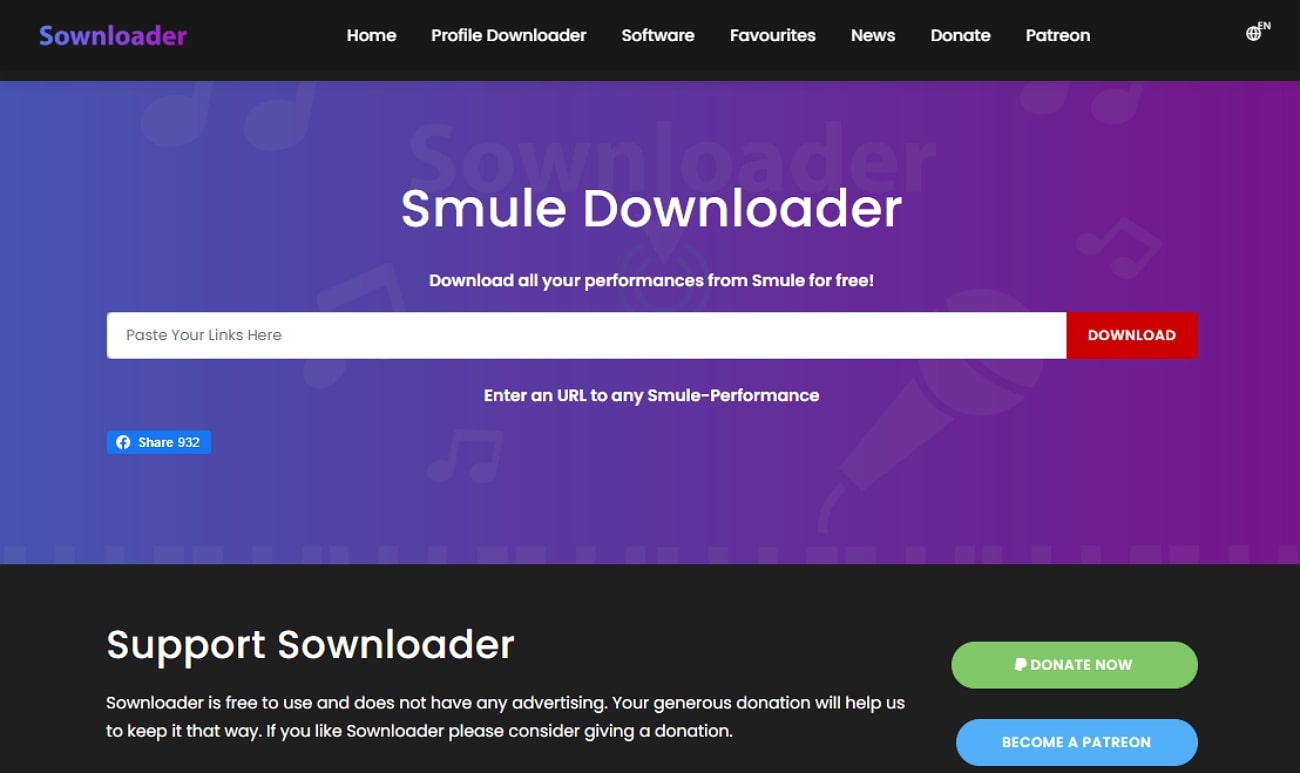
If you want to download Smule online with ease, use Sownloader, which lets you download videos. Being an online web tool, it does not require you to log in to the account while providing easy navigation. Users can download Smule videos and songs directly from the browser by inserting the video URL. Plus, this tool ensures that the download takes a reasonable time and doesn't take an immense time.
Key Features
- Provides an intuitive interface, making it easier for beginners.
- Sownloader supports all apps in the Smule family, such as Sing.
- While downloading, it also fetches extra details of the video songs.
- Many users praise Sownloader for its fast download speed and efficient customer service.
Detailed Guide to Use Smule Video Downloader
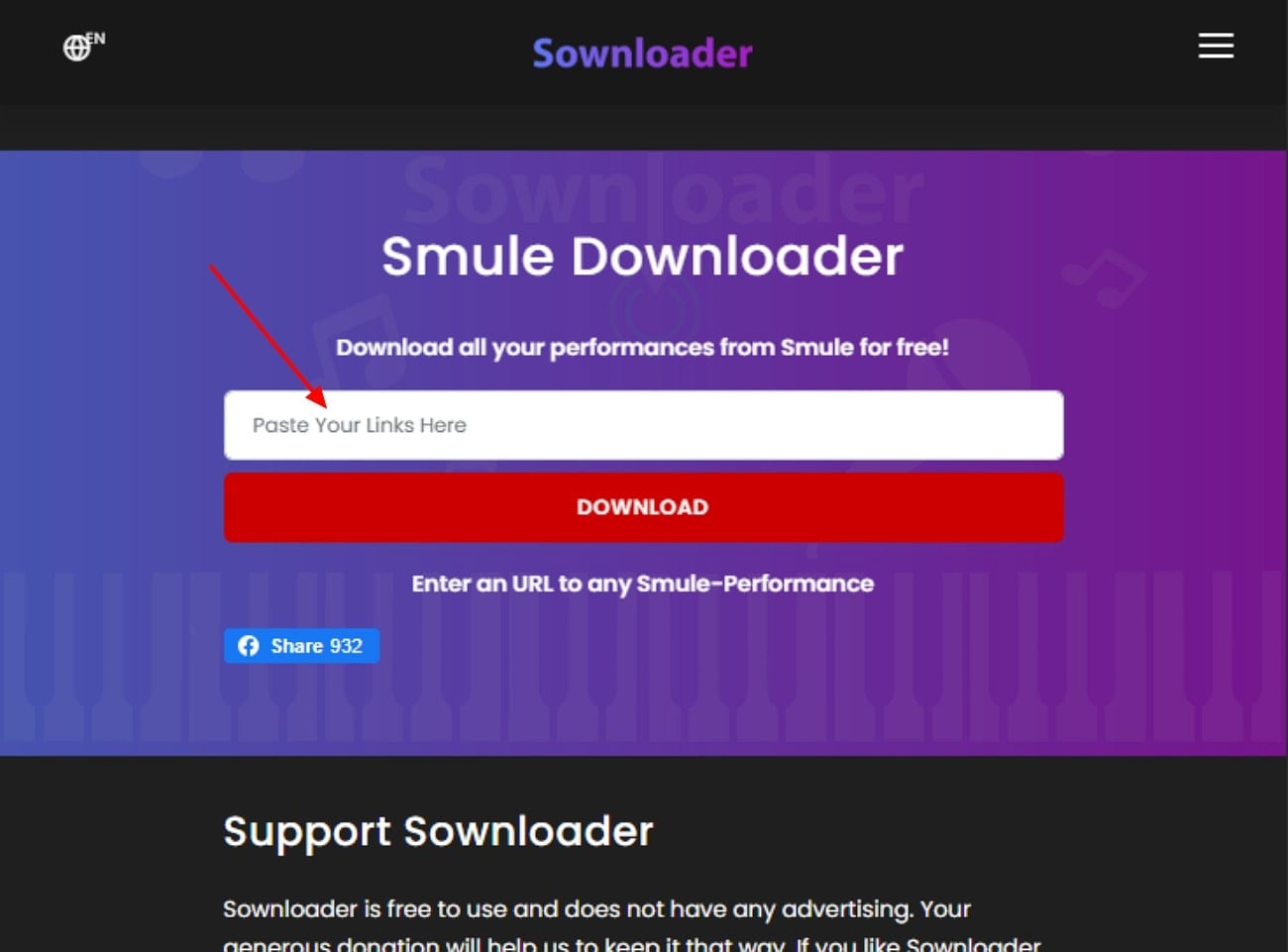
Step 1. Access the tool and insert the desired Smule video link within the “URL” search bar and hit the “Download” button to initiate the procedure.
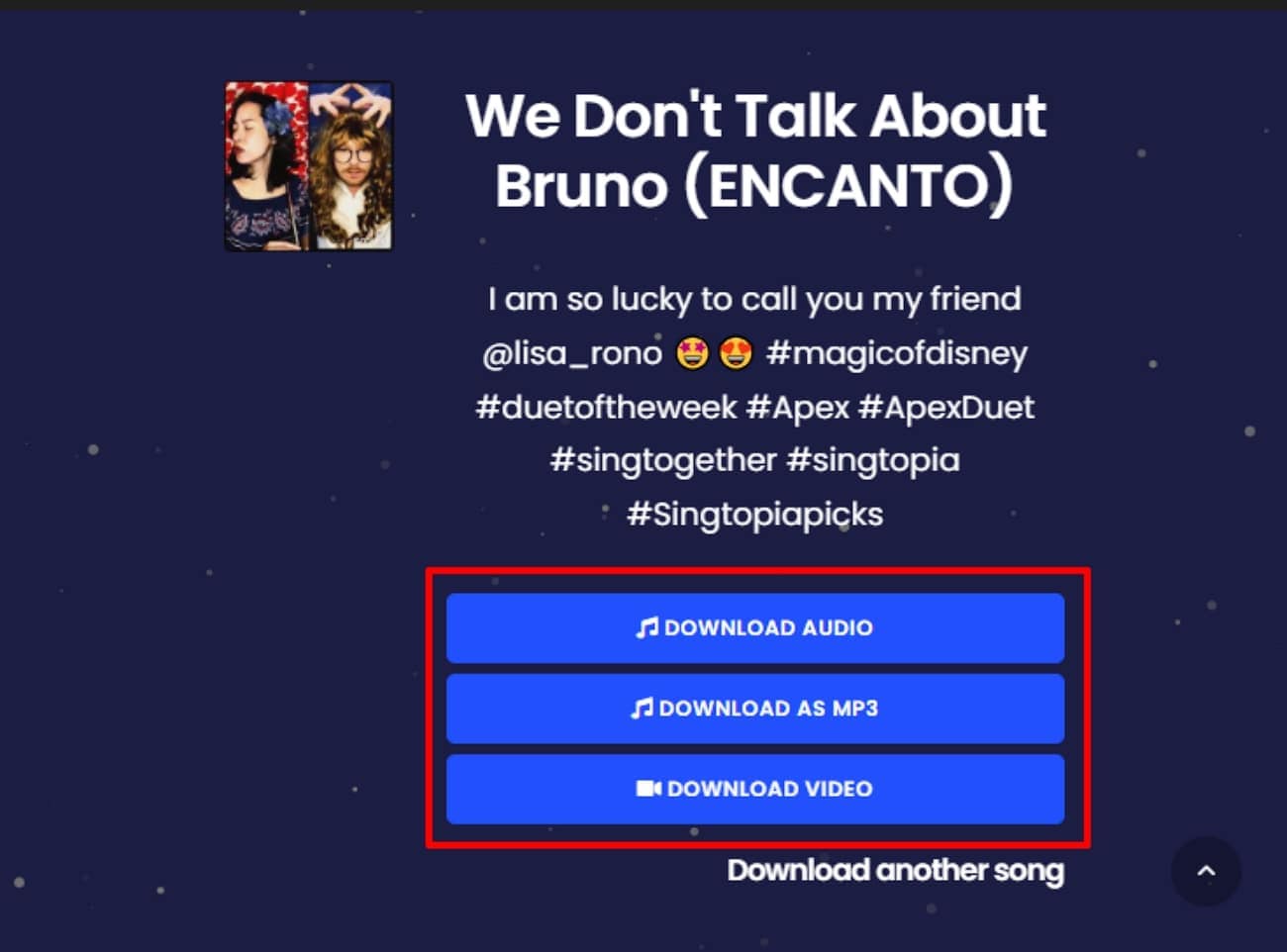
Step 2. Your video will be shown on the interface below, so scroll down the page. Here, click the "Download Audio" or "Download Video" button to download them simply. You can even convert the video into MP3 format before downloading.
Part 4. Method 2: Using Screen Recorder (Safest Choice)
Imagine you are a singer whose passion is to sing and record her singing to post later on Smule. However, sometimes you worry that, someday, this platform may change its policies and delete your memorable videos and collaborations. In this situation, we recommend using Wondershare UniConverter, which lets you use its efficient screen recorder to get a backup of her whole playlist.
Users simply turn on the screen recorder and record unlimited videos without any size restrictions. After downloading, it also lets you generate subtitles for the specific downloaded videos by simply inserting them. You can also easily download video by URL from other media websites or other media formats. All in all, this tool is a complete solution that provides you with complete features from downloading to editing.
Key Features
- Compressor: After downloading videos, it lets you compress the videos and audio by choosing the desired resolution without ruining their actual quality.
- Converter: One can also convert their audio, video, and even DVD formats into numerous supported standard formats.
- Video Enhancer: To make your videos more visually appealing, you can also enhance your downloaded or recorded videos using its built-in video enhancer.
- Downloader: It lets you download unlimited files using its batch processing system, making it an ideal and quick solution to download videos by URL.
- Speech-To-Text: After downloading your long-format video, you can also convert it into audio for a better understanding of the topic.
Guide to Use Wondershare UniConverter Screen Recorder
Upon hearing key features of Wondershare UniConverter, if you want to download Smule for free, read the following detailed step-by-step guide:
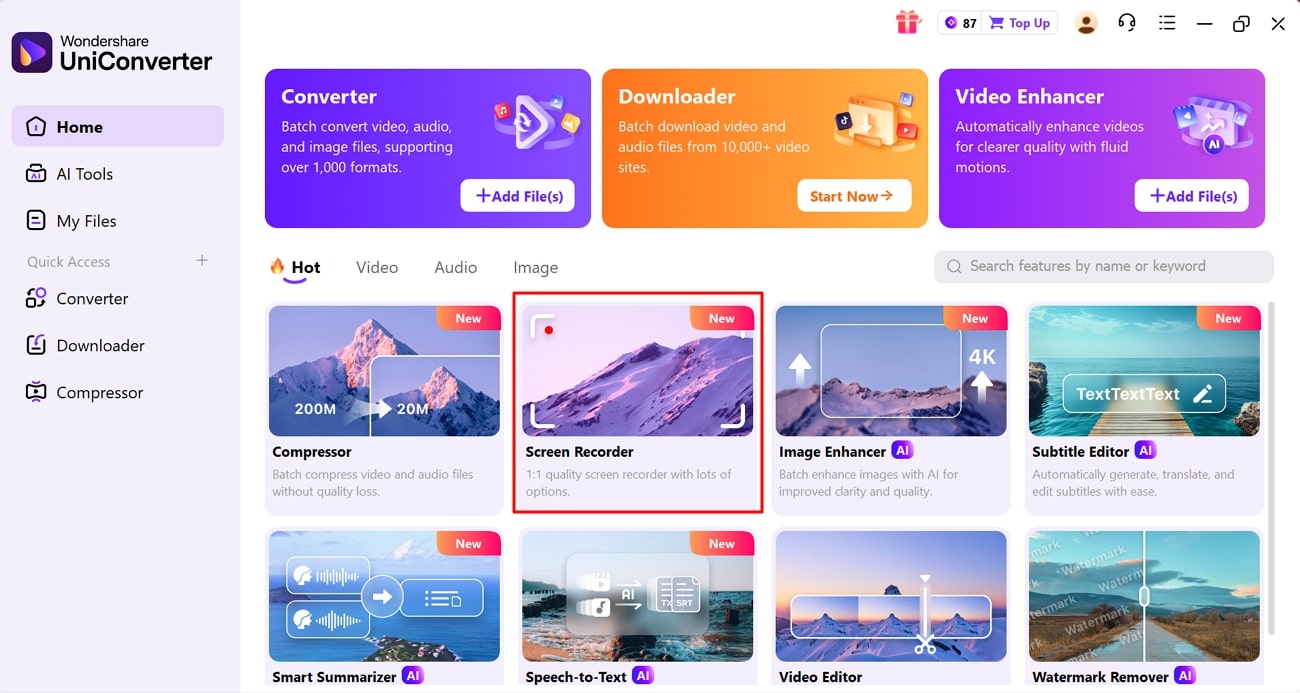
Step 1. Choose the Screen Recorder From the Main Interface
Upon entering the UniConverter, click on the "Screen Recorder" to jump into its editing interface.
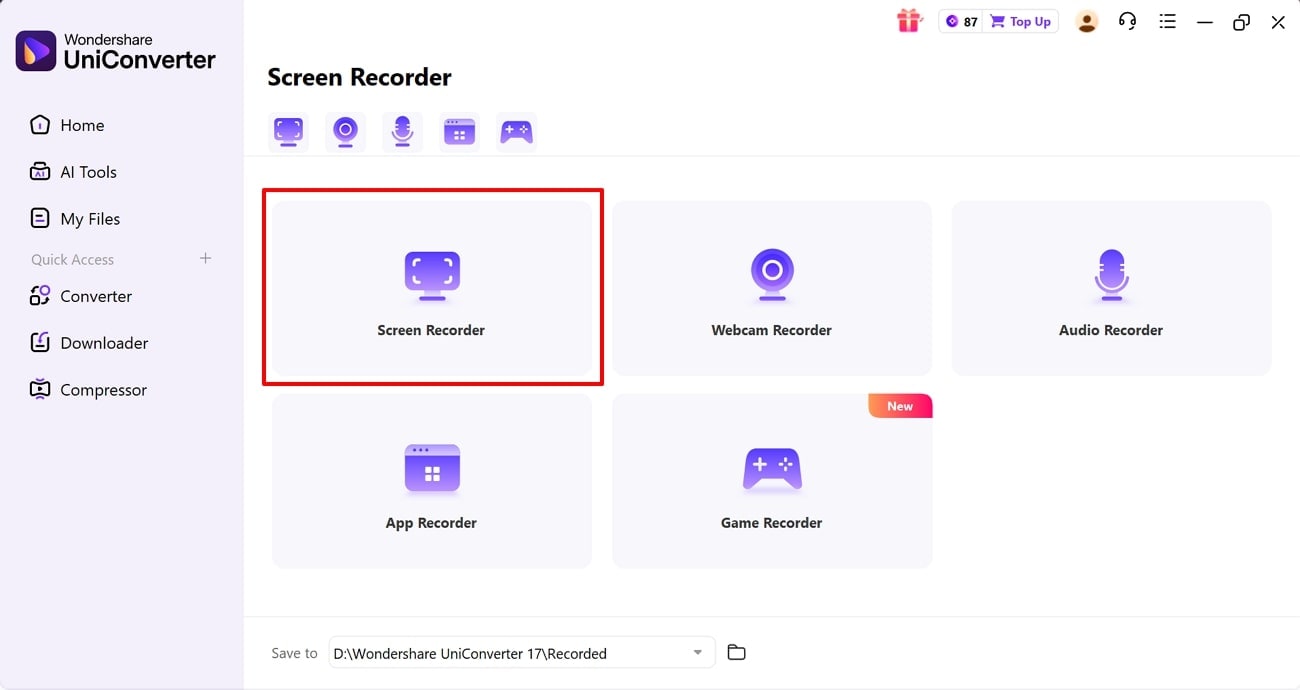
Step 2. Select the Screen Recorder Option
Here, click on the "Screen Recorder" option available in this interface to enter the recording interface. However, before this step, make sure that you have already opened the targeted screen so you can access it directly.
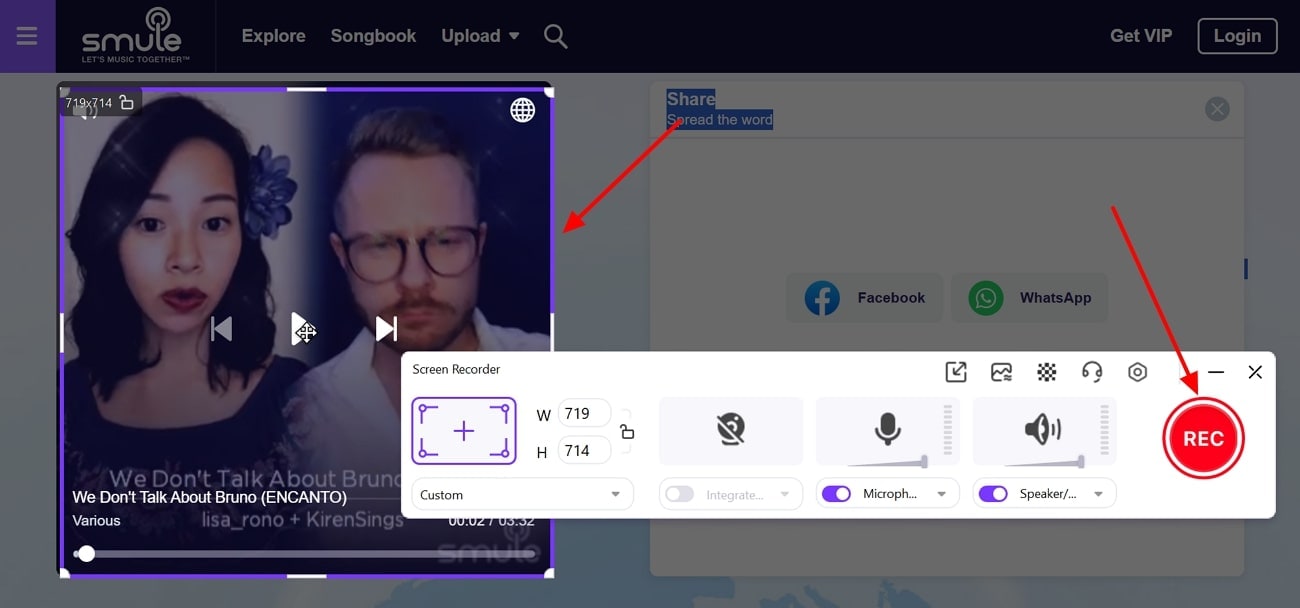
Step 3. Adjust The Frame and Start Recording Video
Adjust the square frame on the targeted video and hit the "Rec" button available in the pop-up to start the recording process. When you are done with recording, click on the "Stop" icon available on the same pop-up.
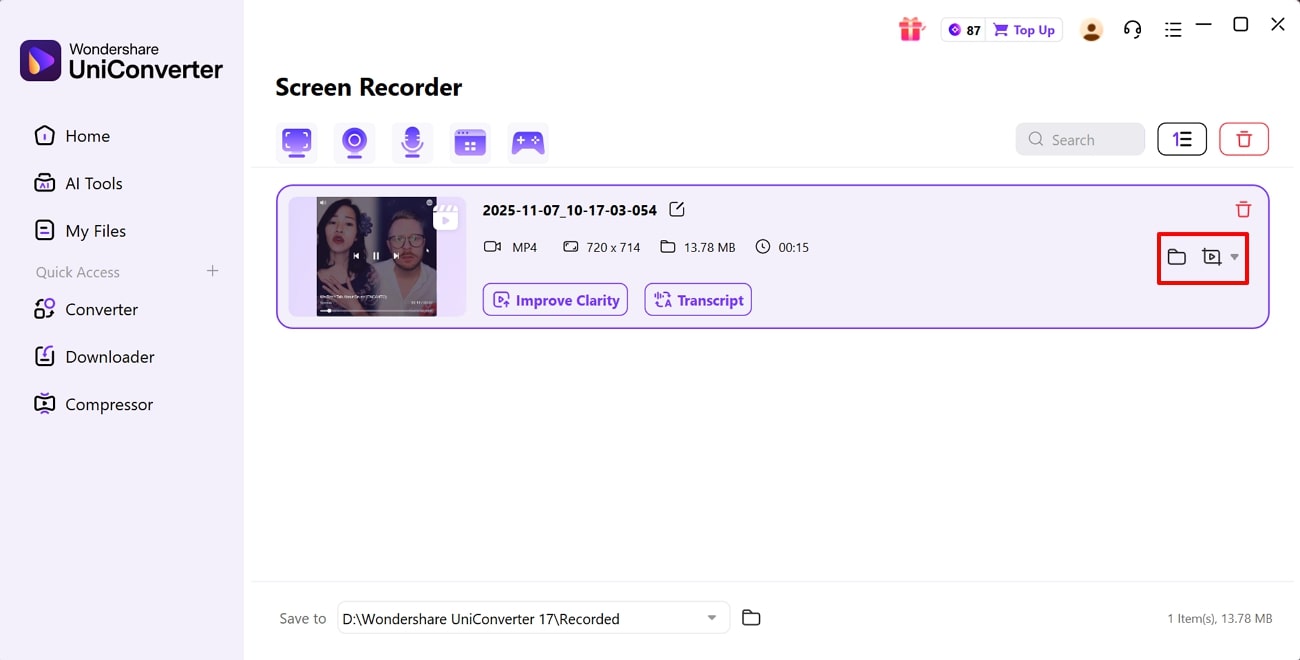
Step 4. Locate or Preview the Recorded Video
Finally, your video will be automatically saved in the device folder. If you want to preview it, click on the "Preview" icon or select the "File" icon to locate it on the device.

Easy to Use Smule MP4 Downloader
Part 5. How to Ensure the Best Quality Download or Recording
Once you have chosen a reliable Smule video downloader, the next step is making sure your Smule videos are saved smoothly, so look at the following tips:

Tip 1. Before downloading, always use the highest sound and video quality settings available in the Smule app.
Tip 2. When using online downloaders, double-check that you're choosing the "HD" or "High Quality" format if the site offers multiple download options.
Tip 3. If your downloader doesn't support direct downloading and you opt to record, make sure your internet connection is fast and stable for smoother playback.
Tip 4. Choose a quiet location for your recording and eliminate background sounds, echoes, or distractions.
Tip 5. Keep your Smule app and any downloader or screen recording software updated to the latest version, helping you avoid technical glitches.
How We Tested Smule-to-MP4 Methods
For this guide, we evaluated Smule-to-MP4 methods based on download success, output quality, ease of use, and how practical each approach is for saving performances for offline viewing, editing, or archiving.
Download or capture success
We checked whether each method can reliably save Smule performances as usable MP4 files without broken downloads or unstable processing.
Video quality
We reviewed whether the saved MP4 files remain clear enough for playback, sharing, and basic editing instead of looking obviously degraded.
Ease of workflow
We compared how easy it is to paste a link, record a session, or complete the task across browser and desktop-friendly workflows.
Archive usefulness
We also considered whether the saved files are practical for preserving performances, editing clips, or keeping personal backups over time.
This page gives extra weight to successful MP4 output and practical archiving value, since readers converting Smule performances usually want a simple way to keep memorable recordings accessible beyond the platform itself.
Conclusion
Summing up, now anyone can download from the Smule website by using efficient tools. We have provided detailed guides along with their main features and weaknesses. Among these tools, we recommend using UniConverter, which lets you download Smule videos to MP4 and lets you edit them by using advanced features.
FAQs
-
1. Is it possible to download private Smule videos or recordings?
No. Most Smule downloaders can only access public videos and recordings. Private or password-protected content cannot be downloaded due to Smule’s privacy policies and platform restrictions. -
2. Do online Smule downloaders work on mobile devices and computers?
Yes. Reputable Smule downloaders are web-based and work smoothly on both mobile devices and desktop computers, allowing access from virtually any browser. -
3. What format will my Smule download be, and can I choose video or audio only?
Most tools export videos in MP4 and often provide an MP3 option for audio-only downloads. For more flexibility, UniConverter lets you download and convert Smule recordings into 10+ additional formats. -
4. Are there any limits to how many Smule videos I can download for free?
Generally, most online Smule downloaders do not enforce strict download limits. Still, it’s wise to review each platform’s terms of use before bulk downloading.

