Marathi Status Video Download: Love, Sad & More
Looking for a Marathi love song, a funny clip for friends or a Ganpati greeting? There are plenty of status videos to explore, but not every thumbnail leads to a downloadable file. This guide covers the popular styles, where to find the original videos, and practical ways to save and share them on WhatsApp.
In this article
- What Are Marathi Status Videos?
- Popular Marathi Status Videos for Every Mood
- Where to Find and Download Marathi Status Videos
- How to Download Marathi Status Videos
- How to Add Marathi Videos to WhatsApp Status
- Tips for Better Marathi WhatsApp Status Videos
- Common Marathi Status Video Download Problems
- FAQs About Marathi Status Video Download
- Conclusion
What Are Marathi Status Videos?
Marathi status videos are short clips built around Marathi songs, dialogue, greetings or quotes. You might post a romantic lyric, a line about friendship or a festival wish. Some videos are ready to share, while others are background clips you can personalize.
People also search for Marathi WhatsApp status videos because WhatsApp is a common place to share these clips. You can browse for the video first, then decide whether it needs a download, a quick edit or a format change.
Popular Marathi Status Videos for Every Mood
Pick the mood first: a romantic track, a thoughtful line, an attitude quote or a festival greeting. The video should make sense in just a few seconds, with captions clear enough to read on a phone.
| Type | Popular themes | Best use |
|---|---|---|
| Love | Romantic songs, affectionate lines, couples | Personal messages and romantic updates |
| Sad / Emotional | Missing someone, heartbreak, reflective lyrics | Mood-based and emotional updates |
| Attitude | Confidence, self-respect, motivational dialogue | Strong personal statements |
| Devotional / Festival | Ganpati, blessings, seasonal celebrations | Religious and festival greetings |
| Funny / Friendship | Comedy, friendly teasing, shared memories | Lighthearted updates for friends |
Marathi Love Status Videos
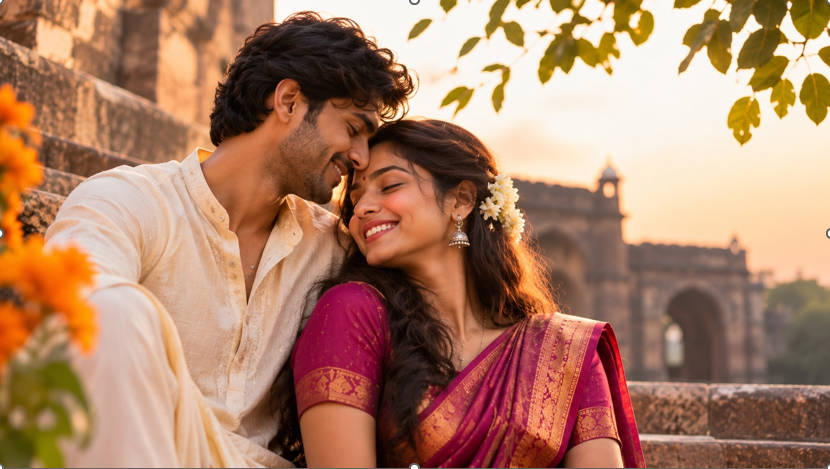
Love statuses often pair a Marathi lyric with a quiet scene, a couple or a few words of affection. A clear line of text is usually enough; fast transitions can make a short status harder to read. You can find ideas in Marathi status video posts on ShareChat.
Marathi Sad & Emotional Status Videos
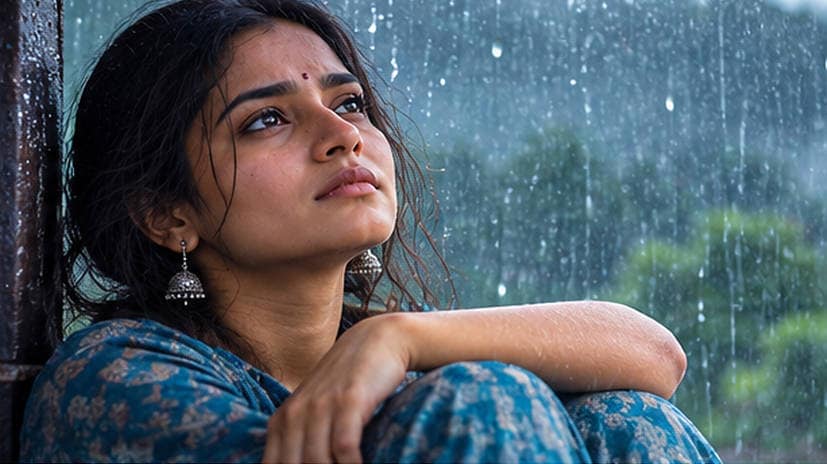
Sad and emotional statuses may use a short lyric about missing someone, a reflective quote or a quiet scene. You do not need an elaborate edit for the message to land. Try Marathi quote and status posts on ShareChat for inspiration.
Marathi Attitude Status Videos
An attitude status works well with a punchy Marathi quote, confident dialogue or a short motivational line. Give the first frame a clear focal point instead of filling it with effects. Browse the Marathi attitude status collection on ShareChat for examples.

Marathi Devotional & Festival Status Videos
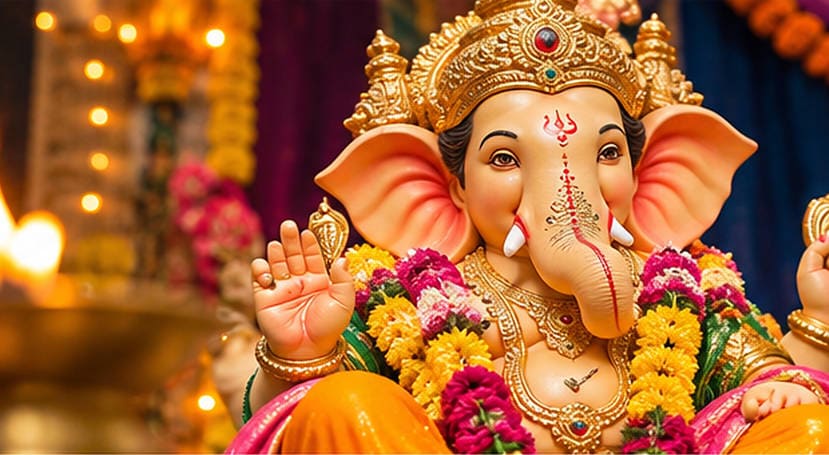
Ganpati greetings often feature an idol, flowers, diyas and a brief devotional message. Make sure the wording and date fit the festival you are celebrating. Explore the Ganpati status collection on ShareChat for ideas.
Marathi Funny & Friendship Status Videos
For a funny status, the joke should land quickly. Friendship banter, familiar Marathi dialogue and short reaction clips work better than a long setup. Browse Marathi comedy posts on ShareChat and listen to the audio before you share.

Where to Find and Download Marathi Status Videos
Start with the kind of file you want. A ready-made status is handy if you want to post something today; stock footage or a template is better if you plan to add your own Marathi words.
| Source | What you'll find | What to check before saving |
|---|---|---|
| ShareChat | Creator posts, Marathi-language status themes and festival clips | The individual post, creator permissions and available save options |
| Marathi Status Video Collection | Language, topic and festival browsing categories | The actual clip language, video preview, download availability and usage terms |
| YouTube | Marathi status songs, Shorts, lyric videos and creator channels | Whether the creator provides an authorized download or offline option |
| Your own footage or a licensed template | Personalized greetings with your words and photos | Asset and music licenses, export format and permission to share |
Try searches such as marathi status video, मराठी स्टेटस व्हिडिओ (Marathi for "Marathi status video"), marathi love status or गणपती बाप्पा स्टेटस (Ganpati Bappa status). Open the individual video rather than stopping at a search results page.
Watch the full clip before saving it. A thumbnail cannot tell you whether a lyric ends midway, the sound is missing or the original file is available for download.
How to Download Marathi Status Videos
There are two ways to save a video: use the download option offered by its original source, or use a compatible desktop downloader for a supported link you are authorized to save.
Method 1: Save the Video from Its Original Source
- Open the original post or asset page and watch the video you want.
- Look for the platform's Save or Download option. A share button or an in-app offline feature is not always a downloadable file.
- Choose an available file version and save it to your device, following the source's terms.
- Play the saved copy once. Make sure the audio, wording and ending are intact.
If your video comes from ShareChat, see the ShareChat Video Downloader guide for practical phone and browser options.
Method 2: Download a Supported Video Link with UniConverter
For video URLs that UniConverter supports, UniConverter Downloader offers a straightforward desktop way to save a clip. These steps use UniConverter 18 on Windows; Mac controls may look slightly different.
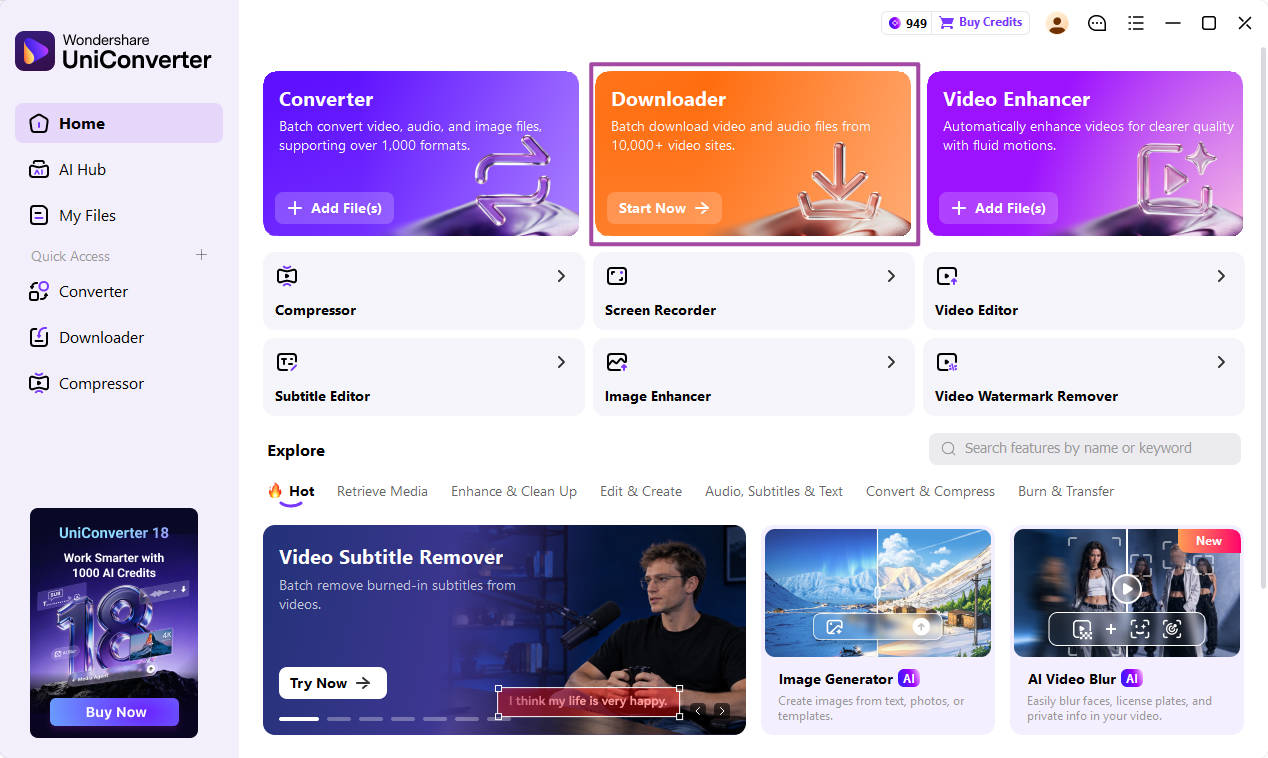
Step 1. Open UniConverter Downloader. Launch UniConverter 18 and select Downloader from the Home screen or Quick Access.
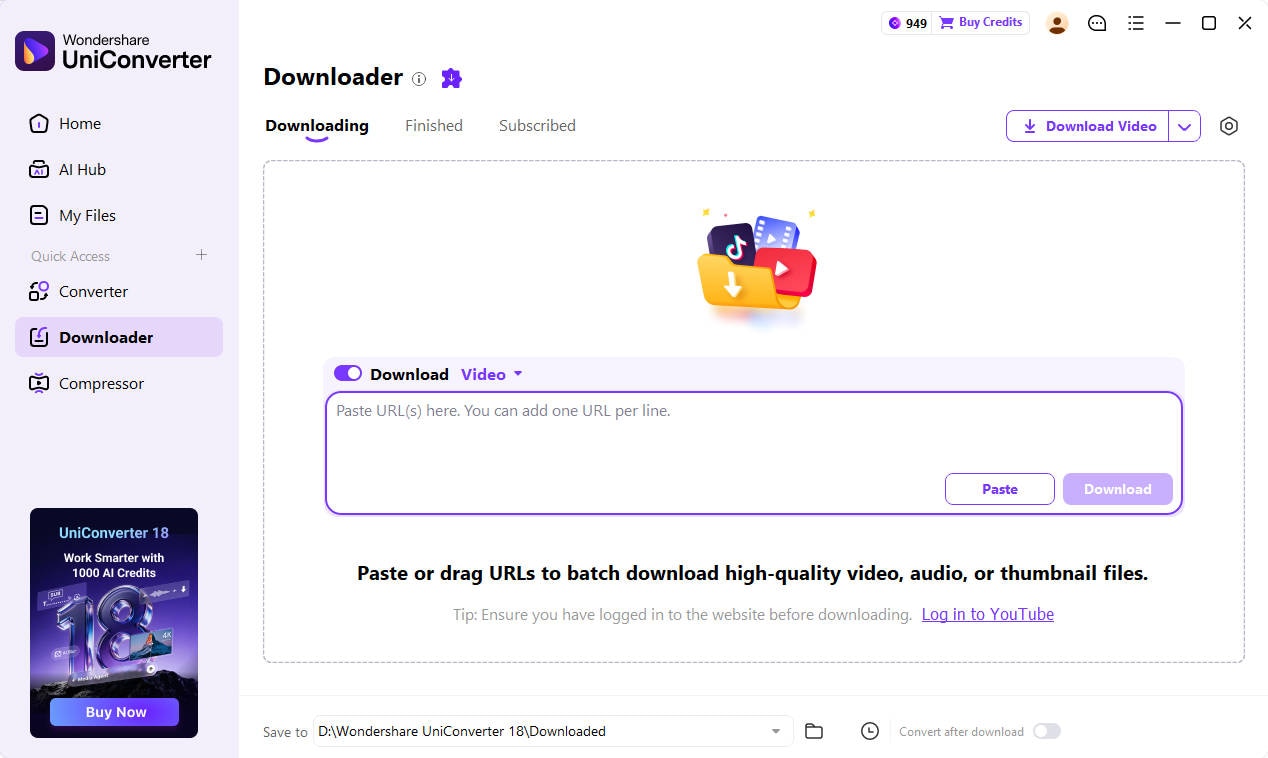
Step 2. Paste the video link. Copy the URL of a video you have permission to save. In Downloader, keep Download Video selected, paste the link and choose a folder under Save to. Click Download if the link is recognized.
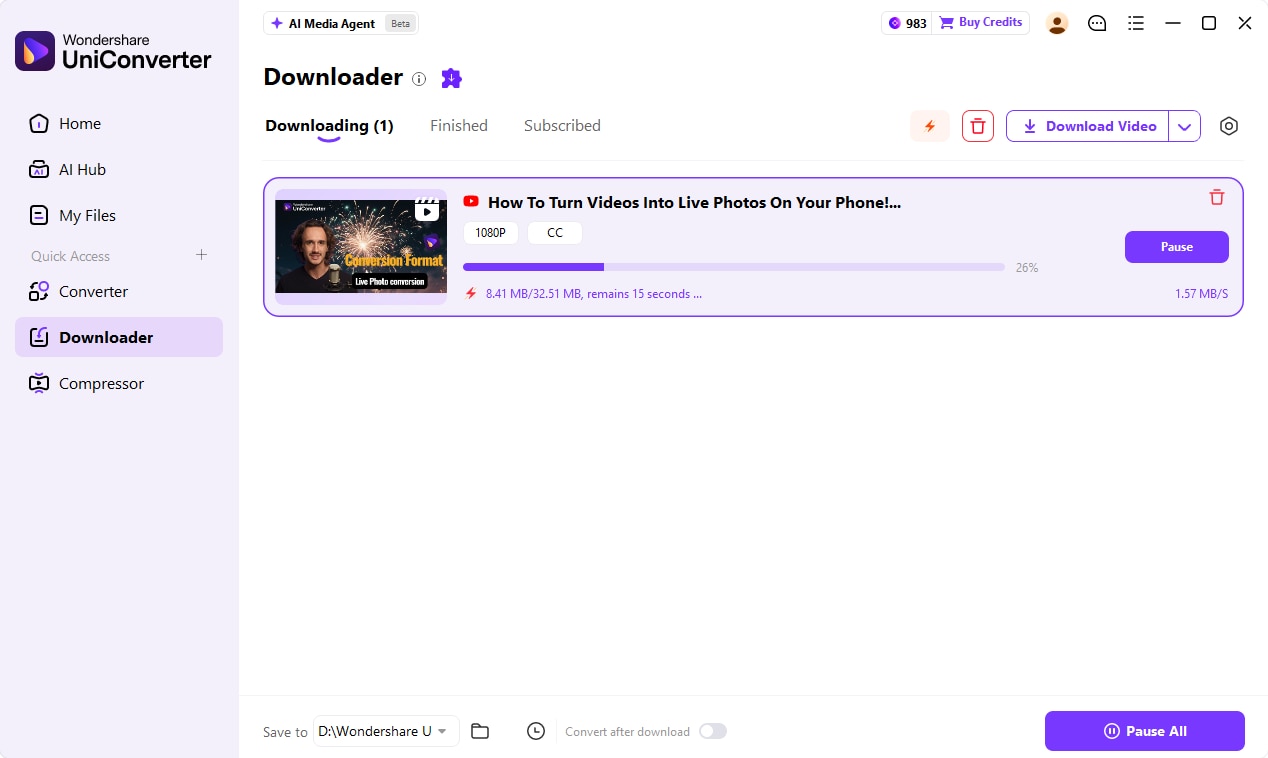
Step 3. Follow the download. In the Downloading tab, you can see the task and its progress. The format and quality available depend on the source video.
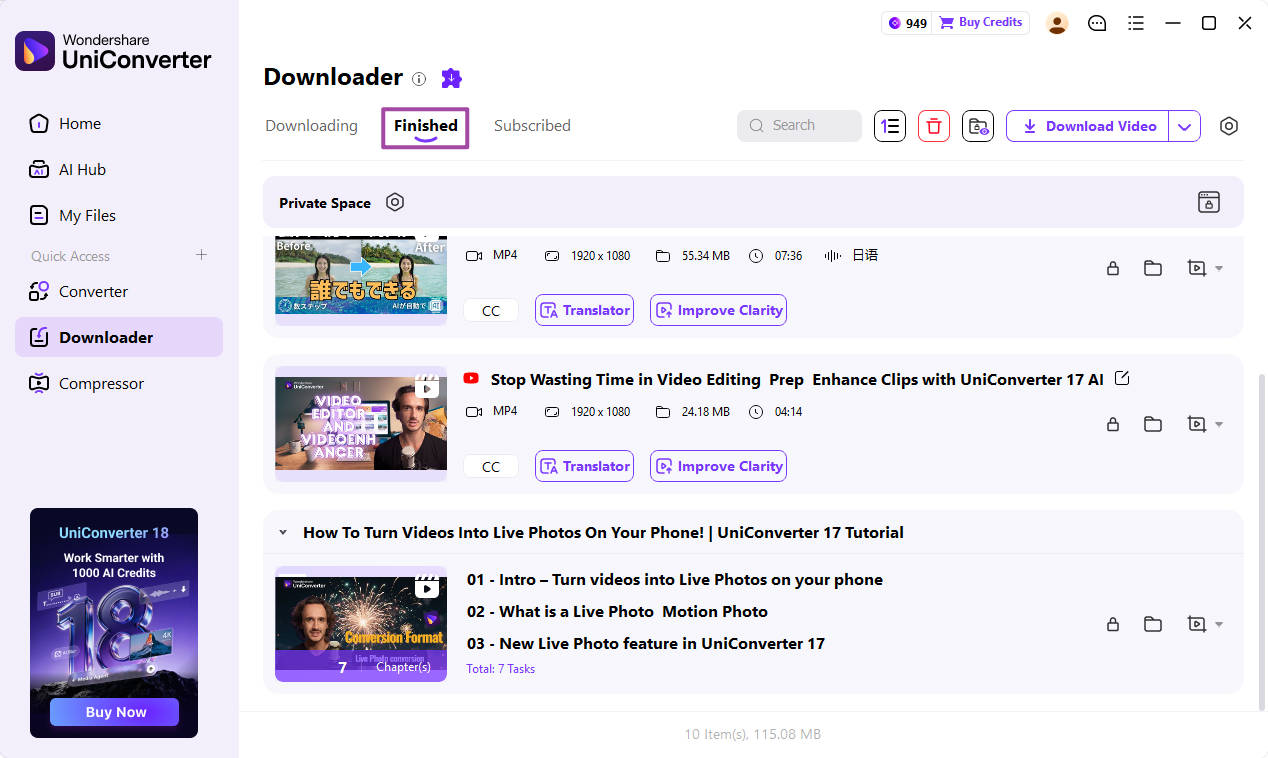
Step 4. Find your file. Open Finished, locate the video and play it to make sure the sound and picture are correct before moving it to your phone.
Not every video link is supported. In particular, ShareChat links have not been verified with UniConverter Downloader; if one does not work, use a compatible saving method described in the ShareChat Video Downloader guide.
How to Add Marathi Videos to WhatsApp Status
With your video saved on your phone, you can post it as a WhatsApp Status:
- Open WhatsApp, go to Updates and tap My status or Add status, depending on your device.
- Select the Marathi video from your phone.
- Preview the clip, trim it if needed and add any text or stickers.
- Choose who can see your status, then tap Send.
WhatsApp may trim or compress a status video, so preview the final post on your phone. If you want to save a status that someone has already posted, that is a separate task covered in our WhatsApp Status Download guide.
Tips for Better Marathi WhatsApp Status Videos
- Frame for a phone. A 9:16 portrait layout is a useful starting point for WhatsApp, even if the original video is widescreen. Keep faces and captions away from the edges.
- Make the Marathi text easy to read. Use a short line, good contrast and enough space around the lettering. Busy backgrounds can hide small lyrics.
- Listen through the ending. Cut-off lyrics or a sudden silence can spoil a status. Use music you have permission to share, or choose licensed audio.
- Use a phone-friendly file. MP4 is a sensible first choice for many devices, but the codec still matters. Test playback before posting.
- Fix blurry footage before posting. If the original clip is soft or noisy, try UniConverter AI Video Enhancer on a compatible local file. Compare a short preview first; enhancement cannot recreate every missing detail.
WhatsApp can compress Status videos. Keep your original file, and avoid exporting the same already-compressed clip over and over.
Common Marathi Status Video Download Problems
| Problem | Likely reason | What to try |
|---|---|---|
| A ShareChat URL isn't recognized | The link type may be unsupported | Check the individual post; try the platform's permitted save method instead |
| The download button is unavailable | The creator or source may not offer a file download | Use an authorized alternative or choose another clip |
| The video is saved but won't play | Incomplete download or incompatible format | Download again from the original source; verify the file, then convert a compatible local copy if needed |
| Text is cropped in WhatsApp | Landscape framing or text too close to the edge | Reframe for a vertical preview and move important text inward |
| The video looks blurry after posting | Low-quality source or additional upload compression | Check the original file, avoid repeated exports and use a cleaner source when available |
FAQs About Marathi Status Video Download
-
Where can I find Marathi status videos with songs and lyrics?
Search creator posts for marathi status video, marathi song status or मराठी स्टेटस व्हिडिओ (in Marathi script). Open a complete clip rather than a collection thumbnail, and listen to the audio before saving. You can start with Marathi video posts on ShareChat.
-
How do I save a Marathi status video from ShareChat?
Open the individual post and check whether it offers a save option. If it only provides a share link, you will need a method that supports that link; do not assume every post can be downloaded as an MP4. Our ShareChat Video Downloader guide explains the available routes and where to find saved files on Android or iPhone.
-
Why does UniConverter reject my Marathi status video URL?
First, copy the link from the individual video rather than a profile or tag page. Check that the post is still accessible and that you are allowed to save it. UniConverter Downloader works with supported URLs, not every platform or link type; see the video-link download guide for the desktop steps. ShareChat URL support has not been verified.
-
How do I put a downloaded Marathi video on WhatsApp Status?
If you saved it on your computer, transfer the video to your phone first. In WhatsApp, open Updates → My status, select the file, preview any crop or trim, choose your audience and post it. Want to save a status you already saw in WhatsApp instead? Follow our separate WhatsApp Status Download guide.
-
What if my Marathi status video will not play on my phone?
Play the saved file on your computer first to rule out an incomplete download. If it plays there but not on your phone, try making an MP4 copy with H.264 video and AAC audio from a supported local file. The UniConverter MP4 conversion walkthrough shows how to choose the output settings and verify playback.
-
Why does WhatsApp cut off the Marathi lyrics in my status video?
WhatsApp previews may crop widescreen clips or cover text near the edge of the screen. Reframe the video for a 9:16 phone view, move the lyrics toward the center, and check the draft before posting. Keep the original file in case you need to adjust it again.
-
Can UniConverter improve a blurry Marathi status before I share it?
If the original file is soft or noisy, try a short preview in UniConverter AI Video Enhancer. Compare faces, lettering and motion before exporting. Enhancement may improve visible clarity, but it cannot restore every detail missing from a heavily compressed source.
Conclusion
A memorable Marathi status needs a message that fits the moment and a video that plays well on your phone. Find the clip from its original source, save it using an available permitted method, and turn to UniConverter Downloader when you have a supported link. One final preview of the text, sound and crop is worth it before you post to WhatsApp.