


Have a collection of old YouTube FLV videos that won't play on your devices? You're not alone. With the death of Adobe Flash, these classic videos are stuck in an obsolete format. This guide reveals the easiest way to use a YouTube FLV to MP4 converter to rescue your videos. We'll show you why MP4 is the best modern format, compare tool options, and provide a simple step-by-step method to convert and download your videos safely. Preserve your digital memories and make them playable on any device, today.
Table of Contents:
Part 1. What is an FLV File and Why Convert It?
Before HD streaming took over, one format ruled the internet: FLV, or Flash Video. If you were online in the mid-2000s, you definitely ran into it—it powered platforms like YouTube, Vimeo, and countless others, all running on Adobe Flash Player. In fact, YouTube primarily used the FLV (Flash Video) format during those years. For nearly a decade, if you downloaded a video, you'd get an .flv file, and to play it on devices like iPods or iPhones, you had to convert it to MP4. That's why search terms like "YouTube to MP3" and "FLV to MP4" became internet staples. A YouTube FLV converter was the go-to tool for saving clips offline.
Fast forward to today, and the FLV format is practically a relic. Modern browsers and devices no longer support Flash, making old FLV files unplayable. The solution? Convert them. MP4 offers universal compatibility, MP3 gives you audio-only convenience, and even AVI has its uses. Converting isn't just handy—it's how you rescue your old videos from digital extinction.
Part 2. YouTube to MP4, AVI, FLV: Which Format Should You Choose?
Once you've decided to use a YouTube converter YouTube to MP4, AVI, FLV, the next question is: which format is right for you? The answer depends entirely on what you plan to do with the file. Each format serves a distinct purpose, and choosing the correct one will save you time and frustration in the long run.
For the vast majority of users, MP4 is the best choice for video compatibility. It is the undisputed king of consumer video formats. Whether you want to watch on a phone, tablet, computer, game console, or smart TV, an MP4 file will work flawlessly. It provides an ideal balance of high quality and manageable file size, making it perfect for sharing and storage.
Suppose your goal is to edit the video in software like Adobe Premiere or DaVinci Resolve. In that case, AVI can be a good option for editing software due to its less compressive nature, though high-quality MP4 codecs are often preferred today.
As for FLV, it is only useful for archiving old videos or for specific software that still requires it. For 99% of users, converting from FLV to MP4 is the goal, not the other way around.
| Format | Primary Use Case | Compatibility | Quality & File Size | Best For |
|---|---|---|---|---|
| MP4 | General playback & sharing | Excellent (Phones, tablets, smart TVs, game consoles) | High quality with manageable file size | Vast majority of users; the default, safe choice |
| AVI | Video editing | Good on computers, weaker on other devices | Large file size, less compression (potentially higher quality for editing) | Video editors using software like Premiere Pro |
| FLV | Archiving / Legacy use | Poor; requires specific media players | Outdated format; quality varies | Archiving old Flash videos or for specific software needs |
Part 3. Easiest Way to Batch Convert YouTube Videos to FLV or MP4 (Step by Step)
Navigating the world of video conversion requires a tool that is both powerful and user-friendly. For anyone looking for a reliable YouTube video converter FLV to MP4, UniConverter stands out as the premier solution. Its strength lies in its versatility; it functions as a robust YouTube converter FLV to MP4 and can handle a vast array of other formats with ease.
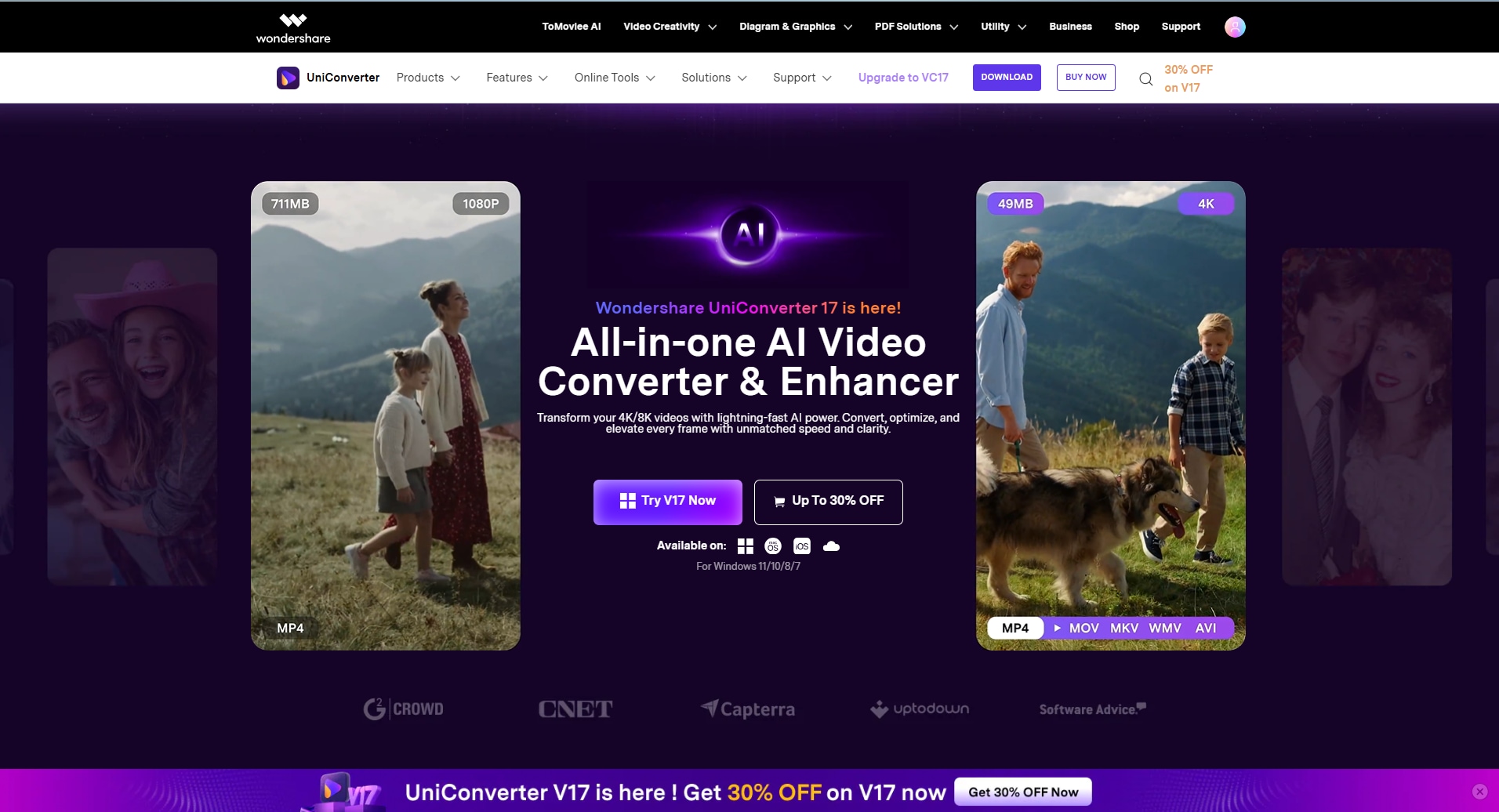
Key Features of UniConverter:
- Blazing-Fast Conversion: Leverages GPU acceleration for significantly faster processing speeds.
- Batch Processing: Handles hundreds of files at once, saving you time and effort.
- Built-in Video Downloader: Allows direct downloading from YouTube and other platforms.
- Advanced Editing Toolkit: Includes tools for trimming, cropping, and adding subtitles.
- High-Quality Output: Guarantees zero quality loss during conversion (e.g., from FLV to MP4).
For users who need reliability, speed, and no file size limits, the UniConverter Desktop version is the ultimate tool. Here's how to use it for effortless conversion:
Step 1: Download and Import Your Videos
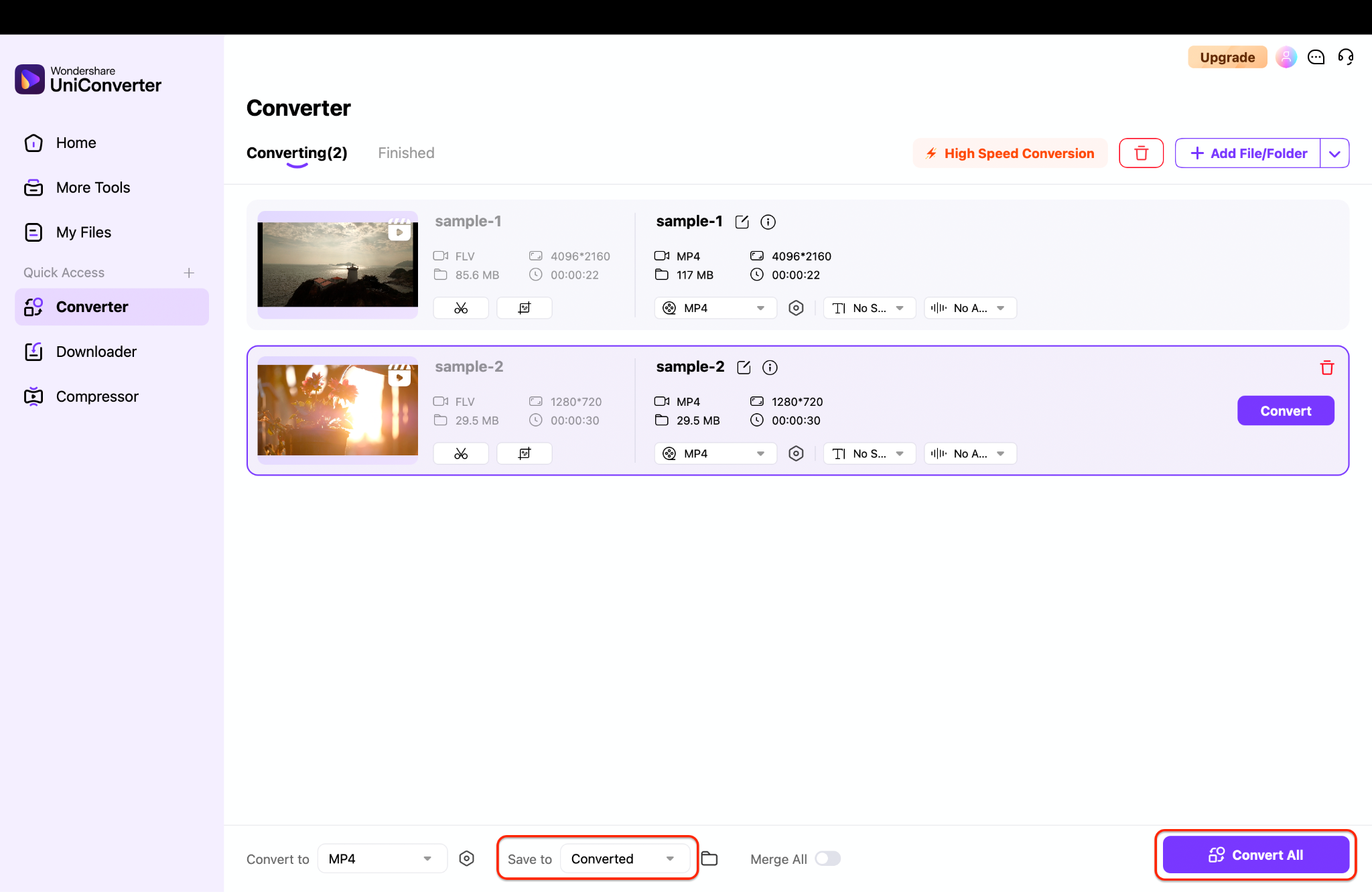
After launching UniConverter and navigate to the Converter tab and then click Add Files to import any existing FLV or other video files already stored on your computer for conversion.
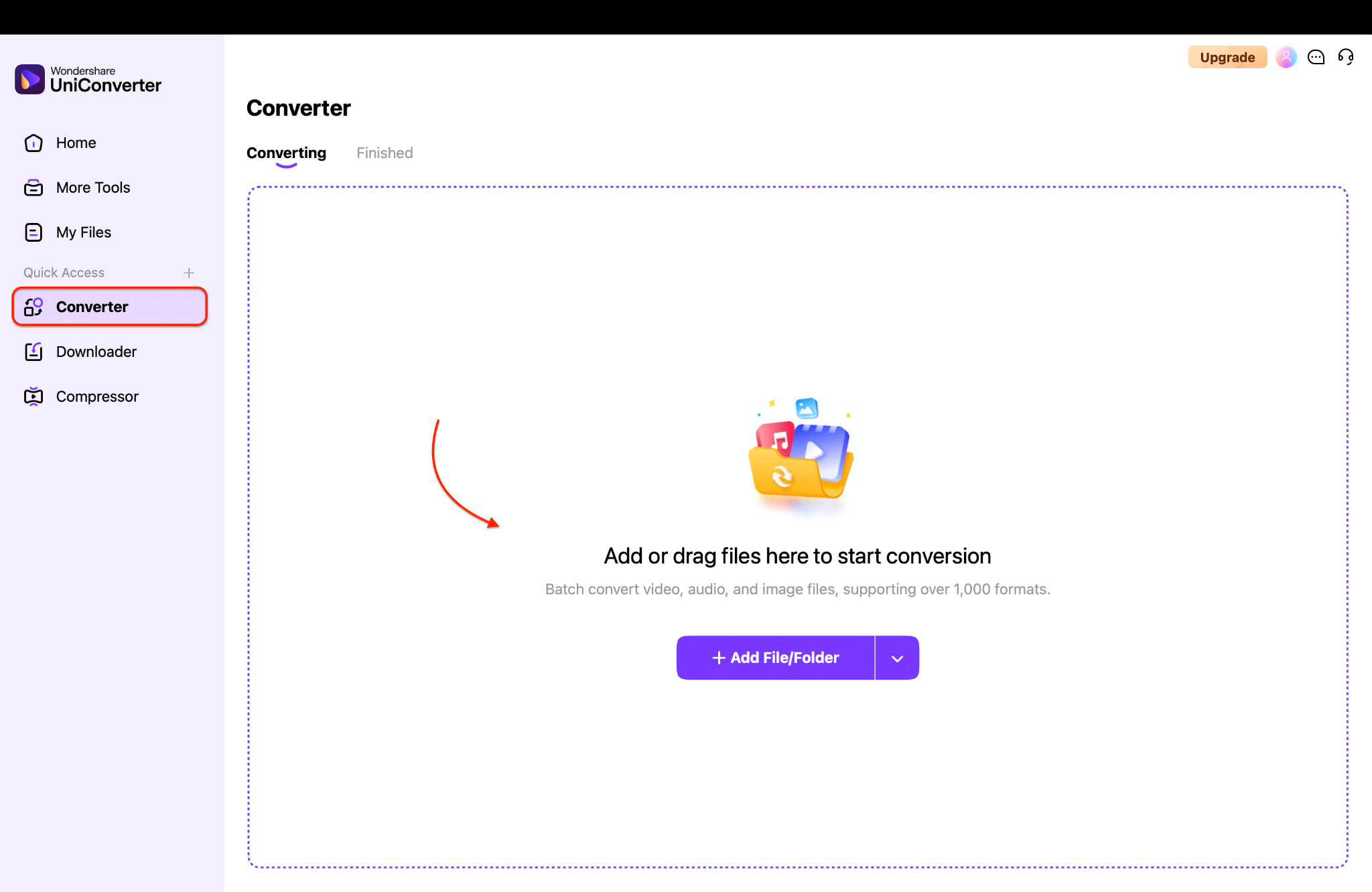
Pro Tip: You can also try the Downloader module, where you paste multiple YouTube URLs at once. In just a few clicks, it lets you download and save the video in any format you want—making it a seamless option for bulk YouTube FLV to MP4 conversion without extra hassle.
Step 2: Choose Your Output Format and Settings
This is where you define your goal. Click the output format menu and select your target, such as MP4 for universal use. For the highest quality and compatibility, ensure the H.264 codec is selected. You can customize parameters like resolution, bitrate, and frame rate here, or use one of the many optimized preset profiles for different devices.
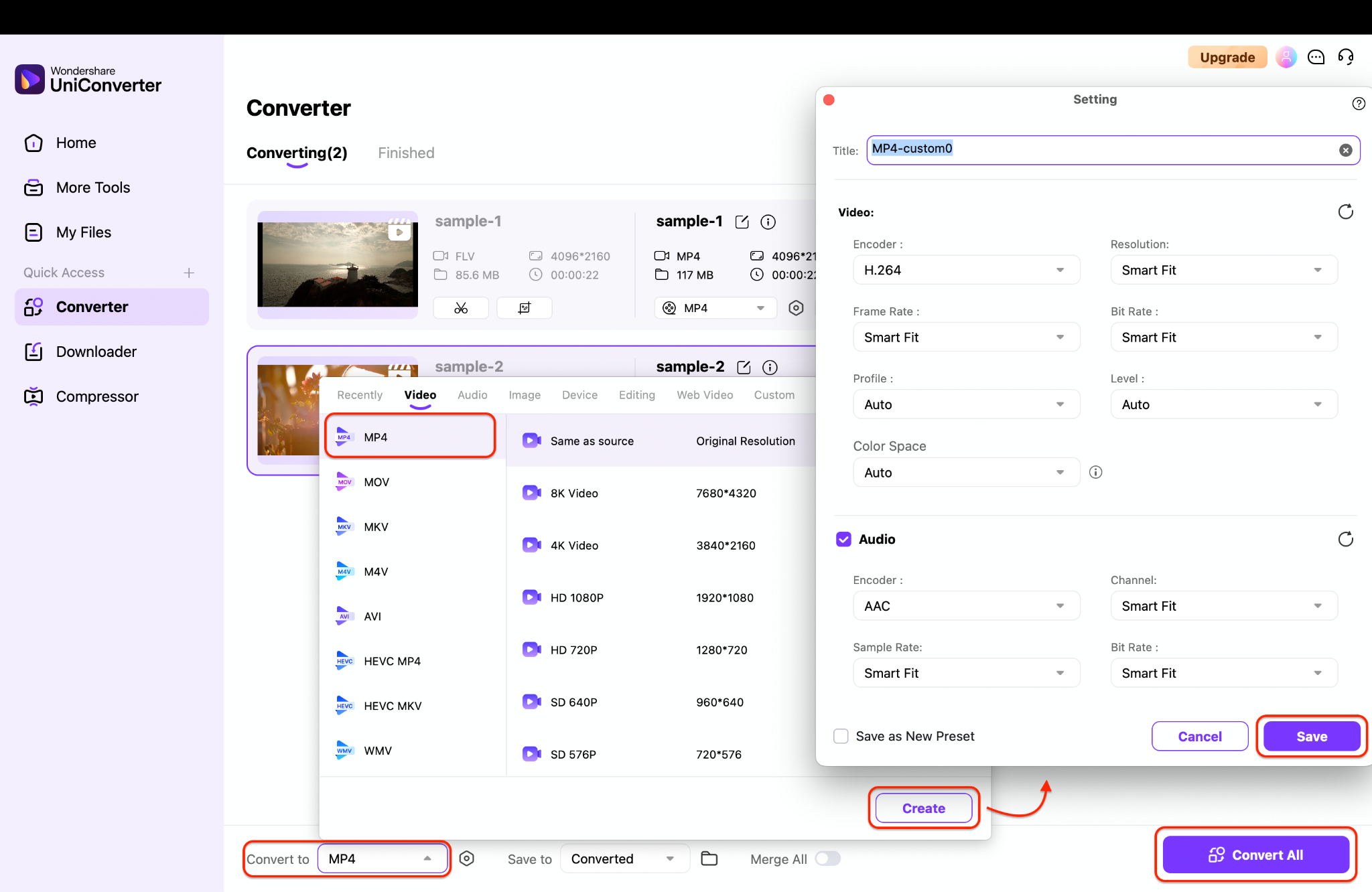
Step 3: Initiate the Batch Conversion Process
Choose a destination folder for your new files by clicking the Output button. Finally, hit the powerful Convert All button. UniConverter will now process every file in your queue, efficiently transforming them into your chosen format. Within minutes, your entire collection will be modernized and ready to use.

Easy to Use YouTube FLV to MP4 Converter
Part 4. Other Alternative Options for YouTube FLV to MP4 Conversion
Alongside professional desktop software, there are several other ways to handle YouTube FLV to MP4 conversion. From quick online tools to lightweight browser extensions, here are some alternative options worth considering.
Online Converters
Websites like Zamzar, CloudConvert, or OnlineVideoConverter promise a quick FLV to MP4 YouTube conversion without requiring software installation. However, they suffer from slow upload/download speeds, strict file size limits, and are often cluttered with intrusive ads. Most importantly, they require you to upload videos to third-party servers, raising major privacy and security concerns.
Browser Extensions
Add-ons such as Video DownloadHelper (Firefox/Chrome) or SaveFrom.net Helper claim to grab and convert videos directly from your browser. While they seem convenient, these tools are often poorly maintained, can slow down browsing performance, and may be blocked by platforms like YouTube. Their reliability for a true YouTube to MP4 FLV conversion is questionable, and they usually lack advanced options like batch processing or custom quality settings.
Professional Software (UniConverter)
Desktop software such as Wondershare UniConverter, HandBrake, or Any Video Converter provides the most powerful and secure solution. Since files are processed locally, you get full privacy and maximum speed. Tools like UniConverter support unlimited batch conversions, preserve high quality, and come with extras like editing, downloading, and burning. While there's a one-time cost, the reliability and feature set make this option the best value for anyone serious about managing their video library.
Choosing the right FLV to MP4 YouTube converter can feel overwhelming with so many options out there. From quick online tools to browser extensions and powerful desktop software, each comes with its own strengths and drawbacks. To make things easier, here's a clear comparison of the most popular tools based on tool type, supported devices, batch conversion, ads & limitations, and pricing.
| App Name | Supported Format | Unique Edge | Best For |
|---|---|---|---|
| Wondershare UniConverter | MP4, MOV, MKV, AVI, and 1000+ more | All-in-one suite (Record, Convert, Edit, and Download) | Batch converting your entire Memories archive |
| 4K Video Downloader+ | MP4, MKV, MP3 | 8K support & simple “Smart Mode” | High-quality downloads of public Spotlight links |
| SnapDownloader | MP4, MP3, AVI, MOV | Built-in video trimmer; supports more than 900+ sites | Trimming public videos before downloading |
| HitPaw Video Converter | MP4, MOV, and 500 more | 120x conversion speed in a modern UI | Users who want an all-in-one suite but prefer a subscription |
| EaseUS Video Downloader | MP4, MP3 | Simple UI from a known software brand | Basic, no-fuss link downloading |
| OBS Studio | MP4, MKV, FLV | 100% free, open-source, and professional quality | The highest-quality, safest screen recording (for free) |
| VLC Media Player | MP4, AVI, MPEG | Built-in to a common media player | Quick, free screen recording if you already have it |
| Apowersoft Online Recorder | MP4, AVI, WMV | Browser-based, no install, no watermark | The easiest free way to screen record a Snap |
| SnapSave.app | MP4 | Dedicated online Snapchat link downloader | Quick, risky downloads of public Spotlight videos |
| SSSTikSnap | MP4 | Alternative to SnapSave | Quick, risky downloads when other sites are down |
Easy to Use YouTube FLV to MP4 Converter
Part 5. Tips for YouTube FLV to MP4 Conversion
Converting videos should be a safe and effective process. Follow these essential tips to ensure you get the best results without any headaches.
Avoid Malware and Spammy Sites: The internet is full of websites offering a YouTube converter FLVto MP4 download free service. Be extremely cautious. Many of these sites are fronts for adware, malware, or phishing schemes. Stick to well-known, reputable software like UniConverter or primary online services with positive reviews to keep your computer safe.
Check Copyright Rules Before Downloading: It is crucial to understand copyright law. Downloading videos from YouTube for personal, offline viewing is often a gray area, but redistributing, selling, or re-uploading someone else's copyrighted content without permission is illegal. Always respect creators' rights and use downloaded content responsibly.
Prefer Well-Known Tools: When selecting a converter, choose established brands with a proven track record. Well-known tools are more likely to be safe, regularly updated, and offer quality customer support. They provide a reliable and consistent experience for your FLV to MP4 YouTube needs, unlike obscure websites or software that might vanish tomorrow.
Final thought
Navigating the transition from outdated FLV files to modern, usable formats doesn't have to be a technical chore. As we've explored, understanding the history of FLV and the clear benefits of MP4 is the first step to rescuing your old video collection. While various online tools and converters promise a quick fix, they often come with compromises in speed, security, and quality.
Don't let your favorite videos become lost media. Embrace the easiest and most reliable solution. Download UniConverter now to effortlessly convert, preserve, and enjoy your YouTube videos in any format you choose!
FAQs
-
1. Is there still a need for a YouTube FLV converter today?
While YouTube no longer uses FLV for new videos, the need for a YouTube FLV converter is still very real. Millions of old videos were downloaded and saved in the FLV format by users during the 2000s. To play these archived videos on any modern device, you must convert them to MP4, making a converter an essential tool for accessing these pieces of digital history. -
2. Can I use a free online YouTube to FLV converter?
You can, but we strongly advise caution. Many free online tools labeled as a YouTube converter FLV to MP4 are supported by excessive ads, have very low file size limits, and can pose a security risk by exposing your computer to malware. For occasional, small files, they might work, but for batch conversion, quality, and safety, a dedicated desktop software like UniConverter is a far superior choice. -
3. What makes MP4 a better format than FLV?
MP4 is superior to FLV in almost every way for a modern user. It is a universally compatible container that works on every device and platform without needing extra plugins. It also uses more advanced compression algorithms, which means you get high-quality video at significantly smaller file sizes, making MP4 ideal for storage and sharing online. -
4. Is it legal to convert YouTube videos to MP4 or FLV?
The legality depends on how you use the content. Downloading videos for your own personal, offline viewing is generally tolerated. However, it is almost always against YouTube's Terms of Service to download videos without explicit permission from the creator. Converting and then redistributing, selling, or publicly showing the content without the copyright holder's permission is illegal. Always respect copyright and use converters responsibly. -
5. Does UniConverter only convert FLV files from YouTube?
No, not. UniConverter is an incredibly versatile powerhouse. While it excels as a YouTube converter YouTube to MP3, MP4, AVI, FLV, its functionality extends far beyond that. It can convert between over 1000 different video and audio formats, download videos from over 10,000 sites, record your screen, burn DVDs, and edit video files. It's a complete multimedia toolkit.

