


You've likely been searching for Topaz Video AI free because improving low-quality or low-resolution footage can be expensive, especially if you're a creator working on a tight budget or restoring old clips, smartphone videos, or archival material.
The good news is that Topaz offers some free functionality through Topaz Express, a browser tool that provides basic upscaling, sharpening, noise reduction, and FPS boosting up to 4K or HD. It works without downloads or sign-ups, making it useful for quick enhancements.
The full Topaz Video AI desktop software is not free, and it requires a $299 yearly subscription. Below, you’ll find a clear breakdown of the legitimate options, the risks associated with cracked versions, and safer alternatives such as UniConverter that deliver strong results without recurring fees.
While Topaz Video AI offers powerful enhancement capabilities, its free version is limited, and full features require a subscription-based license.
- Downloading cracked or “free” Topaz versions often comes with security, stability, and legal risks that outweigh short-term savings.
- For users seeking a legal and flexible alternative, Wondershare UniConverter provides AI video upscaling through Topaz-level API integration, using a pay-as-you-go AI credit model instead of subscriptions.
Choosing the right tool depends on usage frequency, budget flexibility, and workflow needs.
In this article
- What Topaz Video AI Offers in the Free Version?
- Is Topaz Video AI Free or Paid? Does Topaz have an Unlimited Free Version?
- Safety Risks of Downloading Cracked or “Free” Topaz Versions
- Is Topaz Video Worth It? Consideration Between Topaz and Alternatives
- Best Legal Alternatives to Topaz Video AI Free
- Conclusion
- FAQs
Part 1: What Topaz Video AI Offers in the Free Version?
Topaz does not offer a completely free version of Topaz Video AI desktop software, but it does offer legitimate free options on two distinct platforms. Knowing what each tier includes helps you decide whether to upgrade or look for alternatives.
Topaz Express: The Free Web-Based Option
Topaz Express is the official free video enhancement tool, accessible in your browser with no downloads, installs, or credit cards. You get unlimited cloud processing at no cost.
What Topaz Express Can Do:
- Upscale videos to 4K or HD resolution using AI models
- Remove noise and blur from low-quality footage.
- Increase frame rates (frame interpolation) for smoother playback
- Sharpen details in soft or out-of-focus footage.
- Process directly in your browser without local hardware strain
Topaz Express handles only basic tasks. You won't find Topaz's advanced models, such as Proteus or Rhea. Processing takes longer than local desktop rendering, since everything runs on Topaz's servers.
Cloud Credits: Not Free, Even During Trial
If you want to offload processing to Topaz's servers (useful for slower computers), you'll need Cloud Credits. These are not available during the free trial, even as a sample. Legacy app versions like Photo AI and Gigapixel require purchased credits for any cloud processing.
Newer Topaz Studio subscribers get 300 monthly video cloud credits included with their $299/year subscription, plus unlimited free cloud rendering for images.
You can use Topaz’s Express tools for free, but you face trade-offs. Topaz Express lets you do basic enhancement tasks at no cost.
Part 2: Is Topaz Video AI Free or Paid? Does Topaz have an Unlimited Free Version?
Topaz Video AI is a paid tool; you cannot use an unlimited free desktop version. You need a subscription or purchase for the main application. The “free” options exist only online with Express tools. These work for light enhancement but have limitations.
Desktop Version: Paid-Only, No Free Trial
The Topaz Video AI desktop app uses a paid model, billed annually, and does not offer an ongoing free trial for full use. You must purchase a valid license to export watermarked-free videos, access all models, and run local processing.
Topaz Express: Free, Browser-Based Tools
Instead of a free desktop tier, Topaz directs budget-conscious users to its Express tools, which run entirely in the browser and are free to use with some constraints. On the video side, these include online utilities like Video Upscale, 4K/HD converters, a video enhancer, sharpener, and frame interpolation, all designed for quick fixes and smaller projects rather than heavy production workflows.
On the image side, Express delivers focused tools to upscale, denoise, sharpen, unblur, enhance, and restore photos. It also provides niche utilities, such as face and AI art enhancement. These tools help with occasional improvements but do not match the deep controls and batch workflows found in the desktop software.
What “Free” Really Means Here
Express tools are free to use and offer watermark-free outputs, but they limit you with upload caps, slow cloud processing, single-file operation, and basic presets rather than granular tuning. Topaz provides free AI enhancement via Express, but full Topaz Video AI desktop access requires payment and offers no unlimited free tier.
Part 3: Safety Risks of Downloading Cracked or “Free” Topaz Versions
If you search for "Topaz Video AI free download" or look for torrents and cracks, you expose yourself to serious technical, legal, and financial risks that outweigh any savings from skipping the $299/year subscription. Cracked software threatens your system, files, and long-term security.
The Hidden Costs of Cracked Software:
1. Malware and Ransomware: Cracked versions frequently hide trojans, info-stealers, or ransomware. These can encrypt videos, steal credentials, or give criminals remote system access. Recovering from ransomware often costs more than the software itself.
2. Data Loss and Corruption: Cracked software lacks proper code integrity, leading to random crashes, corrupted exports, or complete data loss during processing. You might spend hours rendering a video only to find the output file is unplayable or permanently damaged.
3. No Updates or Security Patches: Legitimate Topaz subscriptions receive regular security updates that patch vulnerabilities. Cracked versions freeze at their original state, leaving you exposed to exploits discovered months or years later as cybersecurity threats evolve.
4. Slow Performance and System Instability: Cracked builds often include bloated code, miners that drain CPU/GPU resources in the background, or deliberately crippled performance. Your computer becomes sluggish even when Topaz isn't running.
5. Legal Consequences: Using cracked software violates copyright law and Topaz's terms of service. While prosecution of individual users is rare, commercial creators or businesses using pirated software face fines, lawsuits, or business shutdowns.
6. No Customer Support: If something breaks, crashes, or produces poor results, you're on your own. Topaz support won't help users running cracked versions, leaving you stuck troubleshooting without official guidance.
Why Legitimate Alternatives Are Smarter?
The cost of recovering from a malware infection, including antivirus scans, potential data recovery, and replacing compromised credentials, often exceeds the annual subscription price many times over. More importantly, your creative output and personal data are worth protecting.
Part 4: Is Topaz Video Worth It? Consideration Between Topaz and Alternatives
Topaz Video AI is worth it for professional video editors and high-volume content creators who process dozens of videos monthly and need batch processing, local rendering, and advanced model customization. For casual users or those with occasional enhancement needs, free Topaz alternatives deliver sufficient results without the $299/year subscription cost.
When Topaz Video AI MAKES Sense?
Topaz Video AI makes the most sense when you’re handling demanding, professional-grade projects that require high accuracy, fast local processing, and consistent results at scale. It’s built for workflows where quality and speed genuinely matter.
1. For Professional Video Editors and Post-Production Teams
If you're working with broadcast, streaming, or client-facing projects, Topaz often pays for itself within the first few months. Professional editors using Adobe Premiere Pro or Final Cut Pro can integrate Topaz directly into their timeline, applying upscaling or frame interpolation to footage in real time without exporting intermediate files.
Restoring archival footage, salvaging low-resolution interview clips, or enhancing green-screen footage becomes fast and seamless rather than a manual, multi-step process.
2. For YouTubers and Content Creators at Scale
Creators publishing 20+ videos monthly benefit from batch processing and the ability to quickly improve older footage or low-quality source material without watermarks. A single viral video with improved visuals can generate more revenue than a year of Topaz subscriptions.
3. When Working with 4K or High-Bitrate Footage
Local processing on your own hardware is dramatically faster than cloud-based tools. If you're upscaling 4K footage or using frame interpolation for 120fps output, the time saved by processing locally rather than uploading to Topaz's servers justifies the subscription cost alone.
Topaz Video AI Limitations You Should Know
Topaz Video AI is powerful, but it isn’t flawless. Before relying on it for every project, it’s important to understand the limitations that can impact quality, workflow speed, and overall value.
1. Not a Magic Fix for Severely Damaged Footage
Topaz works best on footage that's merely low-resolution, slightly blurry, or shot at lower frame rates. If your source material is heavily compressed, severely out of focus, or degraded from old tape formats, even the best AI models have limits. Results can look artificial or fail to recover meaningful detail.
2. Steep Learning Curve for Best Results
The difference between average and excellent output depends heavily on choosing the right AI model for your specific problem (Artemis for general upscaling, Proteus for sharper detail, Rhea for a less artificial look) and on fine-tuning the model's parameters. New users often produce mediocre results and assume the software is "overhyped."
3. High Hardware Requirements
Topaz demands a modern GPU. If your workstation lacks this, processing becomes painfully slow, negating much of the software's advantage over cloud-based alternatives.
4. Subscription Model Means Ongoing Costs
Unlike one-time purchases, the $299/year fee repeats indefinitely. If you use Topaz sporadically, this becomes expensive per project.
Which Type of Topaz Video AI Alternative Is Right for You?
Not every user needs the same kind of video enhancer. If you are comparing a Topaz Video AI free alternative, it helps to choose based on workflow instead of price alone.
- For casual users: a browser-based tool may be enough for testing short clips or making occasional quality improvements.
- For creators with repeat tasks: a desktop tool is usually more practical because it handles longer videos, larger files, and more consistent exports.
- For editors already in post-production: a tool inside an editing workflow may be a better fit than switching between separate apps.
- For advanced users on a tight budget: open-source tools can be a workable option if you are comfortable with a more technical setup.
Best Choice by Use Case
| Use Case | What to Look For |
|---|---|
| Quick one-off enhancement | Simple interface and fast setup |
| Batch video enhancement | Stable desktop workflow and multi-file support |
| Post-production editing | Timeline integration and stronger manual controls |
| Fully budget-focused workflow | Free access, flexible setup, and tolerance for technical steps |
Part 5: Best Legal Alternatives to Topaz Video AI Free
Short answer: Topaz Video AI desktop is not free. If you are searching for Topaz Video AI free, the official free option is Topaz Express, which offers limited browser-based enhancement tools. If you need stronger desktop features, batch workflows, or more output control, comparing a Topaz Video AI free alternative is the safer and more practical choice.
If you're searching for "Topaz Video AI free" alternatives, you don't need to compromise on quality or resort to cracked software. Several legitimate tools deliver strong video upscaling and enhancement without expensive subscriptions. Here are three practical alternatives that handle the core tasks Topaz addresses while fitting different budgets and workflows.
1. Wondershare UniConverter: Best for Batch Processing and Ease of Use
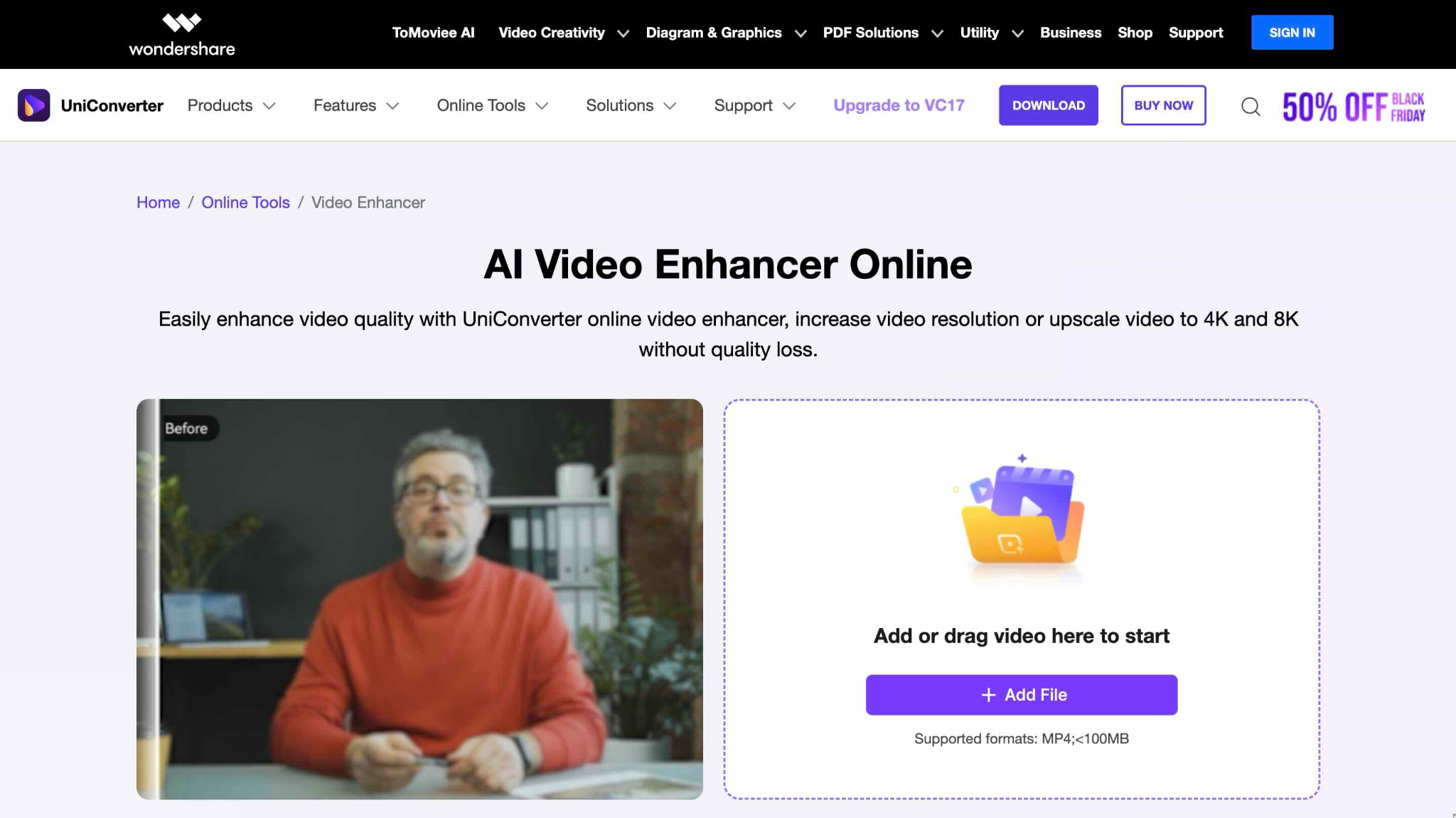
Instead of looking for "Topaz Video AI download free" versions online, Wondershare UniConverter offers a legitimate path forward with a 6-day free trial that lets you test the software before committing financially. It's specifically designed for creators who need to enhance multiple videos quickly without the complexity of professional editing suites.
Wondershare UniConverter combines batch processing, AI upscaling, and format conversion into a single affordable tool, making it ideal for content creators, YouTube editors, and small production teams who want results comparable to Topaz at a fraction of the subscription cost.
Key Features
AI-powered video upscaling (2x, 4x to 4K/8K resolution) and batch processing for multiple videos simultaneously.
Face enhancement, quality restoration, and frame interpolation for smooth slow-motion effects.
Subtitle editor for adding or translating subtitles in multiple languages.
Free video trimmer removes a segment or specific portion of a video with a single click.
Note: Wondershare UniConverter does not support the use of cracked versions, unauthorized downloads, or any form of illegal software access. Always download UniConverter only from official Wondershare channels to ensure safety, legality, and proper functionality.

Professional Results Without Cracked Software
2. Davinci Resolve
Looking for "Topaz Video free" without constant subscription fees? DaVinci Resolve offers a genuinely free version with professional-grade upscaling available through its paid Studio tier, which is a one-time $295 purchase rather than an annual subscription.
If you're already working in a professional editing environment, DaVinci Resolve eliminates the need for separate video enhancement software. You can enhance footage directly in your timeline, apply color grading, and export finished projects without bouncing between applications.
Key Features
Super Scale AI upscaling (2x, 3x, 4x) in the Studio version
Temporal and spatial noise reduction tools
Professional color grading and correction workflows
Fusion VFX integration for advanced compositing
3. Video2X
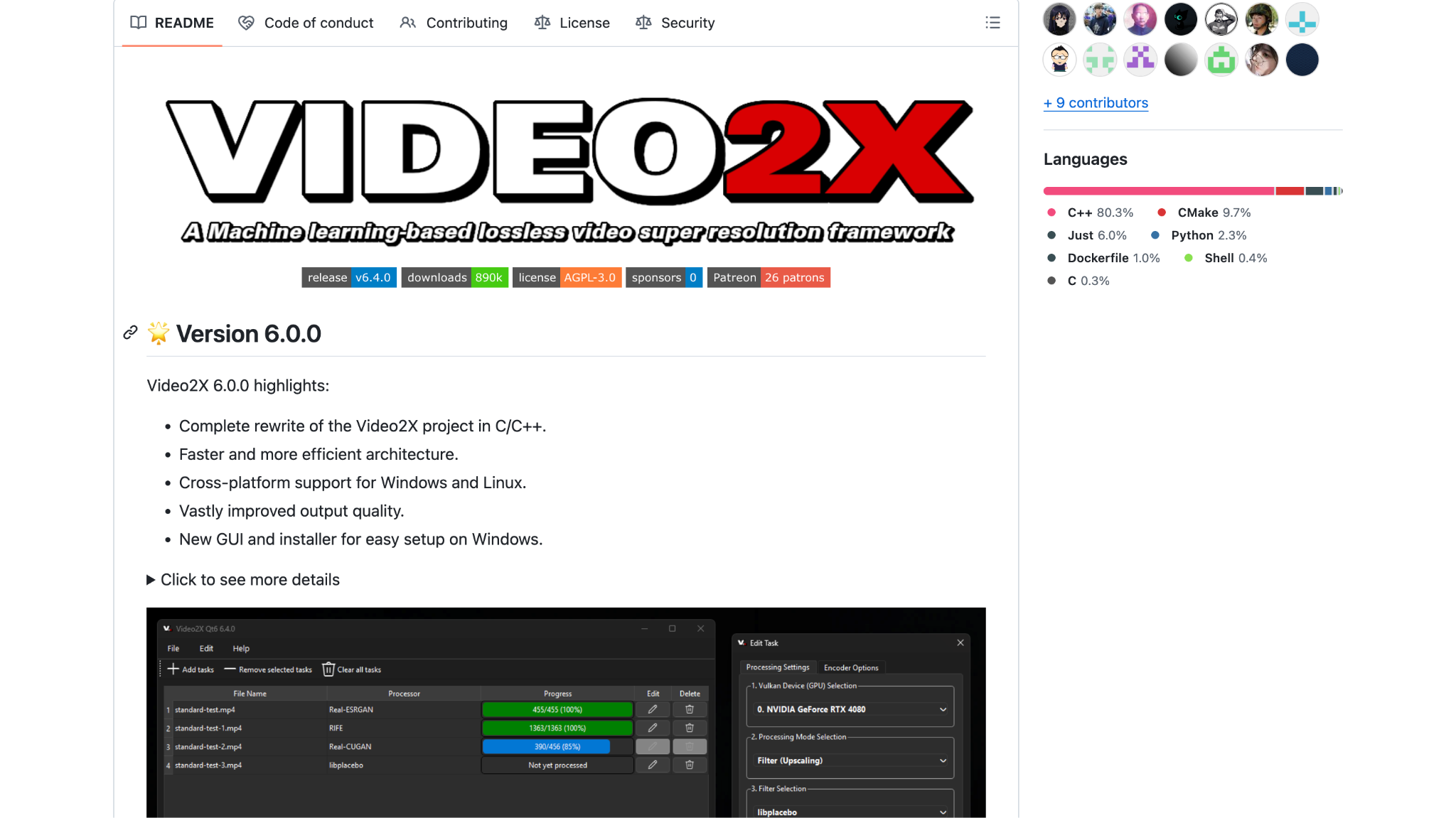
While you might encounter "Topaz Video AI Crack free download" offers online, Video2X provides genuine, zero-cost video upscaling through open-source code and community development, no piracy required.
Video2X is ideal if you are comfortable with technology and want unlimited access to powerful AI upscaling without watermarks, subscriptions, or licensing restrictions. It won't match commercial software in speed or polish, but for users willing to invest time in learning, it delivers professional-quality results at literally no cost.
Key Features
AI upscaling using multiple algorithms (RealSR, SRMD, Anime4K, waifu2x)
GIF and image upscaling support
Highly customizable for advanced users
No watermarks, no limitations, no tracking
Comparison at a Glance
| Tool | Cost | Best For | Processing Speed | Learning Curve |
| Wondershare UniConverter | $49.99/year (Windows) and $59.99/year (Mac) (free trial) | Batch processing, beginners | Fast | Easy |
| DaVinci Resolve Studio | $295 one-time | Video editors, professional workflows | Medium | Moderate |
| Video2X | Free | Technical users, zero-budget projects | Slow | Steep |
Part 6: How to Upscale Videos Using UniConverter’s AI Features?
Wondershare UniConverter’s AI-powered video enhancement tools make it easy to improve video quality in just a few clicks. Whether you want to restore clarity, enhance faces, or smooth out motion, the built-in AI models help you achieve professional results quickly.
Step 1: Visit the homepage, navigate to the "Video" tab, and select "Video Enhancer."
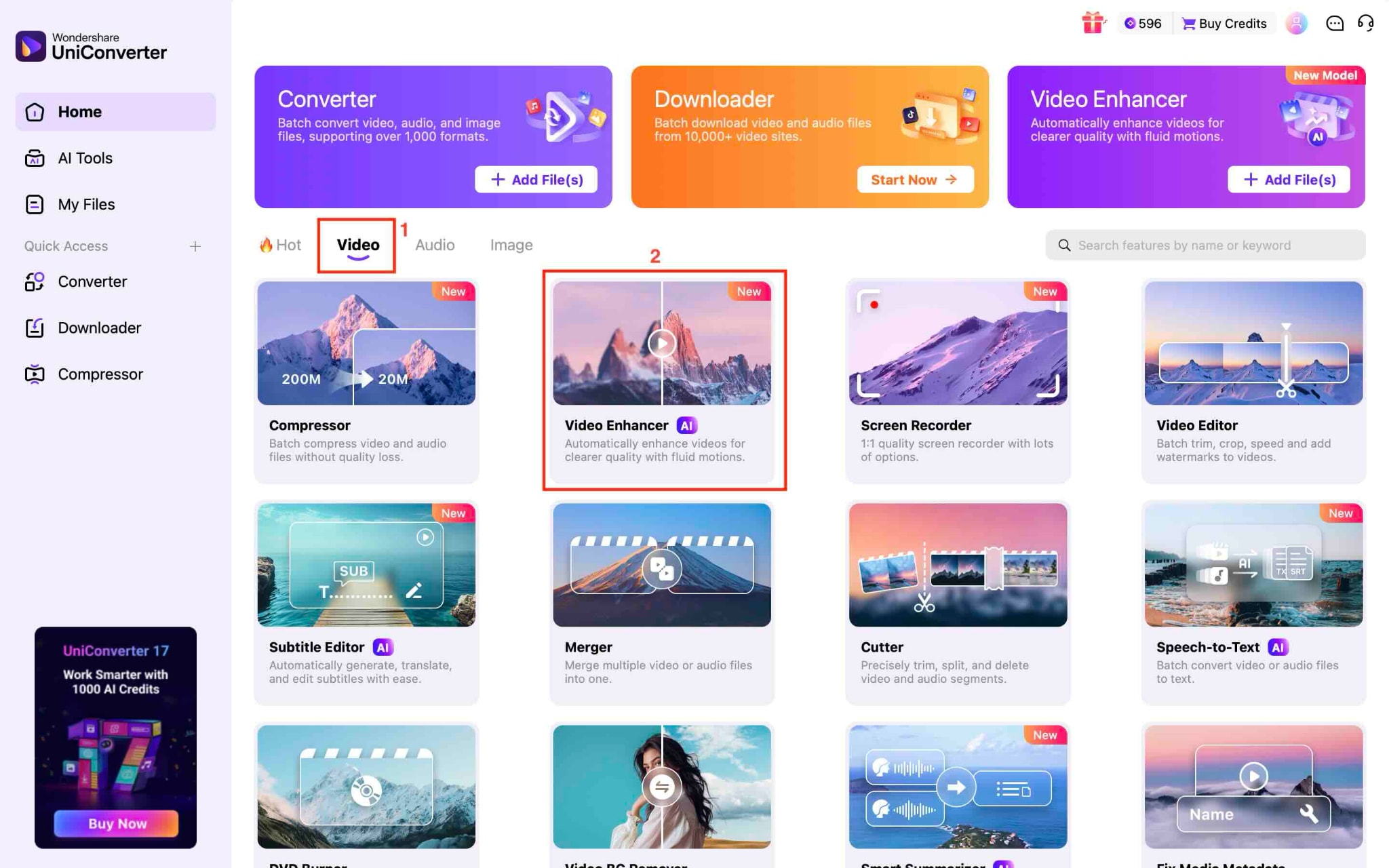
Step 2: Hit "Add Video" to upload your video file, or choose multiple files at once for batch processing.
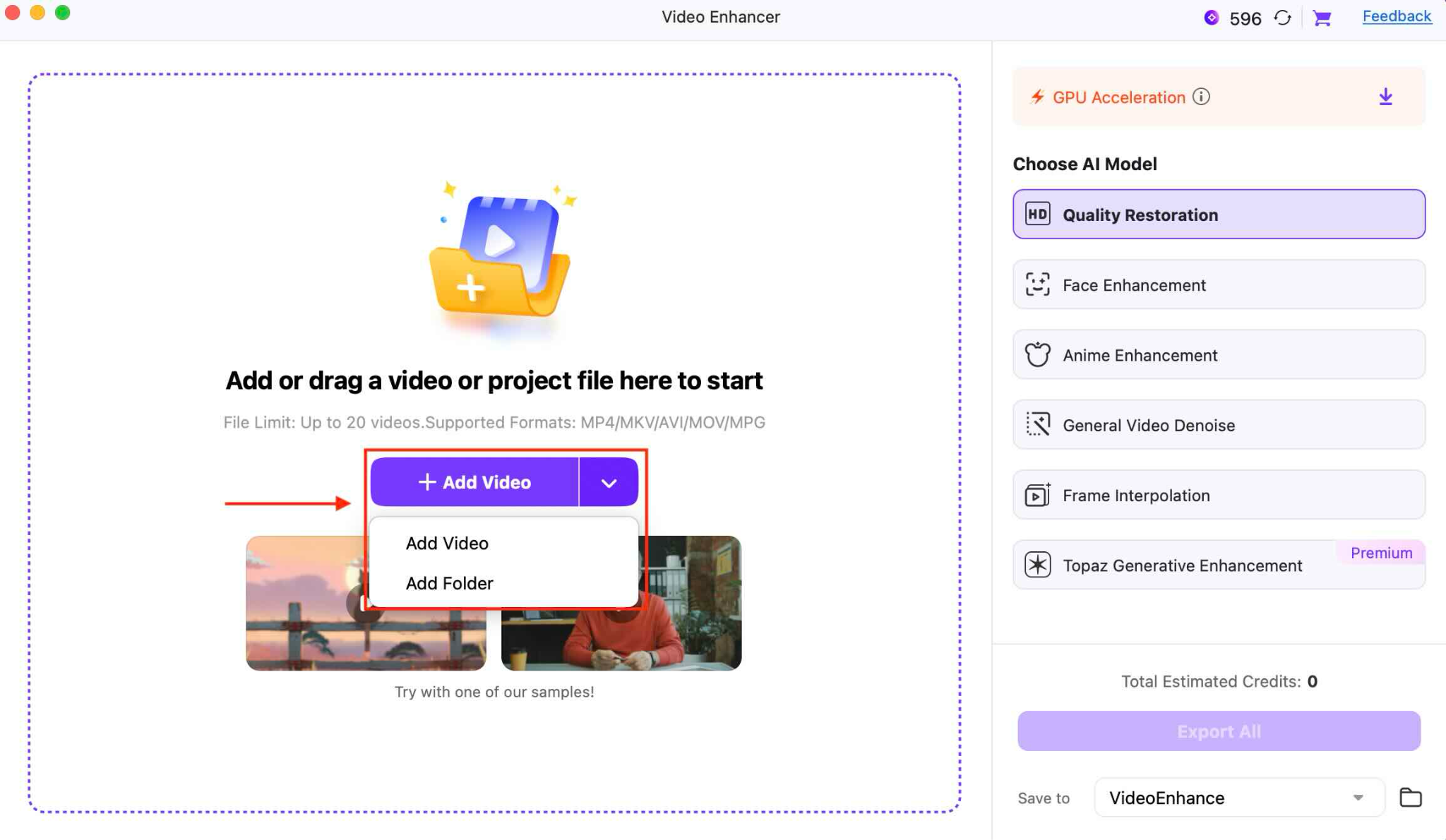
Step 3: Once your video is uploaded, pick an AI model to enhance it. Options include Quality Restoration, Face Enhancement, Anime Enhancement, General Video Denoise, Frame Interpolation, and Topaz Generative Enhancement.
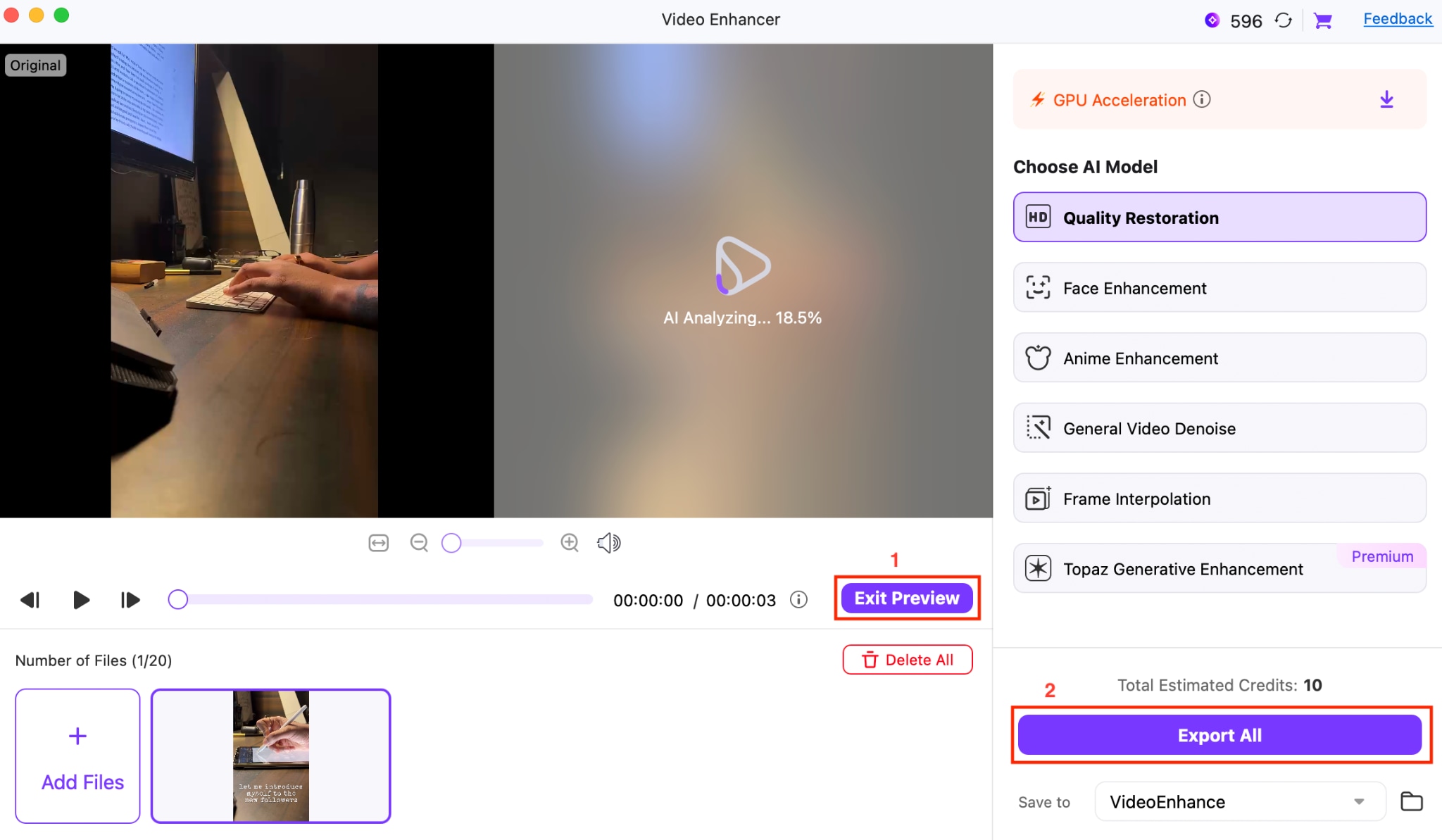
Step 4: Click "Preview" to check the improvements before finalizing. When satisfied, hit "Export All" to save the enhanced video.
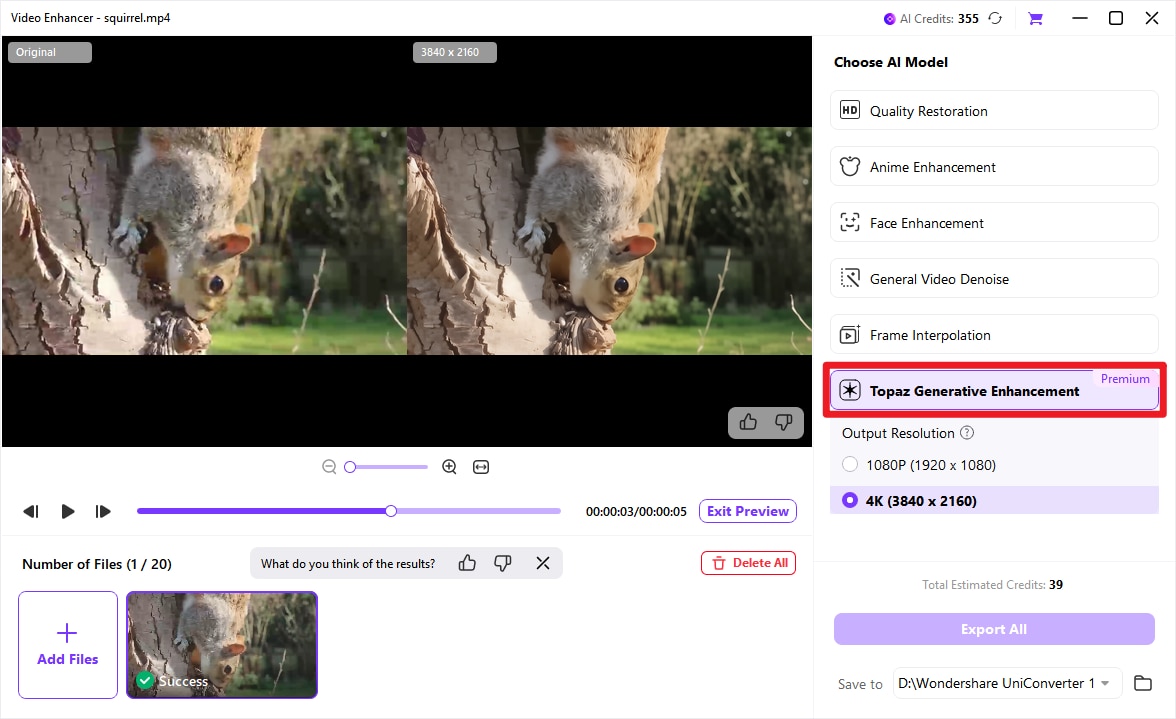
Tip: For users who have higher demand on enhancement quality such as for profesisonal level effect, Topaz Generative Enhancement model is recommended. The integrated Topaz technology intelligently sharpens, denoises, and color-grades your footage during the enhancement process, delivering a 4K result that is visibly cleaner, sharper, and more vibrant.
Conclusion
While Topaz Video AI offers powerful video enhancement tools, its desktop software is strictly paid, and the free browser-based Topaz Express only covers basic tasks. Searching for “Topaz Video AI free” alternatives doesn’t mean you have to compromise on quality.
Tools like Wondershare UniConverter, DaVinci Resolve, and Video2X offer safe, legal ways to upscale and enhance videos without expensive subscriptions or the risks of cracked software. Whether you’re a casual creator or a professional editor, these Topaz alternatives deliver strong results.
Explore Wondershare UniConverter today and start enhancing your videos safely, efficiently, and legally!
FAQs
-
Is Topaz Express Truly Free or Does It Have Hidden Costs?
Topaz Express is genuinely free with no hidden charges. All video and image enhancement tools available through the Express platform are powered by cloud processing, included in Topaz's infrastructure at no cost to users. The only limitations are file-size caps and processing speed (cloud-based), not payment requirements. No watermarks are added in Express, making it the only truly free option from Topaz Labs. -
Can I Use Topaz Video AI Without a Subscription After Purchasing?
No. Topaz switched to a mandatory annual subscription model in late 2025. Previously, users could buy lifetime licenses with yearly upgrade options, but that model is no longer available. All new licenses must be purchased as annual subscriptions ($299/year). Existing license holders with prior purchases may qualify for grandfathered pricing depending on when they purchased. -
What Happens to My Videos if I Stop Paying for the Topaz Subscription?
Your existing processed videos are not affected; you keep the files you've already exported. However, you lose the ability to process new videos, access cloud rendering, or use any Topaz tools once your subscription expires. If you resume the subscription later, you regain full functionality. -
Are There Genuinely Free Video Upscalers That Don't Require Downloads?
Yes. Topaz Express itself is a free browser-based upscaling, and alternatives like Wondershare UniConverter offer a free trial with watermarks, while DaVinci Resolve includes limited free upscaling in its community edition. Video2X is completely free and open-source, but requires technical knowledge and local installation. Each option trades off convenience, speed, or features depending on your needs. -
Can Topaz Video AI Free Download Versions Be Found on Third-Party Sites?
While cracked or unofficial versions circulate online, downloading them violates copyright law and exposes your computer to malware, ransomware, and data theft. These versions also lack security updates, official support, and stability. The legal risks and security dangers far outweigh any cost savings compared to using Topaz Express (free) or paying for the subscription.

