UniConverter
UniConverter Online Free
Converter video, audio & image free
Free Try
Instagram Video & Image Saving and Conversion

How to Save Multiple Instagram Videos and Photos

Quick Answer
  • For several supported Instagram media links, use UniConverter Instagram Downloader, analyze the links, and save the media returned by the tool.
  • A carousel can contain several photos or videos under one post URL. Check the returned items and their order instead of assuming that one URL always means one file.
  • For a copy of your own account’s photos and videos, use the information-download or transfer options in Accounts Center. A post downloader is not a guaranteed whole-account archive.

Downloading several Instagram posts, saving every item in one carousel, and backing up your own account are different tasks. Choose the workflow that matches the collection. UniConverter includes an Instagram Downloader for supported media links, while your own account archive is better handled through Instagram’s information-export tools.

UniConverter desktop:

UniConverter for Windows

UniConverter for Mac

Instagram Downloader with the supported link input and Analyze button
ChooseMatch the method
PrepareReview source files
PreviewCheck the result
SaveKeep useful copies

Several Posts, One Carousel, or Your Own Account Backup?

The dominant search need is local media saving. Keep the scope explicit so a batch of posts is not confused with a complete account export.

Your requirement
Selected media linksPost or carousel saving
Your account archiveInstagram information export
Starting point
✓Supported individual media URLs.
Your own account and its information controls.
What to expect
✓The downloadable items returned for the supported source.
An export or transfer of the account information you select.
Completeness
✓Match downloaded items to the requested posts and carousel contents.
Review the export scope and date range offered by the account tools.
Next step
✓Convert only the saved files that need another format.
Keep the archive intact and work from copies for editing.
Simple decision:
Use media-link saving for selected authorized posts. Use Instagram’s own information tools for your account archive, then convert local copies only when required.
Follow the UniConverter Steps

Choose the Right Way to Download Multiple Instagram Photos and Videos

Downloading several Instagram posts, saving every item in one carousel, and backing up your own account are different tasks. Choose the workflow that matches the collection. UniConverter includes an Instagram Downloader for supported media links, while your own account archive is better handled through Instagram’s information-export tools.

Method 1: Back Up Your Own Photos and Videos

For a personal account archive, open Instagram’s Accounts Center and find the information and permissions controls for downloading or transferring your information. Select the relevant account and export scope, then use the options presented to create your copy.

  • Use this route when completeness across your own account matters.
  • Choose the offered media scope, date range, and quality options for the archive you need.
  • Keep the exported archive separately from later edited or converted copies.
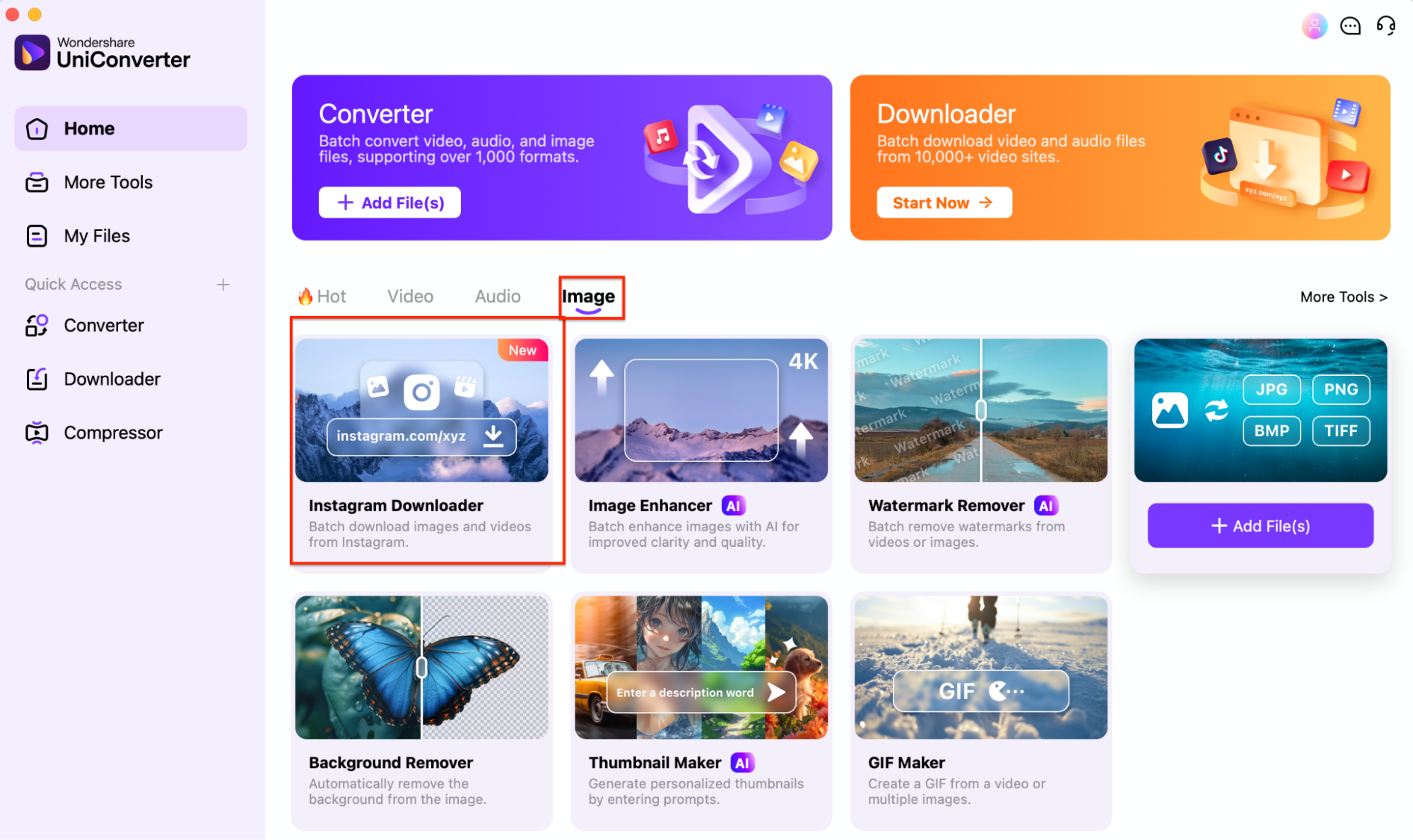
UniConverter Home with the dedicated Instagram Downloader tool

Method 2: Save Supported Post Links with UniConverter

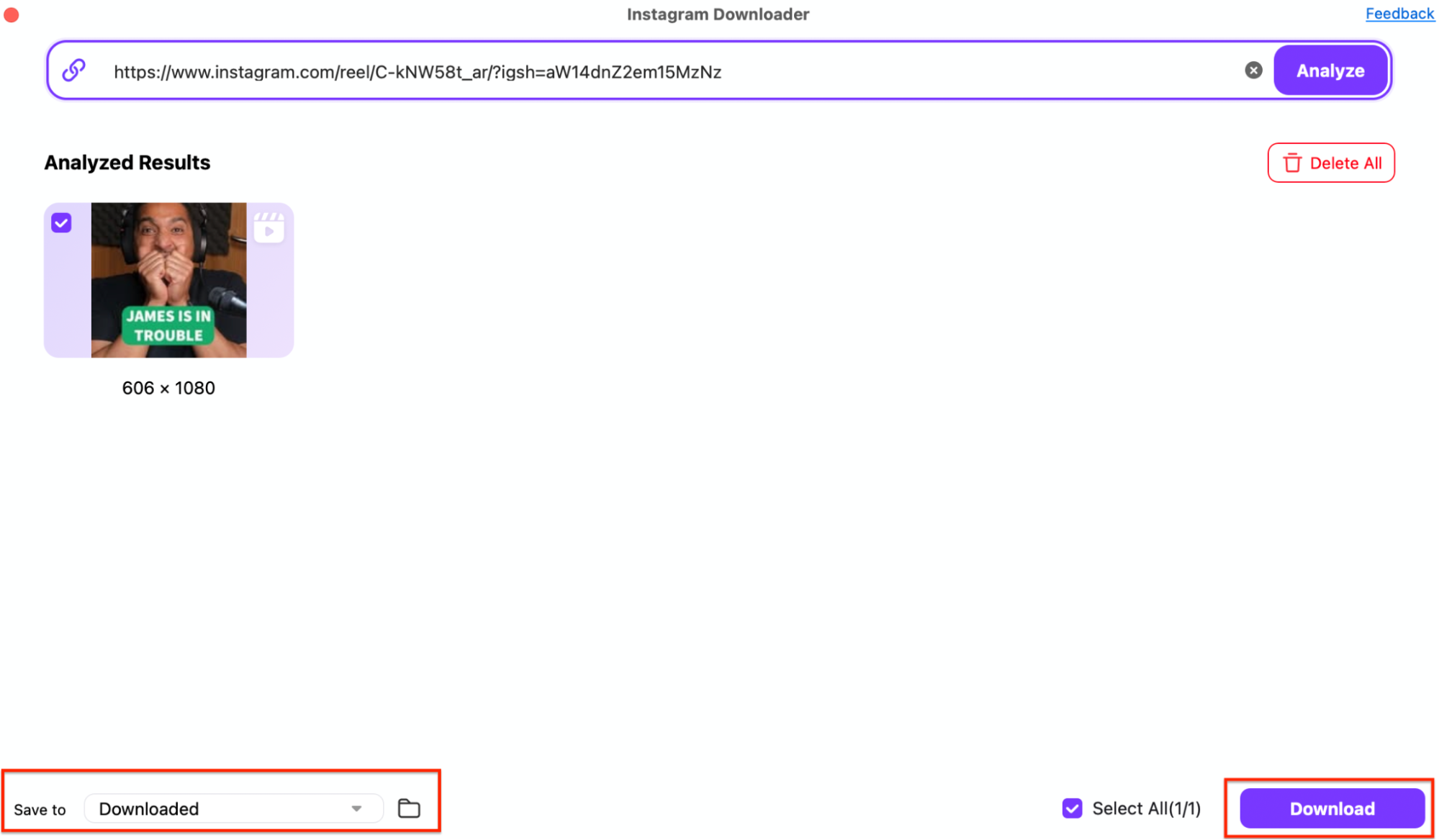
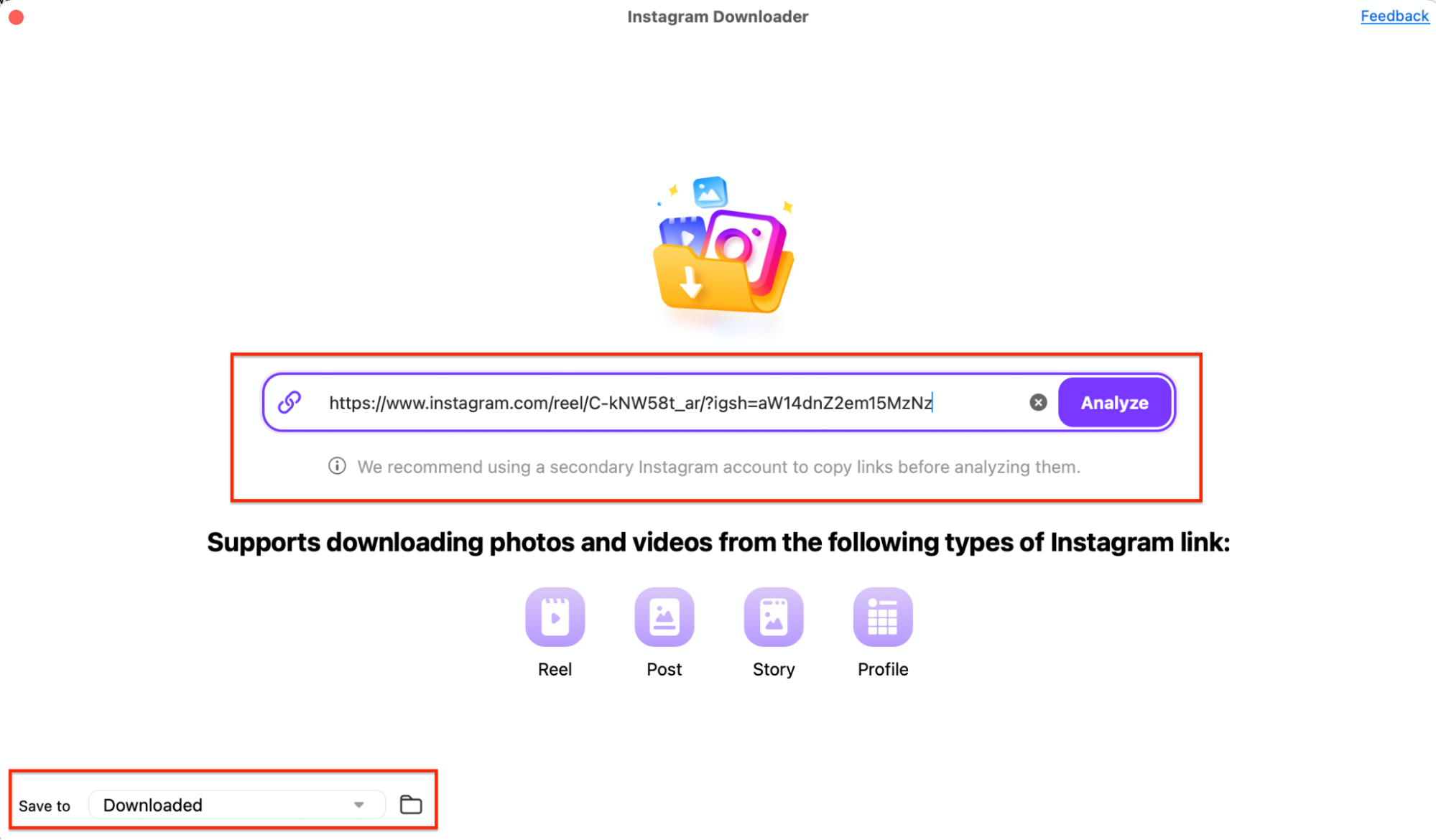
Find Instagram Downloader in UniConverter and paste a supported Instagram media link. Click Analyze, inspect the returned items, and download the media you need. Repeat for the intended links in the available batch workflow.

  • Use complete individual post or Reel links rather than assuming a username represents the entire collection.
  • Check whether the source returns a photo, video, or several carousel items.
  • Use only the media that the source and installed tool actually make available.
Instagram Downloader with the supported link input and Analyze button

Handle Carousels and Missing Items Deliberately

A carousel is a collection within one post. Compare the returned media against the expected slides, including mixed photo-video posts. Keep a source list so a partially saved carousel is not mistaken for the complete collection.

  • Inspect item counts and ordering before deleting temporary source notes.
  • Open saved images at full size to check that they are the intended media rather than a thumbnail.
  • For unavailable sources, request the original media rather than attempting account-access workarounds.

A supported public media link is different from unrestricted access to an account. Do not expect a downloader to retrieve every profile item, private content, or unavailable media.

Instagram Downloader analyzed results, Select All, Save to, and Download controls

Convert the Saved Videos or Images Only When Needed

Downloader saves available media; Converter changes supported local files into a selected output format. Add saved videos to Converter for a suitable delivery output. For photos, use Image Converter and a supported image output when the receiving workflow needs a different format.

  • A URL is not a local image file for Image Converter.
  • Changing to MP4 or JPG does not recover detail lost during the original upload.
  • Keep photos and videos in clearly labeled delivery folders.
  • Test one converted file in the receiving app before processing the rest.

Save the highest available source returned by the tool. Larger output dimensions or a different format do not prove that the original contained more detail.

Image Converter output settings for saved local image files

What to Check in an Instagram Batch

Use the table to choose the correct action, then check the delivered files against the final column.

Media-saving scope and output checks

Choose the action from the source problem, then use the final column to review the result.

Media-saving scope and output checks
TaskCorrect workflowCheck
Several selected postsSupported media links in Instagram Downloader.Each intended post has corresponding local files.
A multi-item carouselAnalyze the post and review returned media.Expected photos, videos, and order are present.
Your own account archiveInstagram information download or transfer.The selected account, scope, and archive are correct.
Another delivery formatConvert saved local media.The receiving app opens the result with acceptable quality.

Technical references: UniConverter Instagram media workflow and Meta information download and transfer.

Post linksCarouselsOwn archiveConversion
InputInput checkUse a supported individual media URL.
OutputOutput checkInspect the returned file type.

Preview a representative sample, check exceptions, and keep the original files for revisions. Interface labels can vary between platforms and versions.

Common Instagram Saving Tasks

Choose the example that matches the source files and the intended delivery.

A creator’s own archive

Use Instagram information export for account-level backup, then retain the archive before editing copies.

Approved campaign assets

Save supported links for the posts you are permitted to reuse and retain a record of the expected items.

A carousel reference set

Check the slide count and sequence, particularly when photos and videos appear together.

A local editing collection

Verify the saved sources first and convert only when the target editor requires a different format.

Fix Instagram Batch Saving Problems

Compare the affected output with its source and review the selected file’s settings. Test the correction on a representative sample before repeating the job.

01

Only part of a carousel was saved

Compare the returned items with the source post and download the missing available media separately. Keep a count of photos and videos rather than relying on a single completed task indicator.
Check 1Carousel completeness
02

A link cannot be analyzed

Check that it is the complete supported media URL. Source availability can change. Use an available official save or request an original when the media is not returned.
Check 2Source availability
03

The result is not genuinely 4K

The downloadable source determines the available detail. A 4K label, larger canvas, or conversion cannot turn a lower-detail source into an original 4K recording.
Check 3Source quality

Consult the official guides for the relevant controls and keep separate tools’ instructions separate.

Instagram Video & Image Saving and Conversion FAQs

01

How do I download multiple Instagram photos?

Choose between saving selected supported post links and exporting your own account information. In UniConverter Instagram Downloader, analyze supported links and inspect the returned photos, including carousel items.
Yes, a carousel post can contain multiple photos or videos. Review the items actually returned for the supported source and confirm their count and order after saving.
No. Saving a post inside Instagram creates an in-app reference. A local download creates a media file on the device. Choose the method that matches whether you need organization or offline files.
Use Instagram’s information-download or transfer tools for an account-level archive. A selected-post downloader should not be treated as a guarantee of every item in an account.
Use Converter for supported local video inputs and Image Converter for supported local images. Choose the needed output format and keep the original saved sources.
The link type, current source availability, and tool support affect the result. Use supported media links and request the original when the item is unavailable.
Wondershare UniConverter

Save Supported Instagram Media and Prepare Delivery Copies

Use UniConverter Instagram Downloader for supported media links, check each returned collection, and convert local copies when your next editing or publishing task needs another format.

Instagram Downloader analyzed results, Select All, Save to, and Download controls