Searching for unblocked music sites at school or work? You might want a browser player for study music, a place to discover new songs, or tracks to listen to when you are offline. The right choice depends on what your network allows and whether you need streaming, radio, or a file you can save.
This guide compares 17 music websites to try, explains their practical limits, and shows how to prepare permitted audio files for compatible devices.
Have audio files you are allowed to save and want to play offline? UniConverter can download from supported links and convert compatible files for your device.
In this article
Unblocked Music Sites: Quick Comparison
These are legitimate services worth checking on your own connection, not a guarantee of access on a school Chromebook or office Wi-Fi. Policies and availability vary. Compare the listening mode and offline options below before choosing a site.
| Website | Best for | Free listening / sign-in | Offline or file download |
|---|---|---|---|
| SoundCloud | Remixes and indie artists | Free playback for many public tracks; requirements vary | Creator-enabled downloads on web with sign-in; paid in-app offline option |
| Bandcamp | Independent artists and albums | Stream eligible releases; limits may apply | Free or paid downloads when offered by artist |
| Jamendo Music | Indie playlists | Free personal listening; features vary | Selected tracks; check their terms |
| Free Music Archive | Indie tracks and project music | Browse and listen; sign-in may be needed for some actions | Available tracks; license differs by item |
| Radio Garden | International radio | Live streaming; station availability varies | Radio streaming; not an on-demand download library |
| AccuRadio | Background music by genre | Free radio; ads may appear | Streaming radio |
| Internet Archive Audio | Recordings and live concerts | Public items vary by collection | Only where the individual item offers a file |
| Audiomack | Hip-hop and new artists | Free streaming; features vary | Availability depends on track, app, and plan |
| Audius | Independent discovery | Public streaming; account features vary | Creator-dependent |
| Freegal Music | Library members | Participating library card required | Subject to library offering and limits |
| Mixcloud | DJ sets and radio shows | Public shows; features vary | Offline options depend on service plan |
| SomaFM | Commercial-free background radio | Listener-supported streaming | Live radio |
| NTS Radio | Curated specialist shows | Live stations and show archives | Options vary by show |
| TuneIn | Live radio and podcasts | Availability varies by plan and region | Features vary by plan |
| Jango | Artist-based radio | Free radio; ads may appear | Streaming radio |
| LiveOne | Curated stations | Options vary by market | Depends on service plan |
| Hoopla | Library albums | Participating library card needed | Borrowing and offline options vary |
Ads, sign-in, offline features, and catalogs can change by device and region. No site is guaranteed to work on a particular school or office network.
17 Best Unblocked Music Sites to Try
Each option serves a different purpose. Try a site already approved by your school or workplace; a page that loads on one network can be blocked on another.
Creator Platforms and Independent Music
1. SoundCloud — Best for Remixes and New Artists
SoundCloud is a music discovery platform with independent releases, mixes, and user-uploaded audio. Search by artist or genre when you want something beyond a conventional radio station.
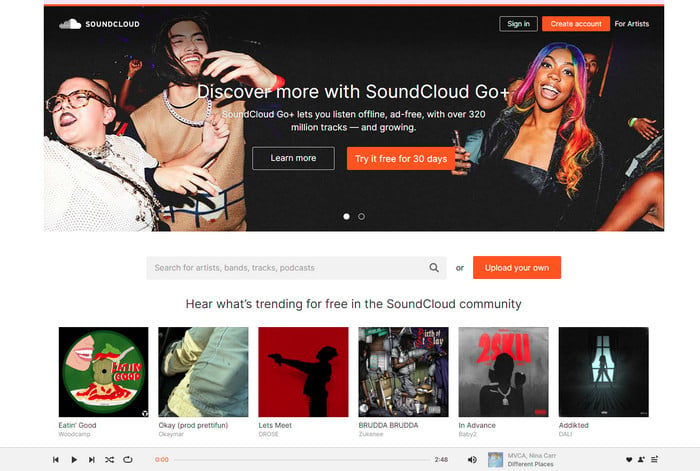
Best for: Discovering new artists and finding alternative versions of songs. Keep in mind: A “SoundCloud unblocked” search cannot guarantee access on a managed Chromebook. On the web, only tracks with a creator-enabled download option can be downloaded through SoundCloud, and sign-in is required.
2. Bandcamp — Best for Independent Albums
Bandcamp is useful when you want to explore independent artists and albums. Browse releases or search by genre. Artists decide how their releases are offered, so streaming, pricing, and download options differ.

Best for: Discovering music while supporting artists directly. Keep in mind: Not every album is free to download or stream without limits.
3. Jamendo Music — Best for Independent Music
Jamendo Music features independent artists and playlists. It is a useful option when you are looking for music to listen to online or exploring possible tracks for a project.

Best for: Discovering independent music. Keep in mind: Personal listening and project or commercial use can have different requirements; review the track's terms.
4. Free Music Archive — Best for Downloadable Tracks
Free Music Archive provides a collection of music from independent creators, including tracks available to download. Browse by genre or artist and check the license on the specific track before reusing it.

Best for: Finding music for listening or an eligible creative project. Keep in mind: A free download does not automatically allow commercial use, editing, or redistribution.
Radio, Archives, and Other Listening Platforms
5. Radio Garden — Best for Live Radio
Radio Garden lets listeners explore live radio stations around the world. Select a station for continuous listening rather than building an on-demand playlist.
Best for: Discovering international stations and background listening. Keep in mind: Live stations and their programming can change.
6. AccuRadio — Best for Genre Stations
AccuRadio offers online radio channels organized around genres and listening moods. Choose a station when you want music without picking every track yourself.

Best for: Background music during permitted study or work time. Keep in mind: It is primarily a streaming-radio experience.
7. Internet Archive Audio — Best for Audio Archives
The Internet Archive Audio collection includes recordings, live music, and spoken-word materials. It can be useful if your interests extend beyond current chart music.
Best for: Exploring historical recordings and niche collections. Keep in mind: Availability, download formats, and reuse rights vary by item.
8. Audiomack — Best for Emerging Artists
Audiomack offers music discovery across genres including hip-hop and R&B. Explore artists and playlists when looking for recent independent releases.

Best for: Finding emerging artists and playlists. Keep in mind: Playback and offline features depend on the track, device, and account.
9. Audius — Best for Independent Discovery
Audius is a music platform for artists and listeners, with tracks and playlists to explore in a browser.
Best for: Finding independent creators. Keep in mind: The availability of individual tracks and downloads depends on the creator and platform settings.
10. Freegal Music — Best for Library Members
Freegal Music is a music service offered through participating libraries. If your public library subscribes, check its access instructions and sign-in requirements.
Best for: Listeners who have access through a participating public library. Keep in mind: Catalog and usage rules depend on the library's offering.
11. Mixcloud — Best for DJ Mixes
Mixcloud specializes in long-form DJ sets, radio shows, and mixes. Start with a public show if you prefer listening without picking individual tracks.
Best for: Long listening sessions. Keep in mind: Free playback and features depend on the show and service plan.
12. SomaFM — Best for Ad-Free Background Radio
SomaFM is listener-supported, commercial-free internet radio with curated channels, including ambient and electronic music.
Best for: Background music during a study session. Keep in mind: Stations offer continuous programming rather than individual song selection.
13. NTS Radio — Best for Curated Shows
NTS Radio features live channels and archived specialist shows spanning a wide range of styles.
Best for: Exploring genres and DJ-led programs. Keep in mind: Content and playback options vary by show.
14. TuneIn — Best for Radio and Podcasts
TuneIn brings together radio stations and other audio programming in a browser and apps.
Best for: Live stations and talk audio. Keep in mind: Availability and features vary by location and plan.
15. Jango — Best for Artist-Based Radio
Jango offers artist-based radio stations for listeners who prefer continuous music rather than assembling a playlist.
Best for: Starting with an artist or genre. Keep in mind: Ads and catalog availability can vary.
16. LiveOne — Best for Curated Stations
LiveOne offers curated stations and other audio programming.
Best for: Exploring programmed music stations. Keep in mind: Free and paid features vary by market and device.
17. Hoopla — Best for Borrowing Albums
Hoopla offers digital content, including music, through participating libraries.
Best for: Listeners with a participating library card. Keep in mind: Borrow limits and available titles depend on the library.
How to Choose Music Websites Unblocked on Your Network
- For study music: Start with an approved radio station such as AccuRadio, or browse instrumental tracks on Jamendo.
- For individual songs and new artists: Explore SoundCloud, Bandcamp, Audiomack, or Audius.
- For files to use offline: Check Free Music Archive, your library service, or an individual artist's official download option.
- For a school project: Read the license on each track; check attribution and whether editing or public sharing is allowed.
- For a Chromebook: Start with an approved browser-based player. UniConverter's desktop workflow below is for Windows or Mac, not a claim of native ChromeOS support.
If a page loads but music will not play, first check volume, browser audio permissions, and whether another permitted site works. Access may also vary by region or network policy. If the site is blocked, ask the network administrator for an approved option.
How to Download and Convert Authorized Music for Offline Listening
Want to listen when your connection is unavailable? First check whether the music service offers a download or its own offline mode. A saved file and an app-only offline track are different: an app-only track usually stays inside that service.
| Your situation | What to do | Result |
|---|---|---|
| Artist enables a SoundCloud file download | Sign in on the website and use Download file when shown | Available individual original file |
| Service offers in-app offline listening | Use its official offline feature if available to your account | Playback inside the app under its terms |
| You have supported links you are permitted to save | Try UniConverter Downloader in Audio mode | File when the source and current product support it |
| You already have a local audio file | Use Converter to select a compatible format | A converted local copy |
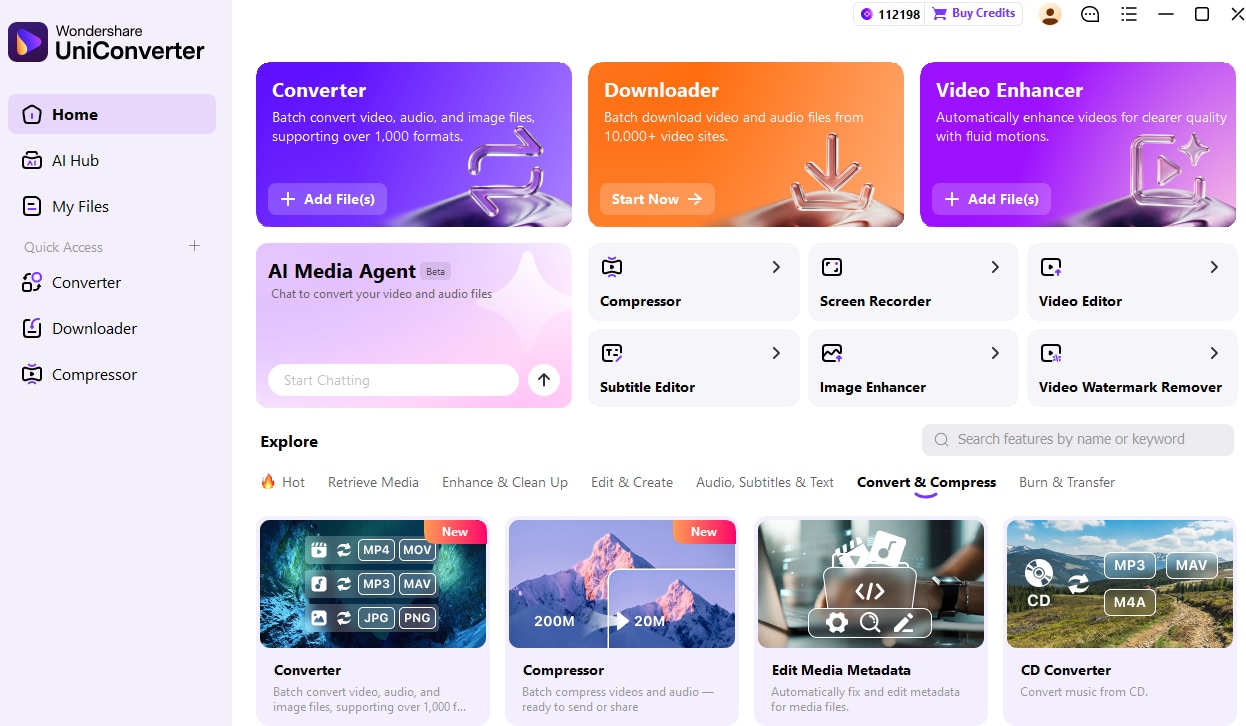
Wondershare UniConverter offers a desktop Downloader and Converter for Windows and Mac. Downloader's Audio mode accepts supported individual links; you can enter multiple eligible URLs with one link per line. Use it for media you own or have permission to save. The app cannot make a blocked site accessible, and not every site or link is supported.
- Save time on repeated tasks: enter more than one eligible link and review each result.
- Choose audio: the Downloader interface includes an Audio mode.
- Prepare existing files: use Converter to make a supported local copy for a compatible device.
Step 1. Check Your Music Source
Open the official track page and confirm you are allowed to save the audio. If there is an official download button, you can use it directly. For a SoundCloud track, check whether the uploader enabled downloads; an unavailable download button is not permission to bypass the restriction. Copy a complete individual URL only for a supported source you are allowed to save.
Step 2. Open Downloader and Select Audio
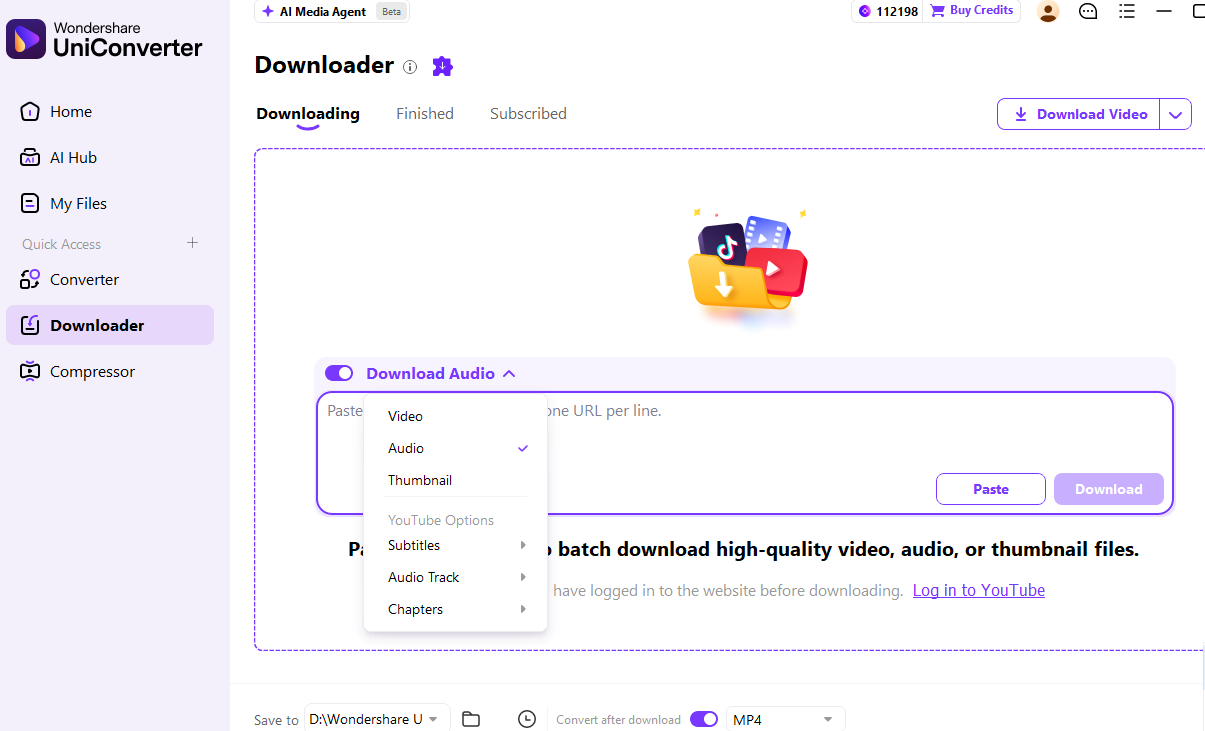
Launch UniConverter, select Downloader in the left sidebar, and choose Audio from the download-type menu.
Step 3. Paste Links and Download
Paste the authorized link into the URL box. To process multiple eligible links, put one URL on each line. Check your save location and available settings, then click Download. Processing depends on the source and the current product version.
Step 4. Check the Result and Convert if Needed
Open the saved folder and play each completed file. If an authorized file is not in the format your player supports, open Converter, add one or more compatible local files, and select an available audio output such as MP3. A higher bitrate will not restore detail missing from the source.
If a link fails: check the complete individual URL and whether the source offers an official download. Some links are unsupported, unavailable, or restricted; use the service's own authorized option when UniConverter cannot process them.
Explore UniConverter · Related guides: SoundCloud to MP3 options, batch audio conversion, and MP3 Juice alternatives.
How to Listen on a School Chromebook
A school Chromebook may have both device settings and network rules that differ from your personal phone. Start with a browser-based service approved by your school. If a page opens, try an available track and check whether Chrome has permission to play sound. If it is blocked or playback fails only on the managed device, ask your teacher or IT team which service is allowed.
For an authorized audio file you already have, check whether the school permits local files and whether its player supports the format. If permitted, prepare a compatible file on your Windows or Mac computer with UniConverter Converter, then transfer it using a method approved by your school. The desktop application itself is for Windows and Mac.
Why Is My Music Website Not Working?
Different symptoms need different checks. A page that does not load, a player that stays silent, and repeated buffering can have different causes; one symptom alone cannot prove which network rule is responsible.
| What you see | Possible cause | First step |
|---|---|---|
| Page does not open | Address, service outage, or network restriction | Check the URL and ask the administrator if blocked |
| Page opens but audio will not play | Muted tab, autoplay, account, region, or streaming connection | Check sound and try another available track |
| Plays on phone but not school laptop | Different network, browser, account, or device policy | Compare network and device settings where permitted |
| Audio starts then buffers | Connection congestion or service issue | Check connection and any available playback setting |
If a website opens but a track does not play, follow these checks in order:
- Check the device volume and whether the browser tab is muted.
- Try the play button on a different publicly available track on the same service.
- Read any message about sign-in, regional availability, or a track that has been removed.
- Try another approved website. If streaming is restricted on a managed device, ask the school or workplace administrator for an approved option.
FAQs About Unblocked Music Sites
-
Why does a music website work on my phone but not on my school laptop?
The phone and laptop may use different networks, browser settings, accounts, or device policies. Check whether both are on the same permitted network and whether the laptop displays a policy message. If a legitimate service appears blocked, ask school IT about approved alternatives.
-
Which unblocked music site is suitable for a long study session without ads?
SomaFM offers listener-supported, commercial-free radio, making it a useful option for continuous background listening where it is allowed. It is radio rather than an on-demand song catalog. Choose a channel that fits your study style and check your network and listening rules.
-
Which unblocked music sites should I try on a school Chromebook?
Start with a browser-based service your school permits. SoundCloud or Bandcamp may suit artist discovery, while Radio Garden is better for live stations and Free Music Archive for exploring downloadable tracks. Access depends on your school's network, account rules, and the specific page, so ask your school if a suitable site is blocked.
-
Why does a music site open but not play songs?
The cause may be muted browser audio, blocked autoplay, a network rule affecting streaming, account restrictions, or a track unavailable in your region. Check browser sound settings and compare playback with another permitted site. If the issue only occurs on a managed connection, ask its administrator to review it.
-
Can I download music from SoundCloud to listen offline?
Some tracks have a creator-enabled download button on SoundCloud's website after sign-in. Other tracks do not offer a downloadable file. SoundCloud also offers eligible in-app offline listening through its paid plans; this is different from obtaining an audio file for another player.
-
Which free music websites let me use songs in a school video?
Free Music Archive and Jamendo are starting points for discovering independent tracks, but permission is determined by the specific track's license. Check whether it permits adaptation and public sharing, whether attribution is required, and whether any commercial restriction applies before publishing.
-
Is an unblocked music downloader the same as a free music website?
No. A music website provides listening or tracks under its own terms; a downloader is a tool that may save content from supported sources. Neither a search result nor technical compatibility grants permission to save a track. Use an artist-enabled download where available and check the source's terms.
-
Can I use UniConverter to listen on a Chromebook?
UniConverter's Windows or Mac desktop Converter can prepare a compatible local file on a supported computer. You can then transfer the file using a method your Chromebook and school allow and play it with a compatible player. This does not install the desktop application on ChromeOS or change network restrictions.
The best unblocked music sites for your situation depend on what you want to hear and what your network permits. Start with the comparison, use official download options when available, and try UniConverter when authorized audio files need a different format for your device.