How to Compress a GIF for Discord
Choose Your GIF
Start with a local .gif file and check that it plays correctly. Use a compressor that supports animated GIF input and output; a static image exporter can lose the animation.
Set a Target and Compress
Identify the destination and choose the settings your GIF-capable tool provides. Start with a gentle reduction, then check whether the exported file fits the required size.
Preview, Download and Test
Save the .gif and watch the whole animation. Check size, edges, transparent areas and looping, then test it in the correct Discord uploader.
Discord GIF Size: Emoji, Stickers and Chat Are Different
A GIF that fits in a chat can still be much too large for an emoji. Choose the destination before reducing the file; dimensions, format and account permissions matter alongside bytes.
| Destination | Requirement to check | Practical approach |
|---|---|---|
| Animated emoji | Discord specifies under 256KB for custom emoji. | A 128 × 128 working canvas is a preparation choice. Keep the reaction readable at a small display size. |
| Custom sticker | Discord’s newer sticker guide lists 320 × 320 exactly, up to 512KB, and GIF or APNG for animation. | Prepare the required square canvas, then test format acceptance in the actual sticker uploader. |
| Chat attachment | The current attachments FAQ lists 20MB for free accounts, with experiments that may change allowances. | Check your account. A 10MB or smaller custom target can leave extra room. |
| Avatar, profile or server banner | Check that feature’s uploader, dimensions and account eligibility. | Do not reuse the emoji or sticker cap as a universal banner rule. Compression does not unlock animation access. |
Checked October 27, 2026: Discord emoji requirements, Discord sticker guide and File Attachments FAQ. The older sticker support FAQ lists APNG only for animation; use the newer guidance and confirm in your uploader. If it requires APNG, convert the animation rather than renaming its extension.
Make a GIF Smaller Without Losing the Reaction
| Control | When to try it | What to preview |
|---|---|---|
| Dimensions | A large animation will be viewed as a small reaction. | Small captions and facial expressions can become harder to read. Crop or pad a square canvas carefully instead of stretching the subject. |
| Colors | Try 128 colors, then 64 if needed. | Gradients, shadows and transparent edges may show banding or roughness. Use more colors if the file still fits. |
| Frame retention | Keep half or one in three frames when the source has more motion detail than needed. | Motion can become less smooth. Check frame delays as well as frame count so that the animation does not unintentionally speed up. |
| Duration | The full clip is too long for a tiny emoji budget. | Keep only the expressive moment in a GIF editor or return to the source video. Check whether your selected tool offers duration trimming. |
Keep your original. Re-encoding an already efficient GIF can make it larger; compare the original and exported file sizes. Reducing every setting to its minimum is rarely the best way to preserve a recognizable expression.
Starting from a Video? Create a Smaller GIF with UniConverter
When you still have the video or photos, choose the useful moment and output dimensions before creating the GIF. UniConverter Desktop’s GIF Maker is a source-to-GIF workflow, separate from optimizing an existing animated .gif.
1. Add the Source Video
In the Windows guide, open Tools > GIF Maker, choose Video to GIF and add your video.
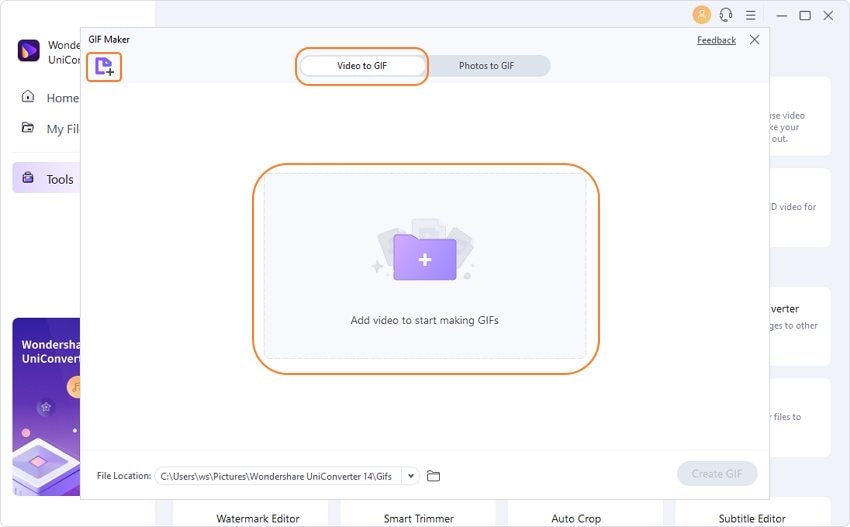
2. Keep the Useful Moment
Select the start and end of the reaction. A shorter source leaves more room for visual detail in a small file.

3. Set Size and Frame Rate
Choose output dimensions and frame rate, then create the GIF. Preview it and verify its actual size before uploading.
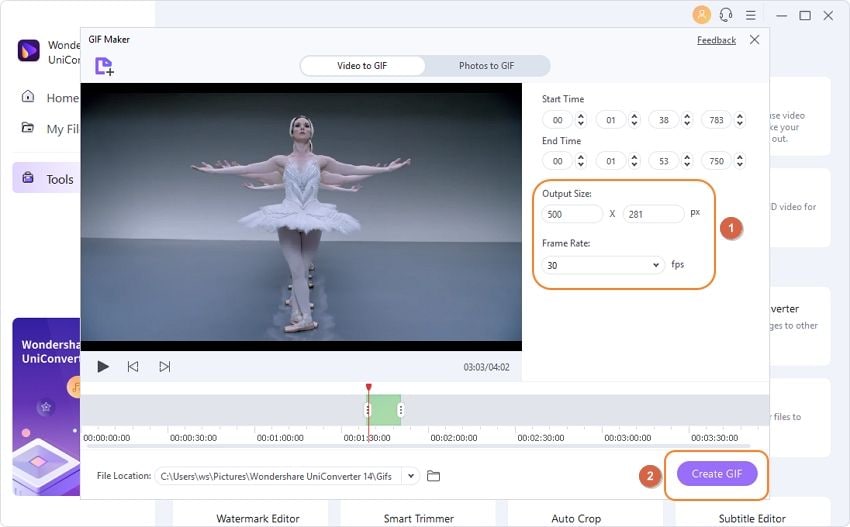
Official Windows guide screenshots; the layout can differ by version. See the GIF Maker guide. Desktop trial and paid features follow the product’s current terms.
Need broader creation methods? Read how to convert MP4 to GIF. For an existing GIF, return to the compressor above.
Which GIF Workflow Fits Your Discord Task?
| Method | Best fit | Boundary |
|---|---|---|
| Existing animated GIF | Use a dedicated animated-GIF optimizer, such as the option below. | Check that both the input and output stay animated; a static image compressor is a different workflow. |
| UniConverter Desktop GIF Maker | Create a new GIF from supported video or photos. | A different input workflow; not proof of direct animated-GIF recompression. |
| Ezgif optimizer | An existing GIF needing additional optimization methods. | Includes options such as lossy optimization, color reduction and frame removal; review each output. |
Choose an optimizer for an existing animation and a GIF maker for new source media. If your reaction can be shared as an ordinary video attachment, compress a video for Discord instead; an MP4 cannot replace a GIF in every emoji or sticker workflow.
GIF Still Too Large, Not Moving or Rejected?
| Problem | Next step |
|---|---|
| Still above the target | Try fewer colors or frames. For a chat GIF, reduce dimensions; for a sticker, keep its required canvas and shorten the animation in a separate editor if needed. |
| Looks static | Open the saved .gif locally. A static image export or an animation playback setting can change what you see. Check that the source actually has multiple frames. |
| Fits the size but fails to upload | Check destination-specific dimensions, format, permissions and account eligibility. Attach the downloaded output, not the original. |
| Jagged edges, trails or color changes | Use more colors and compare transparency against light and dark backgrounds. Try a dedicated optimizer if the source’s frame disposal renders differently. |
| Browser cannot finish | Try a shorter or lower-resolution source. Large animations consume much more memory when decoded than their file size suggests. |
Discord GIF Compressor FAQs
How do I compress a GIF for Discord emoji under 256KB?
Use a GIF-capable optimizer and prepare a small, readable animation. A 128 × 128 working canvas can be a practical starting point. Reduce dimensions, colors or frames as needed, then check that the actual file is under 256KB. Size alone does not guarantee upload acceptance.
Is this Discord GIF compressor free?
Free GIF optimizers are available, including Ezgif. Check the current input formats, size limits and output options in the tool you choose. UniConverter Desktop is a separate product with its own trial and paid features.
Can I compress a GIF to 512KB for a Discord sticker?
Prepare a 320 × 320 animation and export it below the required size, then check it in Discord’s sticker uploader. Size alone is not sufficient: format and server requirements also matter. If the uploader requires APNG, use an APNG export workflow; renaming .gif to .png does not convert it.
Is 10MB the Discord GIF size limit?
A 10MB target can be useful for a smaller chat attachment, but it is not a universal Discord limit. Check the dated requirements table and the limit shown in your account. Chat attachment allowances do not replace the much smaller custom emoji or sticker requirements.
Will compression keep my GIF animated and transparent?
A GIF-capable optimizer can retain animation, but a static image exporter can flatten it. Fewer colors may change edges and gradients, while dropping frames can make motion less smooth. Preview the entire downloaded animation, including its loop and transparent background, before using it.
Can I reduce GIF size without losing quality?
Some GIFs can be optimized with little visible change, but resizing, palette reduction and frame removal can discard detail. Keep the original and try gentle settings first. Already optimized animations may not become smaller; compare the exported size with the original.
Why will a small GIF still not upload or animate on Discord?
Check whether you are uploading an attachment, emoji, sticker, avatar or banner. Each destination has different requirements and permissions. Test the saved .gif locally, confirm the dimensions and format, then review animation playback settings and any account restrictions. A smaller file does not unlock paid profile features.
Can I compress GIFs for Discord on iPhone or Android?
Use a GIF-capable mobile browser tool or a dedicated GIF editor, then save the exported .gif to Files or Downloads and attach that file in Discord. Keep the page open during processing. If a long animation fails, use a shorter source or a desktop GIF editor.
Can UniConverter Desktop compress an existing animated GIF?
The verified GIF Maker workflow creates GIFs from videos or supported photos and offers clip selection, output size and frame-rate settings. It should not be treated as proof that Video Compressor or Image Converter can re-encode every existing animated GIF. Use a dedicated GIF optimizer for an existing .gif file.
How do I make a smaller Discord GIF from a video?
Use UniConverter Desktop’s GIF Maker to select a short video segment and adjust its output size and frame rate before creating the GIF. Preview the export and check its size. This creates a new GIF from source media; it is a different workflow from compressing an existing animation.
More Help with Discord GIFs
Discord is a trademark of Discord Inc. This tool is not affiliated with or endorsed by Discord.
Make Your Next GIF Easier to Share
Choose the destination, compress once, and check the animation before uploading.
Compress GIF for Discord