Watching offline in Russia
If the video has an official “Download” option and you only need offline playback, use the RUTUBE Android app. Check sign-in, location, creator settings, available storage, and the current quality limit.
Use Wondershare UniConverter to process supported RUTUBE video-page URLs when you own the content or have permission to save it and the method is permitted by the platform’s current terms. Review the options detected for the source, then manage the resulting local media on your Windows PC or Mac.
Important: RUTUBE’s current terms restrict copying content outside the functions it provides. Use a third-party downloader only where you have the necessary rights and the platform’s terms permit that method. Product compatibility depends on the source and current version.
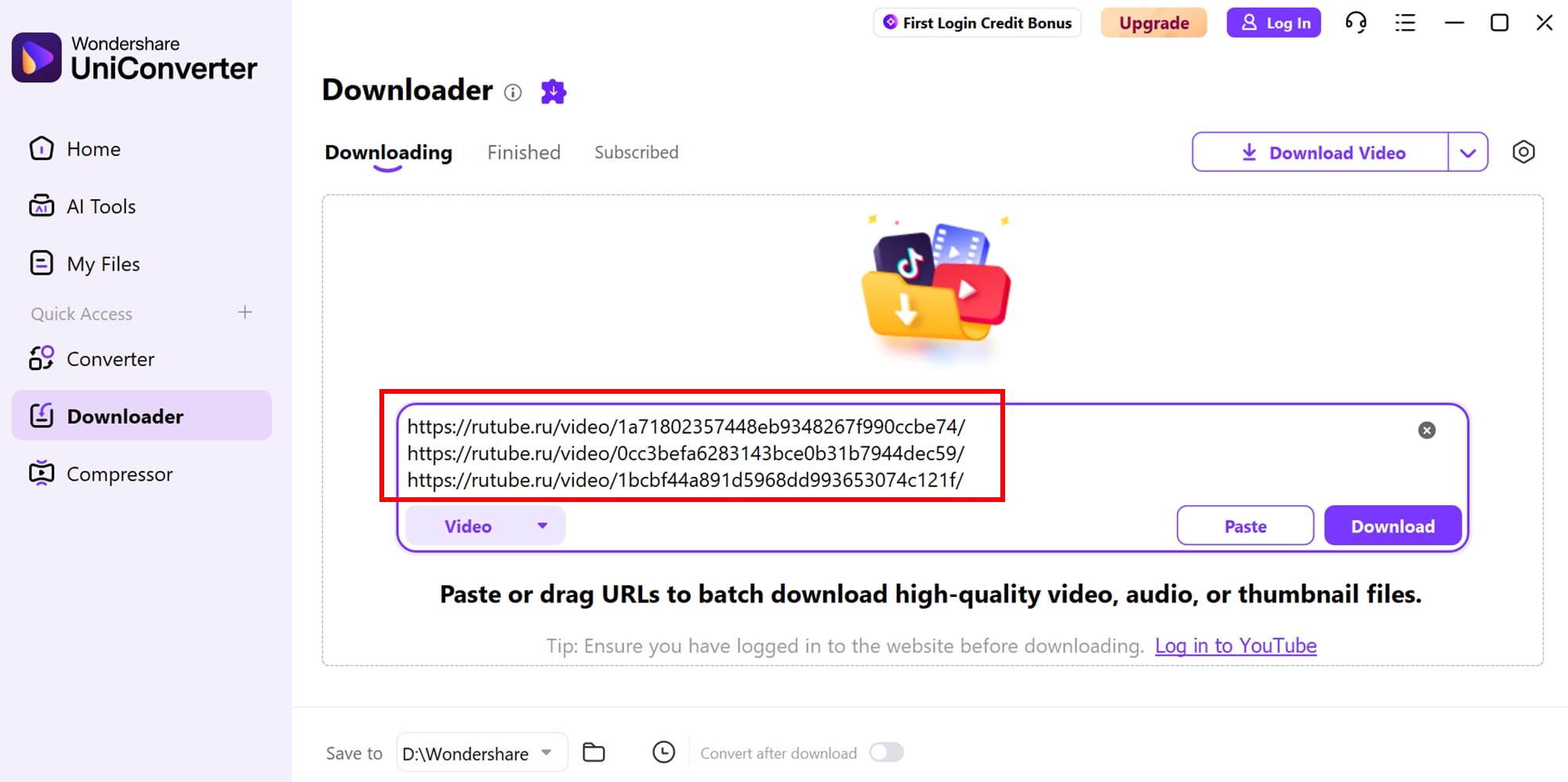
UniConverter interface image from the existing RUTUBE guide. Available options depend on the source and current product version.
These are different outcomes. RUTUBE’s official offline feature is designed for playback inside its Android app, while a portable video file is a separate file that can be managed on a computer.
| Question | RUTUBE official offline feature | Portable local file |
|---|---|---|
| Where it works | RUTUBE Android app for signed-in users located in Russia. RUTUBE says one video can be saved without a subscription; eligible subscriptions with “RUTUBE” in the name allow more. | On a computer or compatible device after an authorized file has been obtained. |
| What is saved | Offline content stored inside the RUTUBE app. | A normal media file, if the permitted export or download route provides one. |
| Quality and availability | RUTUBE currently lists up to 720p; videos up to six hours may be available if the creator has not disabled saving. Shorts are not supported by this feature. | Depends on the source file, rights, export method, and available download options. |
| Can it be opened in another editor? | No. RUTUBE says saved videos are not shown in the device gallery or other apps. | Yes, if the local file uses a format supported by the target editor. |
| Can it be sent as a video file? | RUTUBE says sharing an offline save sends a link, not the video file itself. | File sharing depends on your rights and the receiving service’s limits. |
RUTUBE’s FAQ says it does not provide a service for copying and downloading videos from its website and refers users to its User Agreement. Read the official FAQ, Offline Viewing guide, and User Agreement before using any third-party method.
Searches such as download from RUTUBE and RUTUBE video download can describe different tasks. Start with the rights and output you need, not just the tool.
If the video has an official “Download” option and you only need offline playback, use the RUTUBE Android app. Check sign-in, location, creator settings, available storage, and the current quality limit.
Start with RUTUBE Studio and the creator-side options available for your account. RUTUBE’s agreement describes a request-based, temporary download link for certain user-owned content; availability and conditions should be confirmed with RUTUBE.
If the rights holder has authorized you and the method is permitted by RUTUBE’s current terms, a supported desktop URL workflow may be suitable. UniConverter has been tested with supported public RUTUBE video-page URLs; this does not mean every URL or content type will work.
If you already have a file you are entitled to process, use UniConverter Converter to create a compatible MP4 or another supported output. Local conversion does not require re-fetching the original RUTUBE page.
Use this workflow only when you own the content or have permission to save it and the method is allowed by RUTUBE’s current terms. A public URL is not, by itself, proof of permission.
Use the page for one specific video, not a channel, search-results page, or an extracted temporary media address. Confirm that the video is available to you and that you are authorized to save it.
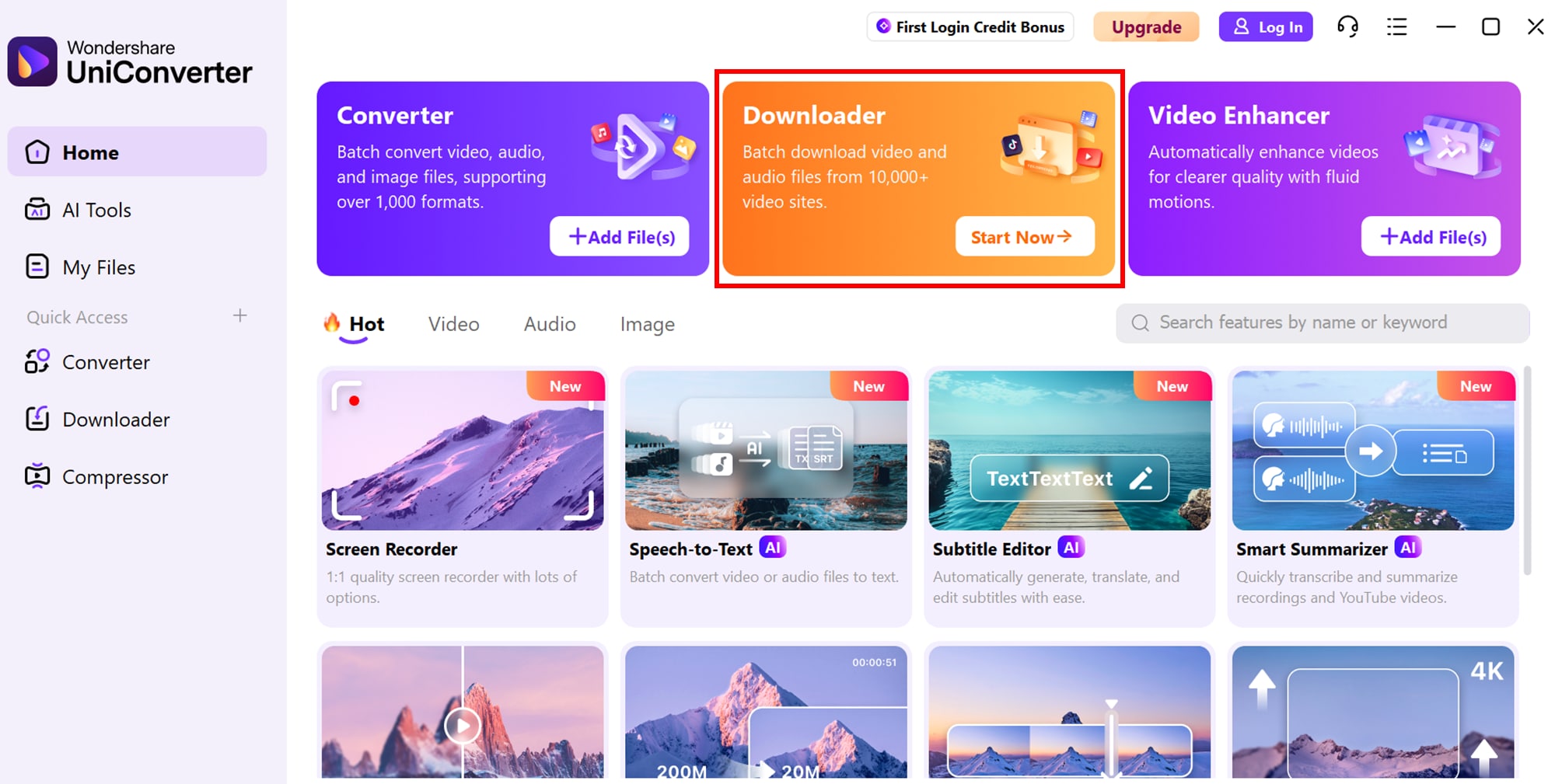
In UniConverter, open Downloader and add the individual RUTUBE video-page URL. The app must be able to recognize the source. If the URL is unsupported, do not attempt to bypass sign-in, regional, private, or other access controls.
If the URL is supported, check the available video or audio choices and the listed quality. Do not assume every RUTUBE video provides 1080p, 4K, MP3, or a particular container. Choose only an option the application actually displays.
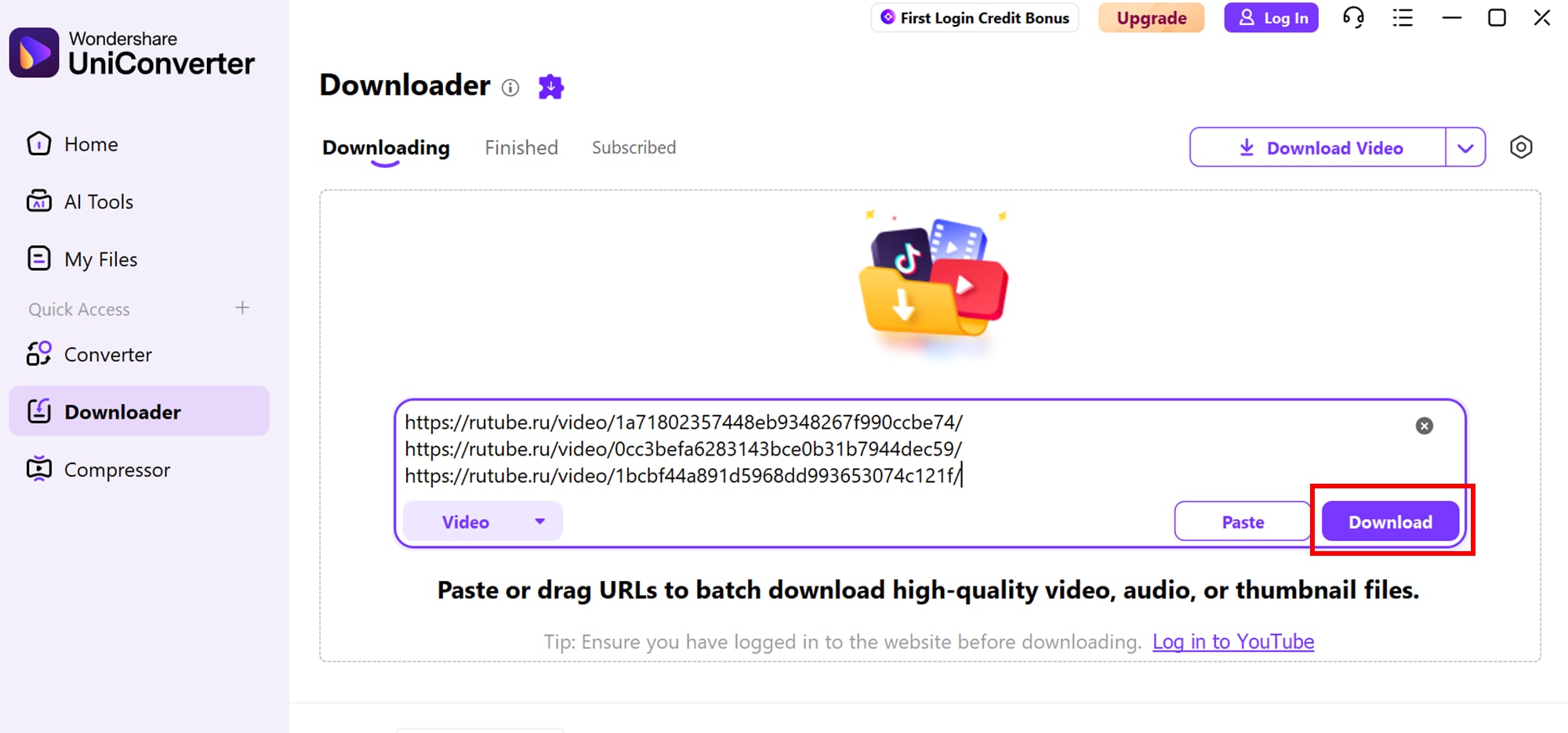
When the task completes, locate the saved file in UniConverter’s Finished list or the selected save folder. Play it and check the expected duration, picture, sound, and resolution before using it in another project.
If the app cannot process the URL, use an official RUTUBE route where available or ask the creator/rightsholder for an authorized copy.
Downloading and converting are separate tasks. If you already have a local video file that you are entitled to process, UniConverter Converter can convert supported inputs to MP4 or another available output format.
Open Converter and import the authorized video file from your computer. This is a local-file workflow; it does not fetch the video from RUTUBE.
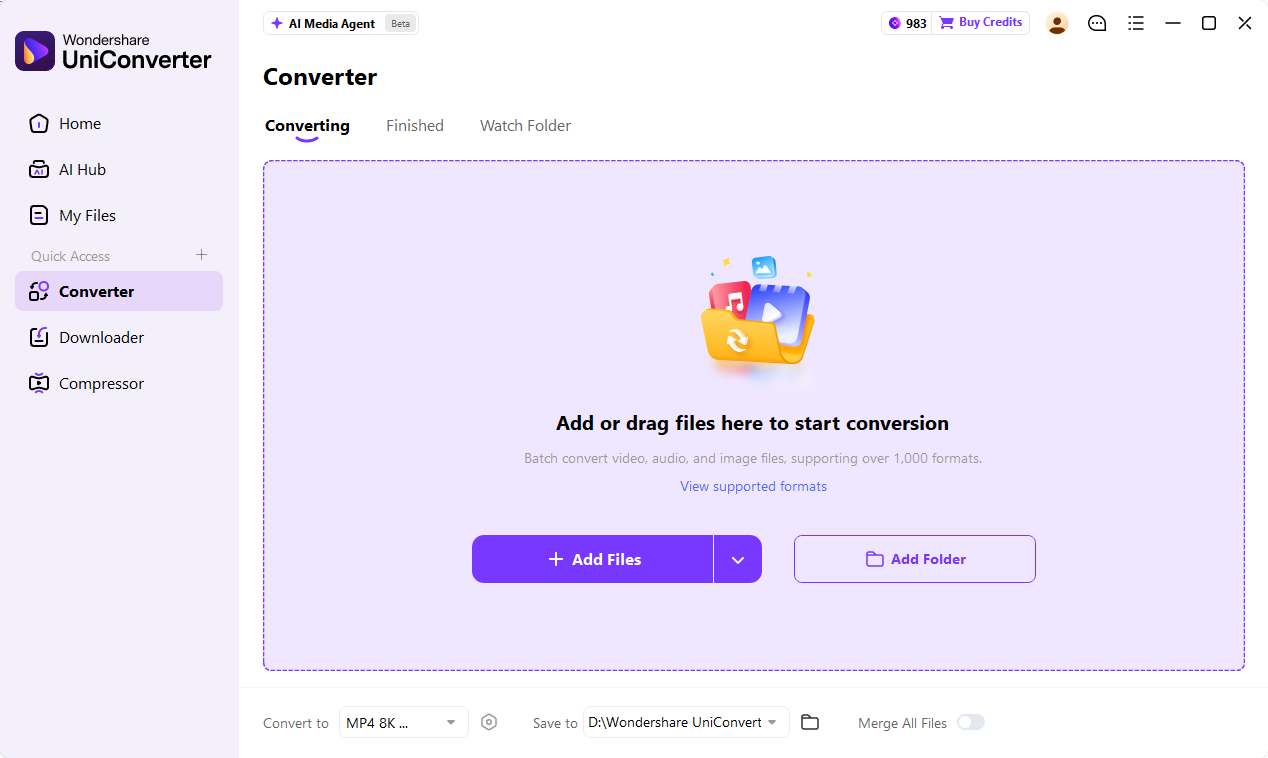
Open the output-format menu and select MP4 or another format supported by the current version. Choose a resolution that matches your playback or editing needs; upscaling does not restore detail missing from the source.
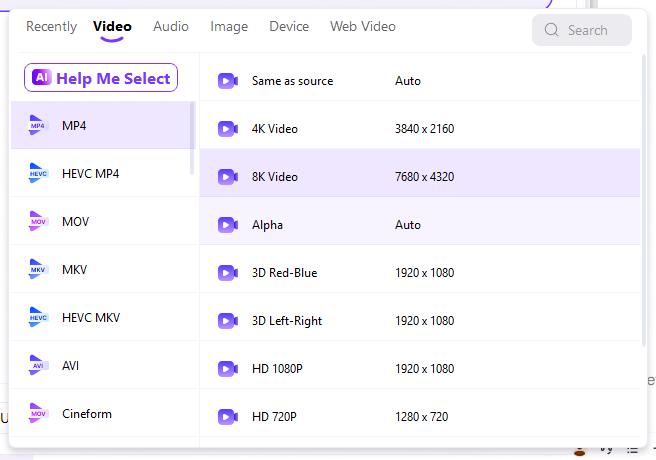
Changing a local file to MP4 does not grant permission to copy, publish, or redistribute the underlying RUTUBE content. Keep the creator’s rights and platform terms in mind at every stage.
Identify whether the issue is permission, platform availability, URL recognition, or local file compatibility before trying another method.
| What you see | Possible explanation | What to do |
|---|---|---|
| Official “Download” option is missing | The creator may have disabled offline saving, or the video/content type may not qualify for the official feature. | Check the RUTUBE Offline FAQ; do not bypass creator settings. |
| UniConverter does not recognize the URL | The source may be unsupported, unavailable, restricted, or the URL may not be an individual video page. | Check the original page and product compatibility. Use an authorized official route if the URL is not supported. |
| Only a lower resolution is available | The source may not offer a higher-resolution rendition, or the available download options may be limited. | Use only the quality options shown. Converting or upscaling cannot recreate original detail. |
| The saved file does not play correctly | The file may be incomplete, damaged, or incompatible with the target player. | Check playback and file properties. If you have a valid local file, convert it to a compatible format. |
| The video is private, paid, or region-restricted | Access is controlled by RUTUBE or the rights holder. | Do not bypass access controls. Request permission or use the platform’s permitted access options. |
Technical support, copyright ownership, and permission under platform terms are separate questions.
RUTUBE’s current public guidance: its FAQ says it does not provide a service for copying and downloading videos from its website and warns that copying videos may violate its User Agreement. The agreement also limits copying and other uses outside the functions provided by RUTUBE.
For your own uploads, start with RUTUBE Studio and RUTUBE’s official support or creator procedures. For someone else’s video, obtain the necessary rights and verify that the proposed saving method is permitted by the platform’s current terms. A creator’s permission alone should not be presented as automatic permission to bypass platform restrictions.
Sources: RUTUBE FAQ · RUTUBE General User Agreement · RUTUBE Video Upload FAQ.
Answers to questions about official offline viewing, portable files, URL support, conversion, and permissions.
RUTUBE’s public FAQ says it does not provide a service for copying and downloading videos from its website. Its separate offline-viewing feature is available in the Android app for eligible videos and users in Russia; those saves remain inside the app rather than becoming portable MP4 files. Check the official FAQ and offline guide for current details.
No. RUTUBE says offline videos are stored in the app and do not appear in the device gallery or other applications. Sharing an offline save sends a link, not the video file. If you need a portable file of your own content, check RUTUBE’s creator-side procedures or contact official support.
UniConverter has been tested with supported public RUTUBE video-page URLs. However, technical compatibility does not establish permission. RUTUBE’s current FAQ and User Agreement restrict copying outside the functions it provides. Use a third-party workflow only when you have the necessary rights and the method is permitted by the platform’s current terms. Do not use it to bypass private, paid, regional, or creator-imposed restrictions.
RUTUBE’s current offline-viewing FAQ lists 720p as the available resolution for its in-app download feature. This is a limit of that official offline feature, not a statement about every video stream or third-party workflow. Any permitted file export can only provide quality actually available from the source.
RUTUBE’s current Offline Viewing FAQ says Shorts cannot be saved through its official in-app offline feature. Do not assume that a third-party tool supports Shorts or that another route is permitted. Check the current platform rules and use only authorized options.
Start with RUTUBE Studio and the creator tools available for the account. RUTUBE’s User Agreement describes a request-based procedure that may provide a temporary download link for certain content belonging to the user. The availability and conditions are determined by RUTUBE, so check the current agreement or contact official support rather than assuming every upload can be exported instantly.
Yes, if you already have a local video file that UniConverter supports and you are authorized to process it. Add the file to Converter, choose MP4 from the available output formats, select a suitable resolution, and export. This local conversion workflow does not download the video from RUTUBE.
Do not assume that personal use automatically makes a copy permitted. RUTUBE’s FAQ says copying videos from its website may violate its User Agreement, and copyright rules can also vary by country and use. Check the current platform terms and obtain permission or use an official download/export option where available.
For a broader comparison of desktop, online, browser-extension, and mobile approaches, see our guide to different ways to download RUTUBE videos. This page focuses on the UniConverter desktop workflow and local file conversion.
Use Downloader only for supported URLs and permitted content. When you have an authorized local file, continue with format conversion and media management in the same desktop workspace.
RUTUBE is a third-party platform and is not affiliated with Wondershare. Compatibility and available options depend on the source and current product version.