UniConverter
UniConverter Online Free
Converter video, audio & image free
Free Try
UniConverter · BitChute Downloader

BitChute Downloader

If you are searching for a BitChute video download or want to know how to download from BitChute, start by checking the platform’s own option. Save videos you own or have permission to download. BitChute provides a built-in download option on eligible video pages; for a desktop workflow, UniConverter Downloader can also process supported public BitChute video-page URLs in the current version. Review the options shown for each source and manage completed files locally.

  • Check BitChute's own download icon first when it is available
  • Use UniConverter Downloader with supported public BitChute video-page URLs
  • Review the available output and locate completed files on your computer

BitChute URL compatibility and available formats depend on the source and current product support. Only download content you own or have permission to save. A tool's technical capability does not grant permission to copy or reuse a video.

Wondershare UniConverter workflow for saving an authorized BitChute video
UniConverter workflow shown in the existing BitChute guide. Available options depend on the current version and source.
Quick Answer
  • Open the individual BitChute video page and check whether the player shows its built-in download icon.
  • If you use UniConverter, open Downloader, paste the public video-page URL, and continue only if the current version recognizes the link and displays available options.
  • After saving an authorized video, check that the file plays through to the end and includes the expected audio. Downloading does not grant permission to republish or monetize someone else's content.
Understand the platform

Why BitChute downloads can behave differently

BitChute has used peer-to-peer delivery technologies, including WebTorrent, for parts of its video experience. In a peer-assisted system, playback may depend partly on other participants sharing data. This can help explain why some videos load slowly or stall, but it does not mean every BitChute video uses the same delivery path or that every download failure is caused by a lack of peers.

01

Peer availability can affect playback

When a video relies on peer-assisted delivery, fewer available peers or an unstable connection can affect how quickly data arrives. A page may load while the video itself buffers or fails to start.

Possible playback factor
02

A stalled player has more than one possible cause

Network conditions, browser behavior, video availability, source changes, and platform-side restrictions can all affect playback. Check the original page and the video's availability before assuming a downloader is at fault.

Diagnose before retrying
What you noticePossible explanationWhat to check
Player spins or buffersPeer availability, network instability, or a source-side issueReload the original page and test the connection.
Playback stops partway throughIncomplete transfer or interrupted playbackCheck the saved file's duration and size.
Video is no longer availableUploader removed it or changed its visibilityConfirm the page is still accessible.
Download option is missingPage or player may not expose the controlReview BitChute's current help guidance.
Official download option

What BitChute's download icon does

BitChute's support documentation describes a manual download route for videos that show the download icon: select the icon at the bottom-right of the player, open the resulting video window, then right-click and choose Save As. The option and browser behavior may vary by video and current site experience.

BitChute support illustration showing the download icon on the video player
BitChute's own illustration of the player download control. See the official BitChute download instructions.

Use the built-in option when it works for your task

For a single video with a visible download control, the platform's own method may be the simplest route. Follow the on-page instructions and check the saved file.

When a desktop media workflow is useful

If you are saving several files you are authorized to keep, or need to organize and convert local media afterward, a desktop application can make file management more convenient. UniConverter supports BitChute URLs only when they are recognized by the current Downloader version.

Troubleshooting

BitChute video won't load or download? Diagnose the symptom

A BitChute downloader online result may promise a quick fix, but first identify whether the issue is the source, the browser, the connection, or the file transfer.

Issue 1

The player keeps spinning

Check whether the video plays on the original BitChute page in another browser or network. Peer-assisted delivery can be sensitive to participant availability, but a page-side error or connection problem can look similar.

Issue 2

The video starts and then stalls

Try the official download control if it is available and permitted. If you use UniConverter, verify that the URL is supported and inspect the completed file rather than assuming a partial task is a successful download.

Issue 3

The saved file is unusually small or short

Compare the local file's duration with the original video. A very short file may indicate an interrupted or incomplete save. Retry only through a supported and authorized route.

Issue 4

The video has been removed or made unavailable

If the original page no longer provides the video, a downloader cannot recreate the missing source. Ask the creator for an authorized copy if you need it for a legitimate purpose.

Choose the right workflow

Four reasons people save BitChute videos

The best method depends on what you are trying to do and whether you have permission to keep a copy.

01

Back up your own channel

Creators may want local copies of their own uploads for backup and future editing. Keep original master files where possible, and use platform-provided export options when available.

02

Watch a permitted copy offline

If you have permission to save a video, a local file can be useful when traveling or working with an unreliable connection. Check the file before leaving the network.

03

Review a source for research

Researchers and editors may need a permitted local reference copy to review a clip, record timestamps, or check context. Follow the applicable copyright rules and cite the original source.

04

Prepare authorized footage for editing

If a creator has licensed a video for your project, saving a local copy can be the first step before trimming, converting, or importing it into an editor.

Desktop workflow

How to use UniConverter as a BitChute video downloader

Use UniConverter with an individual public BitChute video-page URL that you own or are authorized to save. URL compatibility and available output choices depend on the current product version and source.

Step 1

Open Downloader

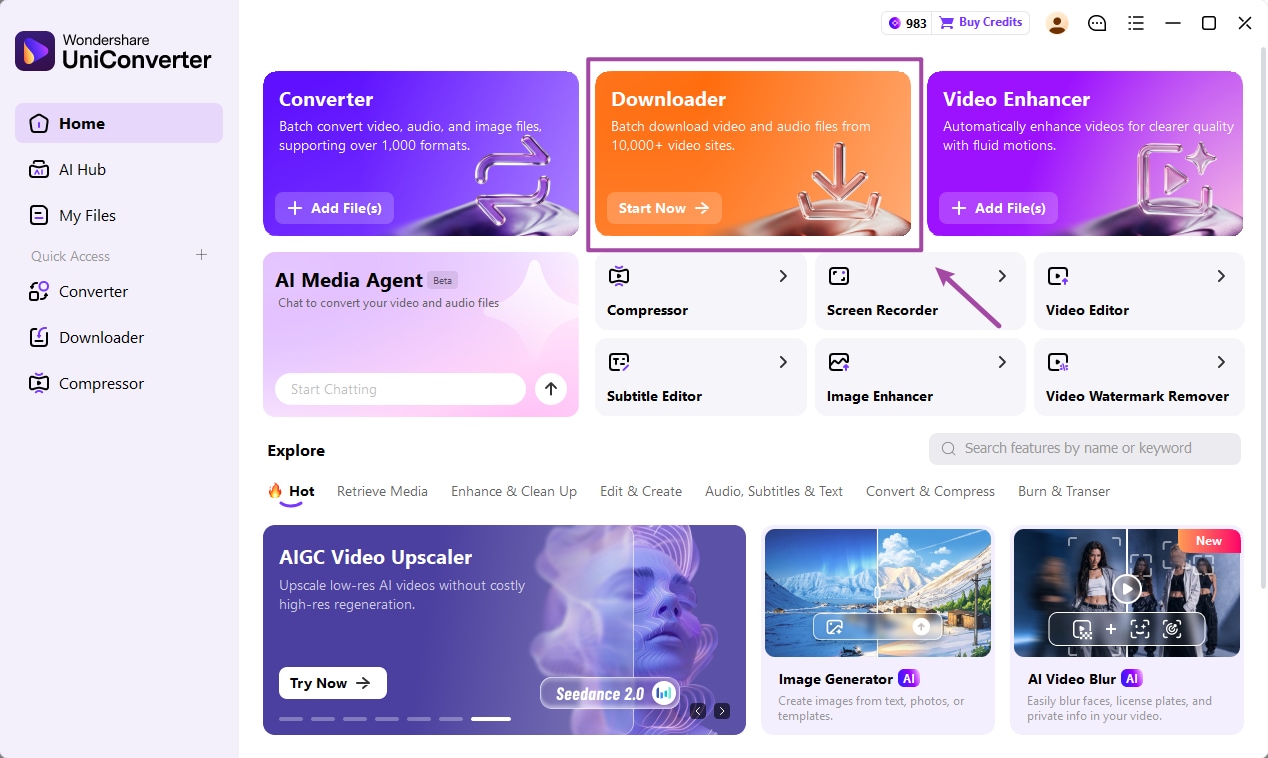
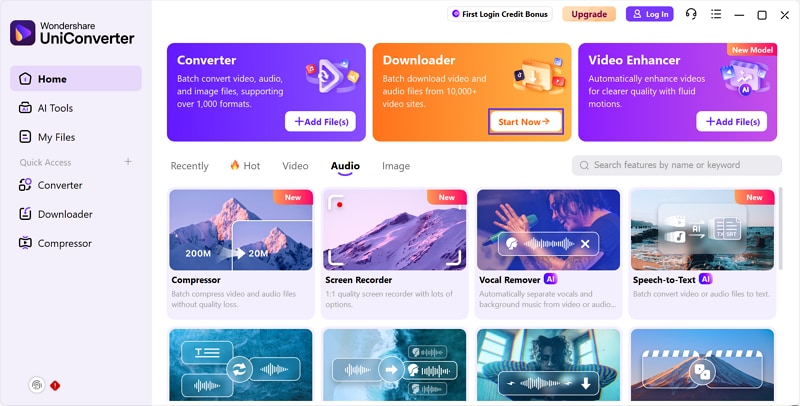
Launch Wondershare UniConverter on Windows or Mac and select Downloader from the main interface.

Wondershare UniConverter desktop home screen with Downloader selected
Step 2

Copy and paste the BitChute video URL

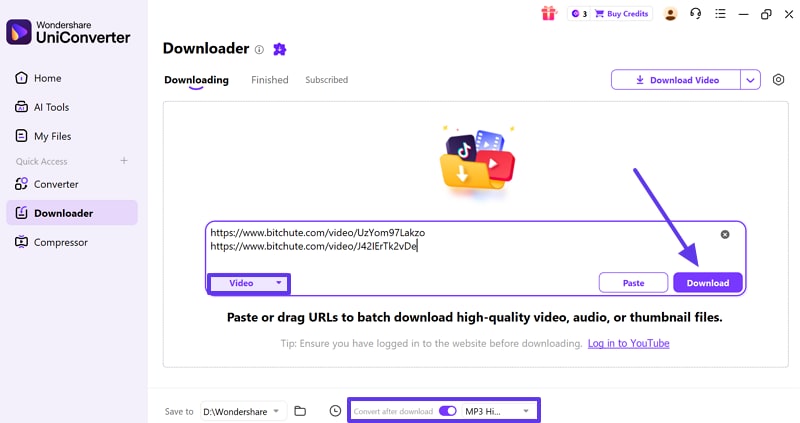
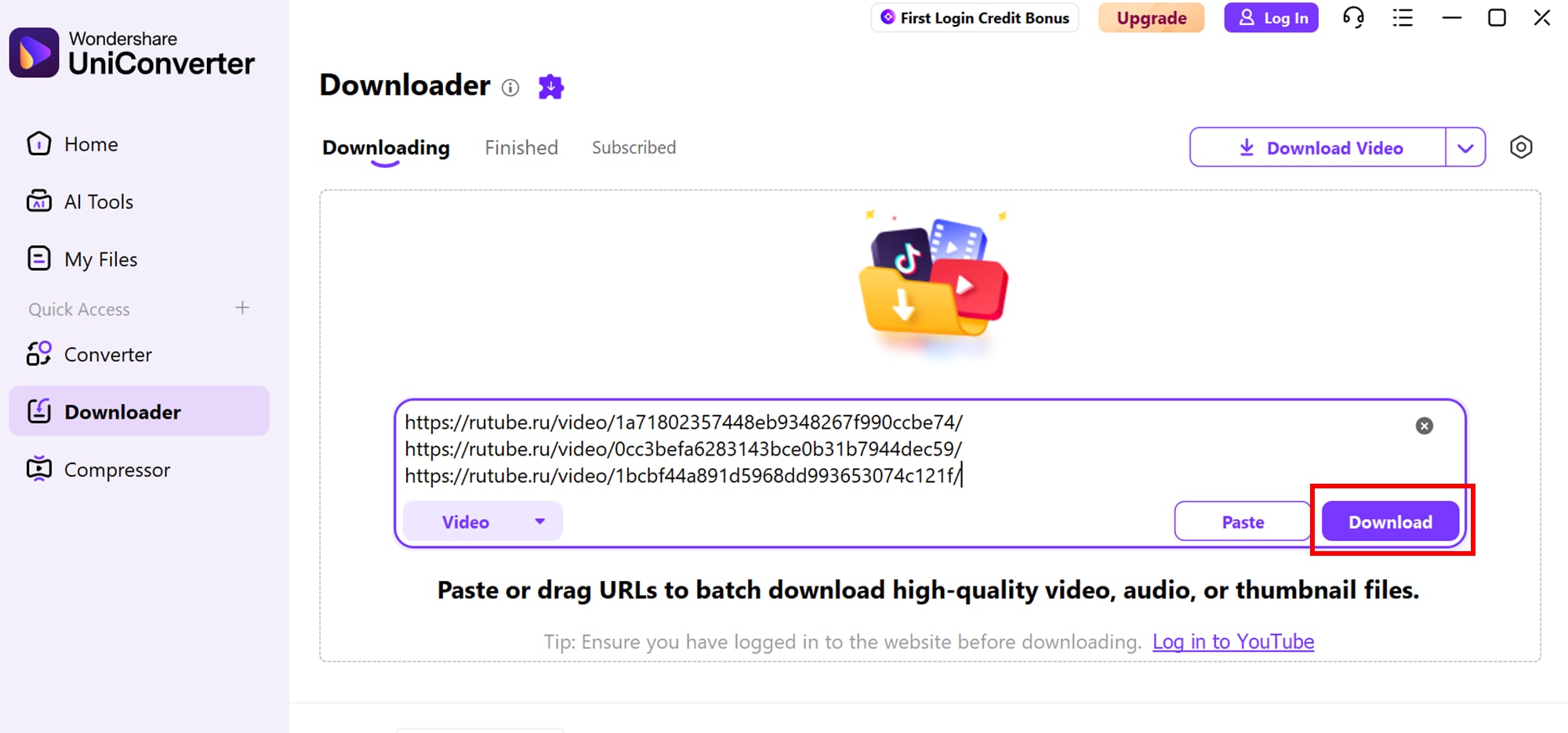
Open the individual BitChute video page, copy its address, and paste it into the Downloader URL field. Use a single video-page link rather than a channel or search-results page unless the current product explicitly supports that URL type.

Paste an individual supported video URL into UniConverter Downloader
Step 3

Review options and start the task

If UniConverter recognizes the URL, review the output options it actually displays. Do not assume every BitChute video provides HD, 1080p, 4K, or audio-only choices.

Review available download options in UniConverter Downloader
Step 4

Find the completed file

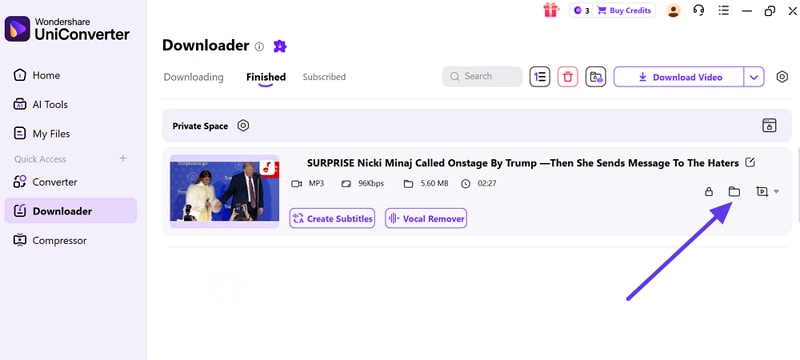
When the task finishes, open the Finished list and use the file-location control to find the saved media. Check its duration and playback before relying on it.

Locate a completed download in the UniConverter Finished list
Important product boundary

This workflow describes the tested public BitChute URL capability at a user level. It does not promise that UniConverter bypasses BitChute's peer-to-peer delivery, retrieves unseeded content, supports every URL, downloads entire channels, or exposes technical stream details.

Quality and output

BitChute video download quality: what to expect

Search results may advertise HD or 4K, but a downloader cannot create detail that is not present in the source. Check the actual quality available for the individual video rather than relying on a generic claim about the platform.

QuestionWhat to verifyPractical guidance
Is the video 480p?Check the resolution shown by the source or the saved file.Some BitChute content has historically been associated with 480p, but do not assume this applies to every current upload.
Can I get 1080p or 4K?Check whether the original video actually offers that rendition.Do not advertise an upscaled file as native 1080p or 4K.
Is the file complete?Compare duration, file size, and audio/video playback.A file that stops early may be incomplete even if it opens.
Can I convert it to MP4?Check the saved file's current format and whether Converter supports it.Use local conversion only after obtaining the file through an authorized route.
After saving an authorized file

Convert a saved BitChute video with UniConverter

Downloader and Converter solve different tasks. Downloader works with supported video-page URLs; Converter works with local media files that you can lawfully process.

Convert a local video to MP4

If the file you saved uses a format that your editor or playback device does not accept, add the local file to UniConverter Converter and choose a supported output format.

Extract audio from a local video

If you own the video or have permission to process it, use the local conversion workflow to create an available audio format. This is not the same as downloading audio directly from a BitChute URL.

Compare the options

BitChute official download vs. desktop and online tools

Choose a method based on availability, file-management needs, and permission to save the video.

MethodBest forLimitations to consider
BitChute download iconA single video when the official control is available.Manual browser save; availability and behavior can vary.
UniConverter DesktopSupported public video-page URLs and local media management.Installation required; compatibility depends on the current version and source.
Online downloaderA quick one-off attempt when a service supports the URL.May have ads, upload limits, privacy considerations, or inconsistent support.
Browser extensionConvenience inside a browser when a reputable extension supports the page.Review permissions, publisher reputation, and update history before installing.

For a broader tool-by-tool comparison, see our BitChute downloader comparison guide. This page focuses on the platform's download behavior and UniConverter's supported desktop workflow.

Rights and permissions

What to know before downloading BitChute videos

BitChute's help documentation says downloads are subject to copyright and intellectual-property law and advises users to obtain the creator's permission before downloading content for personal use. Always check the current platform guidance and the rights attached to the specific video.

Content you created

Keeping a local backup of your own uploads is a sensible media-management practice. Keep original source files when possible and use official account tools where available.

Content created by someone else

Obtain permission or confirm that the license allows the intended download and use. A personal copy does not automatically grant rights to edit, redistribute, publish, or monetize the video.

Read BitChute's download guidance and its Copyright Policy before saving or reusing content.

BitChute downloader FAQ

Questions a basic download guide may not answer

These answers explain the platform, common failure patterns, and the limits of a desktop downloader. Follow the linked official guidance for current platform rules.

Why won't a BitChute video play or download when the page loads fine?

The page and the video may use different delivery paths. BitChute has used peer-assisted delivery, including WebTorrent, for parts of its video experience, so peer availability or network conditions may affect playback. Other causes include browser issues, a removed video, or a source-side error. Check the original page and connection before retrying.

Visit BitChute Support.

Does BitChute have an official download button?

BitChute's support guide describes a download icon at the bottom-right of the video player. When it is available, click it to open the video, then right-click and choose Save As. Follow the current instructions on the individual video page.

Read the official download steps.

Why do some BitChute downloads appear limited to 480p?

Some BitChute videos and older technical reports are associated with 480p-class sources, but this should not be treated as a universal current limit for every upload. Check the actual source and saved-file properties. A converter can change dimensions, but upscaling does not restore detail that was never present.

Is a BitChute downloader safer than a browser extension?

Safety depends on the publisher, installation source, permissions, privacy practices, and update history—not simply whether a tool is a desktop app or extension. Download software only from its official website, review permissions, and avoid tools that request unnecessary account credentials.

Can I download a whole BitChute channel at once?

Do not assume that a channel URL is supported just because an individual video URL works. UniConverter's BitChute workflow should be used only with URL types recognized by the current version. For channel backups, prioritize your own original uploads and verify any batch capability in the app before promising it.

What happens to my saved file if the BitChute video is later removed?

A complete local file you were authorized to save may remain on your device after the online page changes, but keeping a copy does not grant ongoing rights to distribute or republish it. Store your own source files securely and preserve creator permissions or license records.

Is downloading BitChute videos legal?

There is no universal answer for every video, purpose, and jurisdiction. BitChute's own help guidance asks users to respect copyright and obtain the creator's permission before downloading. Check the video's license, creator permission, platform terms, and applicable law before saving or reusing it.

Review BitChute's Copyright Policy.

Why does BitChute's overall search interest fall while downloader searches rise?

Brand searches and task-specific searches measure different needs. A platform can see lower broad interest while a smaller group of users continues searching for a specific action such as saving a video. Your supplied keyword data shows a decline for the broad BitChute term and a recent increase for the downloader term; it does not by itself prove why the change happened.

Windows & Mac

Manage supported BitChute downloads with UniConverter

Try Downloader with an individual public BitChute video-page URL you own or are authorized to save. Then organize or convert the saved local file using supported media tools.

BitChute is a third-party platform and is not affiliated with Wondershare. URL compatibility depends on the current product version and source. Respect creator permissions and BitChute's terms.