UniConverter
AniEraser
Remove unwanted objects instantly.
Try Now
AniSmall
AniSmall - Video Convert & Resize
High-speed video & audio conversion
OPEN
Easy to Use Loader.to Alternative
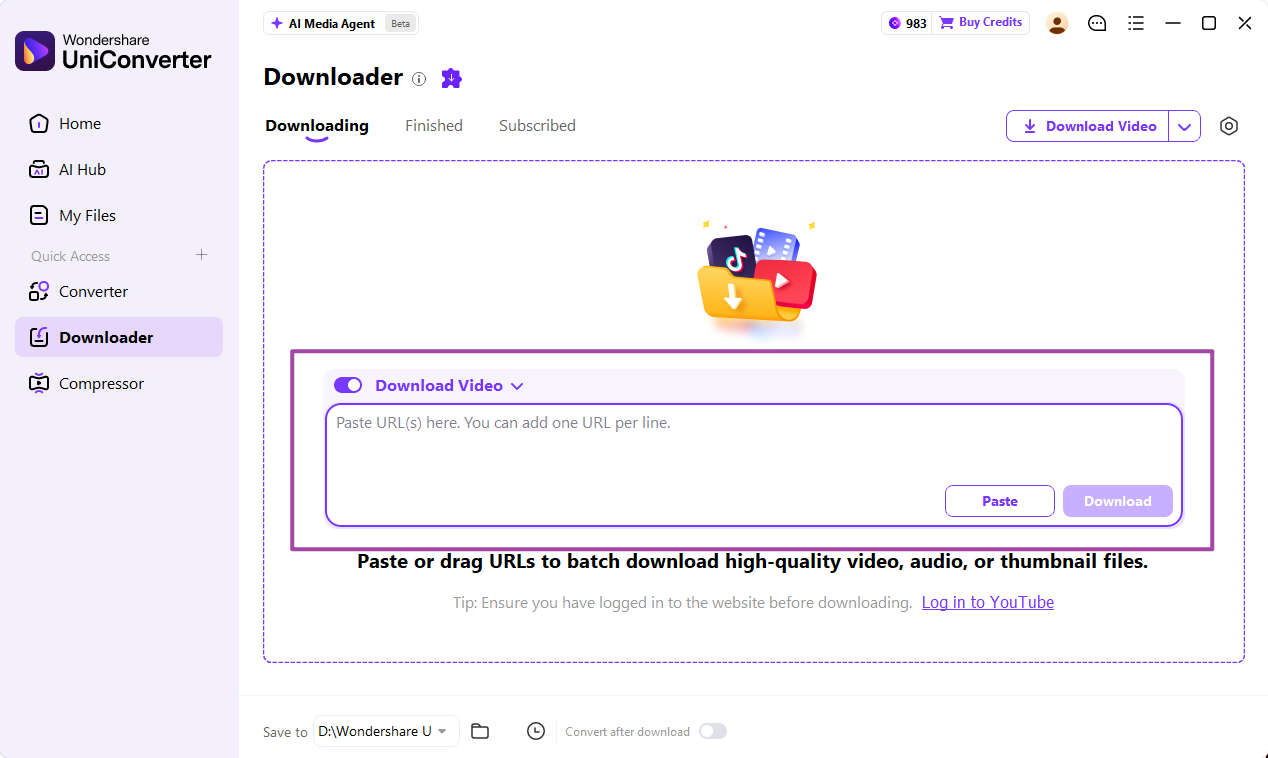
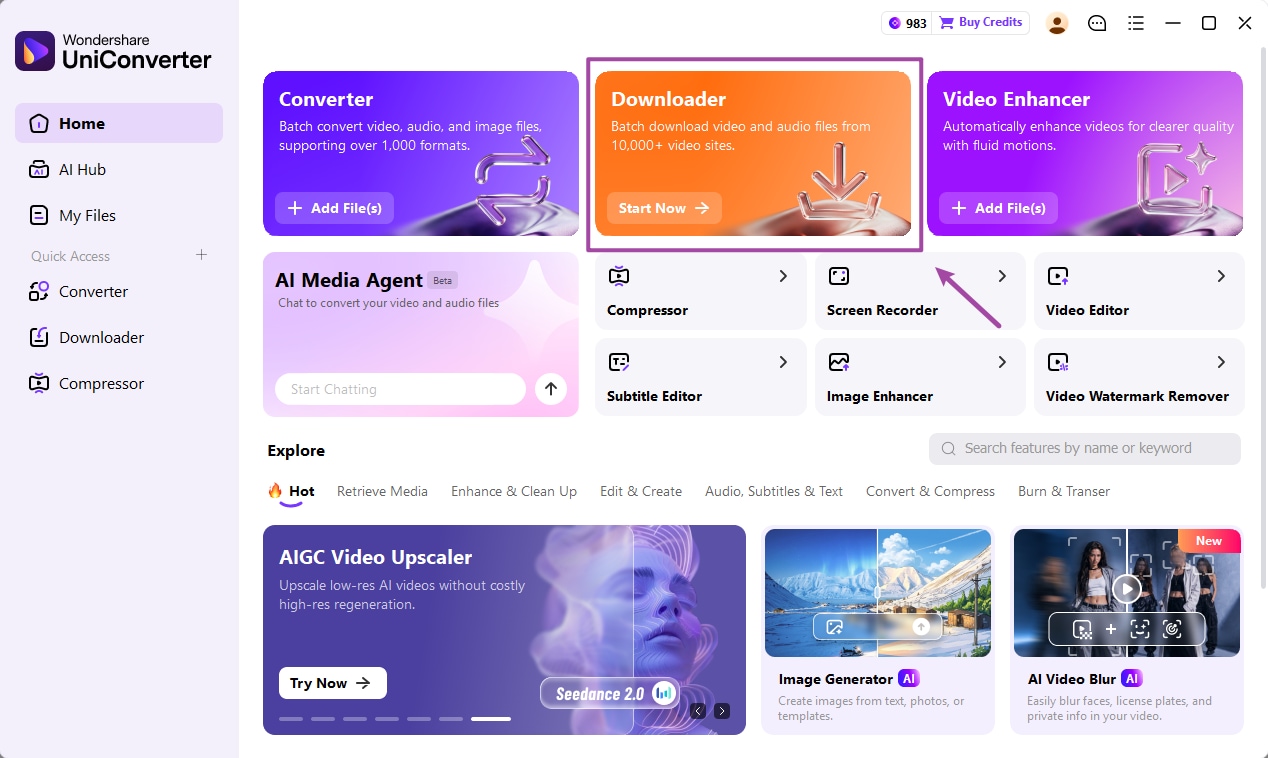
  • Download and install UniConverter.
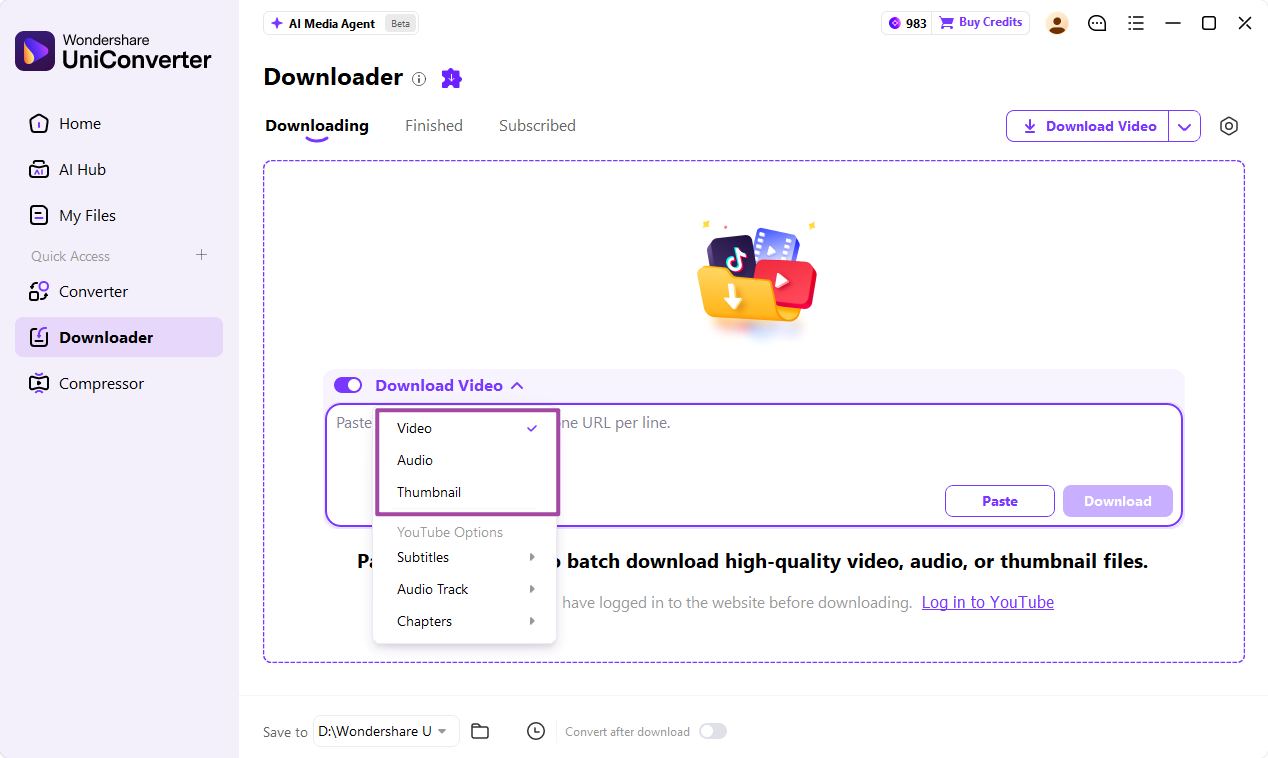
  • Paste your playlist URL.
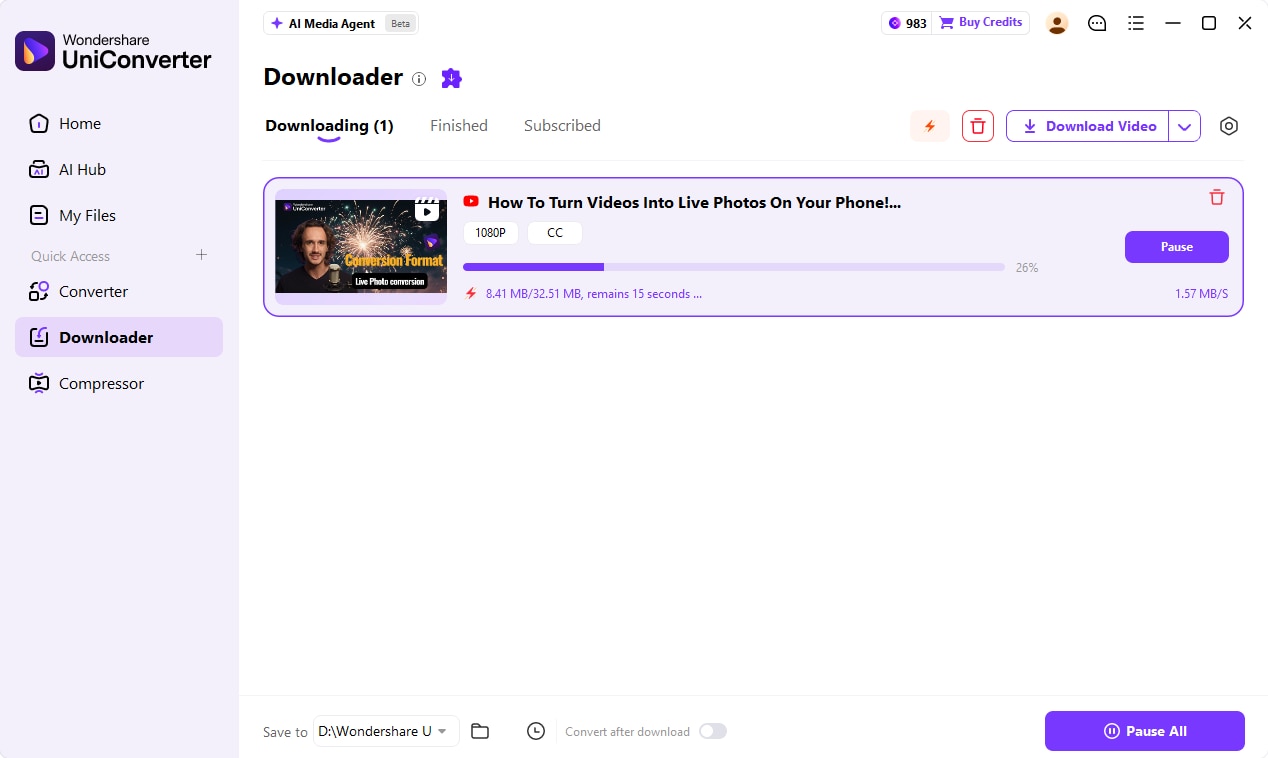
  • Wait for analysis export MP3 offline.
app store btn

(Disclaimer: Our tool is intended for personal use only. We are not liable for any consequences resulting from users' violation of any laws or infringement of others' rights.)

Top 10 Loader.to Alternatives for Hi-Fi Playlist to MP3 Download

Anjali Saxena
Anjali Saxena Originally published Nov 03, 25, updated Nov 12, 25

Have you ever tried downloading a playlist through Loader.to only to face slow speeds, sudden errors, or the tool going offline right when you need it most? You’re not alone—many users struggle with inconsistent performance, limited quality options, and security concerns that make the downloading experience frustrating.

This guide was created to solve those exact pain points by helping you find safer, faster, and more reliable alternatives for converting playlists into MP3. Whether you're tired of broken links, worried about privacy, or simply want a smooth, high-quality download process, this article will walk you through what to look for and present the top tools that actually work—without the headaches.

In this article
  1. Why Looking for a Loaderto Alternative?
  2. What to Look for in a Secure and Effective Alternative
  3. Top 10 Loaderto Alternatives for Secure MP3 Playlist Downloads
  4. Quick Comparison Table of Loader.to Alternatives?
  5. Important Disclaimer & Final Thoughts
  6. Conclusion
  7. FAQs

Part 1: Why Looking for a Loaderto Alternative?

Many users look for a Loader.to alternative because the platform often struggles with reliability, speed, and overall safety. Frequent errors, slow downloads, and security red flags push users to seek tools that are more stable and trustworthy. If you want a smoother, safer MP3 conversion experience, exploring alternatives becomes essential.

Is Loader.to Safe? Understanding the Risks

Before choosing Loader.to, it’s important to understand the safety concerns that come with free online downloaders. These risks can impact your privacy, device security, and even your legal safety while downloading content.

Malware & Adware

Many free downloaders bundle hidden software that triggers intrusive pop-ups or redirects you to unsafe sites. This can expose your device to viruses, unwanted programs, or harmful scripts.

Data Privacy Concerns

Loader.to’s unclear privacy practices make it difficult to know how your input data is stored or used. Without transparency, your information could be collected, shared, or mishandled without your knowledge.

Browser Security Warnings

If your browser labels the site as “not secure” or deceptive, it’s a strong signal of potential threats. Such warnings often indicate unsafe scripts, poor encryption, or risky third-party activity.

Uncertain Legality

Downloading copyrighted content remains legally ambiguous, especially through unregulated tools. Using unsafe platforms can increase the chances of receiving warnings or notices from your ISP.

Common Technical Issues with Loader.to

Even beyond safety concerns, many users face frequent technical problems that make the platform unreliable. These issues can interrupt your workflow, reduce audio quality, and slow down the entire downloading experience.

Inconsistent PerformanceLoader.to often displays “server busy” errors, especially during peak hours. At times, the tool may stop responding altogether, leaving users unable to download anything.

Poor Quality DownloadsDownloads may come out low-bitrate, distorted, or even corrupted. Incorrect metadata—like wrong song titles or artists—further reduces the overall listening experience.

Slow Download SpeedsThe platform frequently throttles download speeds, making even small files take unusually long. In many cases, this appears intentional to push users toward a supposed “premium” upgrade.

Part 2: What to Look for in a Secure and Effective Alternative

Before diving into the list of top alternatives, it’s important to understand what makes a downloader truly safe, reliable, and worth using. Setting these criteria helps you choose tools that protect your privacy, deliver high-quality results, and provide a frustration-free experience:

Safety First

A trustworthy downloader should have no bundled software, no hidden installers, and a secure HTTPS connection. Positive user reviews and a clean browsing environment are strong indicators of reliability. This ensures you’re downloading files without exposing your device to hidden risks.

Audio Quality Options

A good alternative should offer multiple bitrates such as 128kbps, 192kbps, or 320kbps for flexible listening quality. This helps you match the audio output with your device or preference. Higher bitrate options ensure your playlists sound crisp and professional.

Batch Downloading

Look for tools that support downloading entire playlists at once to save time. Batch features streamline the process and eliminate repetitive manual conversions. This is especially useful for long or frequently updated playlists.

Metadata & Tagging

High-quality tools automatically add accurate ID3 tags like artist name, album, and song title. Proper tagging keeps your music library organized and easy to navigate. It also improves compatibility across music apps and players.

Speed & Reliability

Choose platforms with fast, stable servers that don’t lag or crash during peak times. Consistent speed helps you download multiple songs quickly without disruptions. Reliable uptime ensures the tool works whenever you need it.

User Experience

A clean, intuitive interface with minimal ads makes the entire process smoother. Simple navigation reduces confusion and helps you convert playlists faster. A well-designed UI enhances both convenience and overall satisfaction.

Part 3: Top 10 Loaderto Alternatives for Secure MP3 Playlist Downloads

1. Wondershare UniConverter

Wondershare UniConverter is a powerful all-in-one media solution designed for users who want fast, secure, and high-quality playlist downloads without relying on risky online tools. It supports MP3 conversions from thousands of websites and maintains pristine audio quality with customizable bitrates. UniConverter also includes a built-in YouTube Chrome extension, allowing effortless one-click downloads directly from your browser. Its interface is clean, intuitive, and free from ads, making it ideal for beginners and professionals alike. Unlike many online converters, it ensures full data privacy and offers malware-free installation. With batch processing, metadata editing, and a library of advanced conversion tools, UniConverter delivers a premium, reliable experience. It's perfect for users who want speed, stability, and total control over their music downloads.

Wondershare Uniconverter
Pros
  • Converts entire playlists in fast batch mode.
  • Superior output quality with 320kbps MP3 support.
  • Offers advanced trimming, merging & metadata editing.
  • Comes with a YouTube Chrome extension for 1-click downloads.
  • Completely ad-free and secure.
Cons
  • Full features require a paid plan.
  • Can feel heavy for older computers.

Safety Review: 5/5

Starting Price: $39.99/year

Supported Devices: Windows, macOS

uniconverter video converter

Easy to Use Loader.to Alternative

Looking for a reliable and faster way to convert online videos?
UniConverter is the best Loader.to alternative—offering high-speed downloads, multiple formats, and stable performance without ads or risks.

2. 4KDownload.com

4K YouTube to MP3 is a trusted and lightweight desktop downloader designed for users who want simple, reliable, and clean playlist conversions. The tool is widely praised for its smooth performance, zero bloatware installation, and superb audio quality up to 320kbps. It supports playlist and channel downloads, letting you convert large collections with minimal effort. Its interface is extremely beginner-friendly—no ads, no misleading buttons, no hidden features. The tool is also known for stable servers, which makes conversions rapid and consistent. Perfect for users who value minimalism, speed, and clean software, 4K YouTube to MP3 remains one of the safest alternatives to online converters. It’s particularly convenient for long-term use thanks to its one-time license pricing.

4Kdownload.com
Pros
  • No ads or bundled software at all.
  • Supports playlists and channels easily.
  • Delivers high-bitrate MP3 up to 320kbps.
  • Works with multiple platforms like YouTube & SoundCloud.
  • Stable and fast performance.
Cons
  • Free version limits playlist size.
  • Interface is very simple.

Safety Review: 4.5/5

Starting Price: $15 one-time

Supported Devices: Windows, macOS, Linux

3. Any Video Converter

Any Video Converter (AVC) is a well-established tool known for its versatility, supporting hundreds of video and audio formats. It offers secure playlist downloading without ads, pop-ups, or risky redirects, making it a strong replacement for Loader.to. AVC’s conversion engine is optimized for speed while maintaining excellent audio quality, and users can customize bitrate, sample rate, and file size. The interface includes convenient editing features such as clipping, trimming, and basic enhancements, making it useful beyond just MP3 downloads. While slightly dated visually, the tool remains reliable, stable, and trusted by millions of users worldwide. Its ability to handle playlists and long videos makes it ideal for music collectors and power users who want full control.

Any Video Converter
Pros
  • Supports 100+ video platforms.
  • Customizable audio settings for perfect results.
  • Includes built-in editing features.
  • Clean, ad-free interface.
  • No registration needed.
Cons
  • Interface looks older.
  • Can slow down when converting huge playlists.

Safety Review: 4/5

Starting Price: Free / $49.95 Pro

Supported Devices: Windows, macOS

4. YTMP3.plus

YTMP3.plus is a lightweight, no-installation online converter designed for users who want quick MP3 downloads without dealing with ads or complex menus. It is known for its minimalistic interface and fast conversion speed, making it ideal for single tracks or smaller playlist tasks. Unlike many online converters, it avoids aggressive pop-ups, offering a safer browsing experience. Its servers convert videos quickly and allow users to select higher-quality MP3 outputs up to 320kbps. While it doesn’t offer advanced customization or batch downloading, it shines in speed, simplicity, and accessibility. This tool is perfect for users who want a clean, no-fuss downloader that works on any device instantly. Additionally, its straightforward layout makes it incredibly beginner-friendly, even for users unfamiliar with online converters.

YTMP3
Pros
  • Simple and clean interface.
  • Faster conversions compared to most online tools.
  • Supports 320kbps output.
  • Compatible with all browsers.
  • Completely free.
Cons
  • No batch playlist support.
  • Occasional downtime during peak hours.

Safety Review: 4/5

Starting Price: Free

Supported Devices: Any browser

5. SnapSave.io

SnapSave.io is a modern and reliable online downloader offering clean conversions from YouTube, Facebook, and other streaming sites. It’s known for its smooth, secure interface with HTTPS protection and minimal advertising, making it safer than most online tools. SnapSave’s servers are optimized for speed, ensuring rapid MP3 conversions, even for long videos. Although playlist functionality is limited, users appreciate its stability and mobile-friendly design. SnapSave.io delivers consistently high audio quality, providing options for HD video output as well. It’s an excellent tool for users who need a quick, secure download method without installing software. Its intuitive layout also makes it easy to navigate across different devices, ensuring a seamless user experience every time.

SnapSave
Pros
  • HTTPS-secured, privacy-friendly website.
  • Supports long videos and HD downloads.
  • Clean and minimal ads.
  • Fast conversion server.
  • Works smoothly on mobile.
Cons
  • Limited playlist bulk downloading.
  • Occasional slow loading time.

Safety Review: 4/5

Starting Price: Free

Supported Devices: Any browser

6. SaveFrom.net

SaveFrom.net is one of the oldest and most widely recognized online downloaders, offering MP3 and MP4 conversions through direct links and optional browser extensions. Its longevity and familiarity make it a go-to option for quick downloads, especially for users who prefer simple workflows. While the tool is fast and supports multiple platforms, it occasionally displays banner ads that may trigger browser warnings. Despite this, it remains popular for its convenience, ease of use, and broad site compatibility. SaveFrom is ideal for users who want a straightforward solution and don’t need advanced features like metadata editing or playlist batching. It also includes a handy “Quick Download” button that appears directly on supported video pages, saving users extra steps. For people who want reliable performance from a long-trusted tool, SaveFrom.net continues to deliver a fast and functional experience.

Savefromnet
Pros
  • Very quick link-based downloads.
  • Works with several streaming platforms.
  • Browser extension available.
  • Easy for beginners.
  • No hidden fees.
Cons
  • Sometimes flagged by browsers.
  • Audio quality varies.

Safety Review: 3.5/5

Starting Price: Free

Supported Devices: Any browser

7. Y2Mate.is

Y2Mate.is is a cleaned-up, ad-light version of the original Y2Mate, offering fast MP3 conversions with a smooth modern interface. It’s designed for users who want high-quality audio without navigating through pop-ups or confusing buttons. The platform supports 320kbps downloads, making it a strong choice for music lovers. Its fast server response and mobile-friendly interface make it accessible from any device. While it doesn’t support full playlist downloading, it excels at quick, reliable single-track conversions. Users choose it for its stability, speed, and clean experience compared to other online converters. It also supports multiple video platforms, giving users more flexibility when sourcing content. For anyone seeking a simple yet powerful MP3 converter, Y2Mate.is delivers a dependable and fuss-free experience.

Y2Mate
Pros
  • High-quality MP3 up to 320kbps.
  • Works well on both mobile and desktop.
  • No registration needed.
  • Simple, modern interface.
  • Reliable uptime.
Cons
  • No playlist batch support.
  • Small banner ads.

Safety Review: 4/5

Starting Price: Free

Supported Devices: Any browser

8. MP3Juices

MP3Juices is a long-standing MP3 conversion tool that also includes a built-in audio search engine, making it easy to find and download tracks quickly. It’s especially popular for its extremely straightforward one-click interface and lightweight design. Users appreciate its quick results and compatibility across all devices. While the tool sometimes produces redirects, it remains a go-to platform for fast MP3 extraction without installation. MP3Juices focuses on simplicity over features, offering a smooth experience for casual downloaders who want instant conversions without technical steps. Its cloud-based system ensures fast processing even when searching for less common tracks. Despite being minimalist, it continues to attract millions of users who value convenience and speed over advanced customization.

MP3Juices
Pros
  • One-click MP3 download process.
  • No sign-up required.
  • Built-in music search functionality.
  • Very fast processing.
  • Mobile optimized.
Cons
  • Occasional redirects.
  • Bitrate options may be limited.

Safety Review: 3.5/5

Starting Price: Free

Supported Devices: Any browser

9. YT1s.ltd

YT1s.ltd is a clean, secure, and reliable MP3 converter offering high-quality audio downloads without excessive advertising. Its fast server speeds make it perfect for users who want instant conversions without waiting. The minimalist interface keeps things simple, making it a great choice even for non-tech-savvy users. With support for multiple audio and video formats, it offers the flexibility needed for different types of content. HTTPS encryption adds a strong layer of protection, reducing the risk of phishing or malicious redirects. Although it only allows single-video conversions, its strong reputation for smooth performance makes it stand out. It also consistently removes unnecessary clutter and pop-ups, ensuring a distraction-free experience. If you need a straightforward, safe, and reliable downloader, YT1s.ltd remains one of the most dependable options available.

Yt1s
Pros
  • High-quality MP3 with fast processing.
  • Very few ads.
  • Safe, HTTPS-secured site.
  • Works on any device.
  • No login required.
Cons
  • No playlist downloading.
  • Occasional conversion failures.

Safety Review: 4/5

Starting Price: Free

Supported Devices: Any browser

10. X2Download.com

X2Download is a feature-rich online downloader supporting YouTube, TikTok, and other major platforms. Its playlist support makes it stand out from many competitors, providing faster access to multiple MP3 files at once. The website interface is clean, intuitive, and lightweight, making it suitable for both mobile and desktop users. Its server speeds are generally fast, offering smooth conversions even for longer videos. While occasional pop-up ads may appear, the tool remains much cleaner than most free online converters. It's an excellent option for users who want playlist compatibility without installing software. Additionally, its broad format selection ensures you can convert videos to MP3, MP4, and other common outputs with ease. For users seeking simplicity, speed, and flexibility, X2Download delivers a solid and dependable experience.

X2download
Pros
  • Supports playlists and batch downloads.
  • Clean and simple interface.
  • Supports multiple platforms.
  • Compatible with all browsers.
  • Fast and stable processing.
Cons
  • Limited customization options.
  • Occasional pop-up ads.

Safety Review: 4/5Starting Price: FreeSupported Devices: Any browser

uniconverter video converter

Easy to Use Loader.to Alternative

Tired of slow or unstable video converters?
Switch to UniConverter—the all-in-one Loader.to alternative for fast, safe, and flexible video downloads.

Part 4: Quick Comparison Table of Loader.to Alternatives?

Tools Name Supported Formats Unique Edge Best For
Wondershare UniConverter MP3, MP4, WAV, MOV, AVI + 1,000+ formats Desktop full-suite + YouTube Chrome extension Users wanting high-quality, secure batch & playlist conversions
4KDownload.com MP3, M4A, OGG Lightweight, supports playlists/channels Simple, reliable playlist downloads on desktop
Any Video Converter MP3 + supports 100+ video/audio formats Versatile converter with editing tools Power users who convert & edit playlists
YTMP3.plus MP3, MP4 No-install, minimal UI, fast conversions Beginners or users wanting instant browser downloads
SnapSave.io MP3, MP4 (HD video output) HTTPS secured, mobile-friendly interface Users wanting secure online downloads without software
SaveFrom.net MP3, MP4 Long-established link/download tool Users valuing familiarity and simple workflows
Y2Mate.is MP3, MP4 Clean, ad-light interface, supports 320kbps Users needing high-quality single-track conversions online
MP3Juices MP3 Built-in music search + one-click download Casual users wanting quick, easy downloads
YT1s.ltd MP3, MP4 Secure, clean UI, good for single conversions Users prioritizing safety & simplicity for individual tracks
X2Download.com MP3, MP4 + playlist support Online tool that supports playlists + batch downloads Users wanting playlist compatibility in a browser without software

Part 5: Important Disclaimer & Final Thoughts

“Please be aware that downloading copyrighted content for personal use often exists in a legal gray area. It is your responsibility to ensure you comply with your local laws and the terms of service of the platforms you use. We advocate for supporting artists whenever possible through official channels like Spotify, Apple Music, or Bandcamp.”

Using online converters can be helpful for quick, on-the-go access, but always prioritize ethical consumption and respect for creators’ rights. Free tools are convenient, but they should not replace officially licensed platforms that support the artists behind the music. By downloading responsibly, you ensure a safer browsing experience while also contributing to a more sustainable creative ecosystem.

Conclusion

Choosing the right MP3 downloader depends on your priorities—speed, simplicity, audio quality, or multi-platform compatibility. While online converters offer quick, no-installation solutions, they often come with limitations like ads, slower processing, or fewer customization options. For users who want a more reliable, secure, and feature-rich experience, Wondershare UniConverter stands out as a powerful alternative, offering high-speed downloads, batch processing, video editing, and full-format support. Ultimately, whether you prefer online tools or a dedicated software solution, the goal is to download responsibly, safely, and in a way that supports creators whenever possible.

FAQ

  • 1. Is there a difference between browser-based MP3 converters and desktop software?
    Yes. Browser-based converters are convenient for quick downloads but may have limitations in stability, file size, and processing speed. Desktop software usually offers faster conversions, batch downloading, and more advanced features because it uses your system’s full processing power.
  • 2. Do MP3 converters work with private or age-restricted YouTube videos?
    Most online converters cannot access private, unlisted, or age-restricted videos because they require login authentication. Only certain desktop tools or browser plugins with sign-in capability can handle such cases.
  • 3. Why does audio quality vary between different MP3 downloaders?
    Quality differences occur because each converter uses different transcoding methods. Some extract the audio directly at source quality, while others re-compress the file, which can reduce clarity, bass depth, and overall fidelity.
  • 4. Are there limits to how many songs I can convert in a day?
    Many online tools impose hidden limits to reduce server load. After multiple downloads, you may notice slower speeds, temporary cooldowns, or blocked access. Premium or desktop tools typically remove these restrictions.
  • 5. Can I convert videos longer than two hours?
    Some converters struggle with long-form content like podcasts or documentaries due to server timeouts. Tools like can handle longer files more reliably because they process everything locally on your device.
Anjali Saxena
Anjali Saxena Nov 12, 25
Share article:
modal-leave-download modal-leave-download