UniConverter
UniConverter Online Free
Converter video, audio & image free
Free Try
Top Video Downloader & Converter
3 Steps to save videos from links in high quality
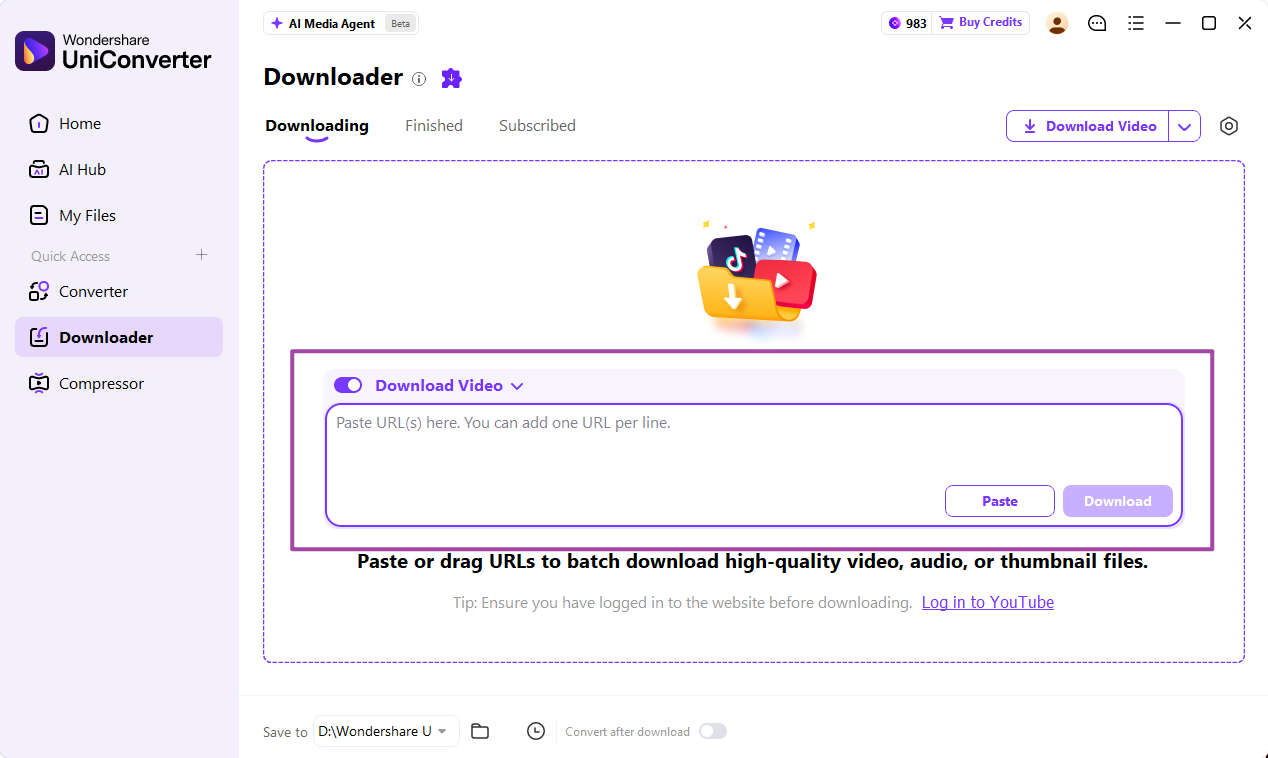
  • Step 1: Copy and paste the urls to Uniconverter Downloader
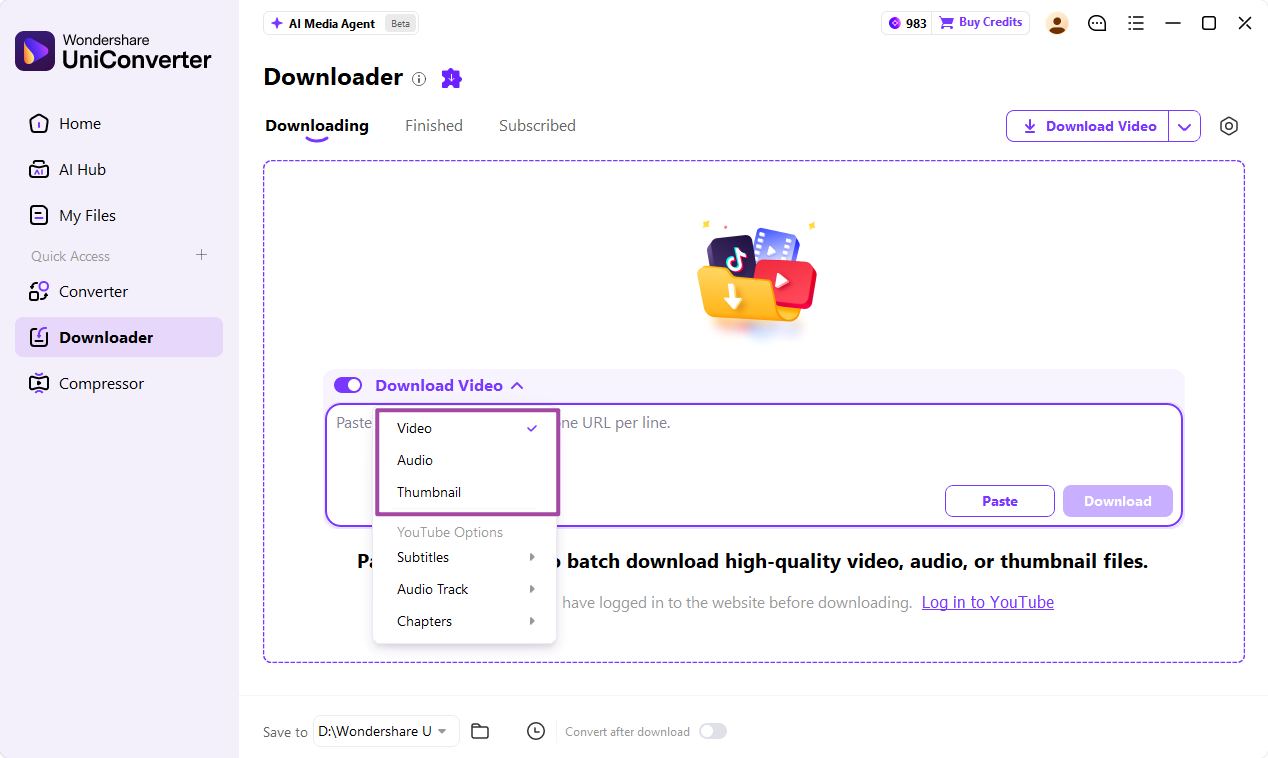
  • Step 2: Choose MP4 or other formats and customize settings
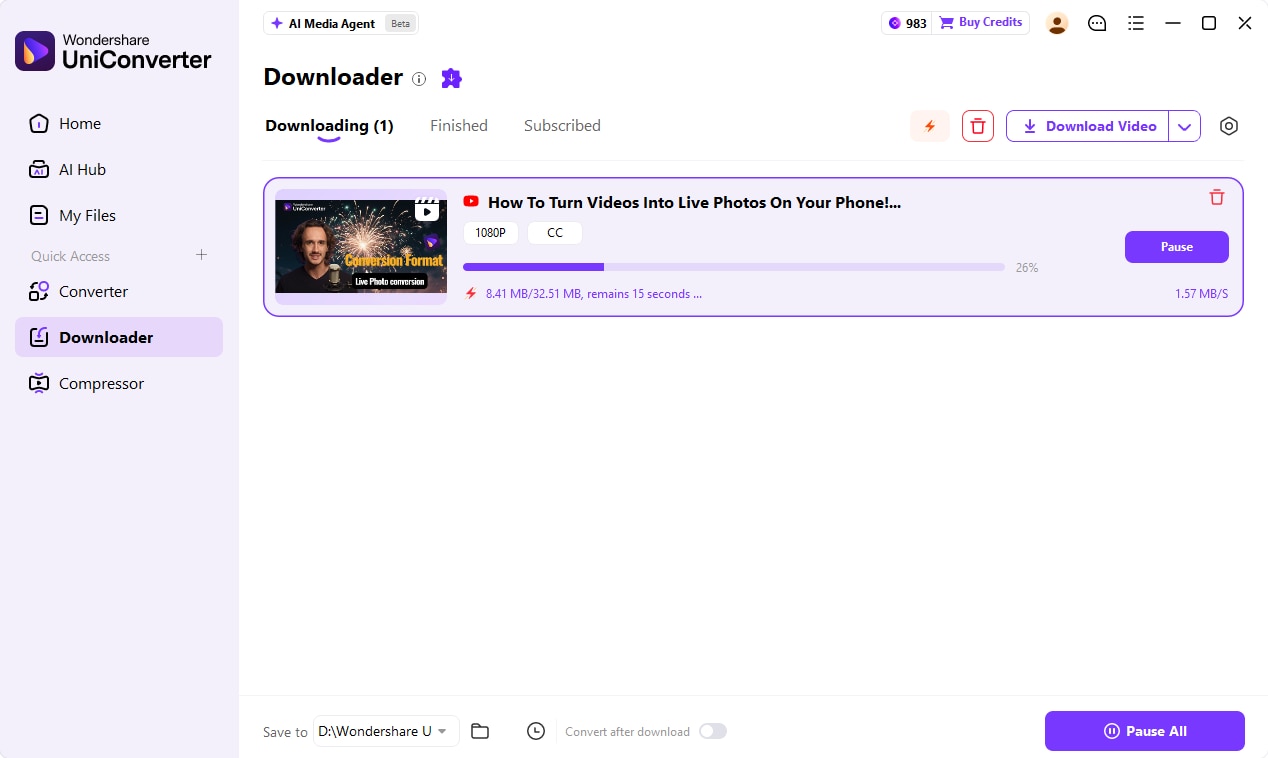
  • Step 3: Click 'Download' to save urls link to videos

*Note: We resolutely oppose all forms of copyright-infringing downloads and recording. This tutorial is only for saving your personal or authorized videos.

url to mp4

10 Best iTubeGo Alternatives for Safe and Fast Video Downloads in 2026

Looking for a safe iTubeGo alternative? Discover the top secure, high-speed video downloaders in 2026. Fix iTubeGo download failed errors by switching to reliable tools like UniConverter for batch downloading and seamless media conversion.
Christine Smith
Christine Smith Originally published Mar 04, 26, updated Mar 12, 26

Are you searching for a reliable alternative to iTubeGo? While the original software has long been a popular choice for saving online videos, recent bugs and frustrating "iTubeGo download failed" errors are leaving many users stranded. If you find yourself constantly dealing with crashes or questioning whether the app is truly secure for your computer, it is time to upgrade your digital toolkit. In this comprehensive guide, we will explore the most efficient video downloaders available in 2026 to help you save your media seamlessly.

uniconverter box
UniConverter All-in-One Multimedia Processing Tool

Top Video Downloader & Converter

Easily batch save videos in high quality up to 8K, supporting other 1000+ sites and platforms, as well as multiple AI features like video enhancement and more.
Table of Contents

Part 1. Why Users Are Looking for an iTubeGo Alternative

Saving videos should be an easy process. Unfortunately, iTubeGo users often run into unexpected problems. Many people are actively looking for an alternative to iTubeGo because of repeated technical errors and valid safety worries.

why users want an itubego alternative

Why Does iTubeGo Not Work?

Do you ever wonder "Why is iTubeGo not working" when you try to save a file? Here are a few common causes:

  • Common installation issues: Broken setup files can stop the app from opening.
  • Server connection errors: The software often fails to connect to its own servers during busy times.
  • Outdated version problems: If you forget to update the app, it will stop reading video links.

iTubeGo Download Failed – Common Causes

Seeing an "iTubeGo download failed" error on your screen is very annoying. This usually happens because:

  • Unsupported video URLs: Some websites actively block the iTubeGo video downloader from reaching their videos.
  • Region restrictions: Some videos are locked in your country, which stops the iTubeGo download.
  • YouTube algorithm updates: YouTube changes its site code often. This breaks the software until the creators fix it.

Is iTubeGo Safe to Use?

Security is a big deal when you install desktop apps. So, is iTubeGo safe? It depends on where you got it.

  • Security concerns: Some users say the app runs background tasks that slow down their computers.
  • Risks of cracked versions: Downloading free, fake versions often puts dangerous viruses on your system.
  • Adware and bundled software risks: Even the official installer sometimes asks you to add unwanted browser extensions.

Part 2. What to Look for in the Best Alternative to iTubeGo

If you want a great iTubeGo alternative, you need to know which features matter most. A good tool must be fast, safe, and very easy to use. Here is what you should check.

must have features in itubego alternatives

Safe and Malware-Free Installation

Your computer's safety comes first. A safe installer means the file comes from a real, official website. It should not hide viruses or force you to install weird search bars. Always stick to official sites to protect your data.

High-Quality Video Downloads (4K/8K Support)

Video quality matters on modern screens. The best tools let you save videos in crisp 4K or 8K resolution. They should also let you pick the format, like MP4 or MKV, so the file works exactly how you need it to.

Batch Download and Format Conversion

You save a lot of time when you download many files at once. Batch processing lets you save entire playlists at the same time. This is a must-have feature for teachers or creators who handle large projects.

Built-In Video Converter and Compressor

A great tool does more than just download. It should have a reliable Codec (a tool that compresses and decompresses media files). This helps you make large video files smaller without making them look blurry.

Part 3. 10 Best iTubeGo Alternatives (Tested & Compared)

We tested the top apps to find the best iTubeGo alternative. Use this quick comparison table to choose the right software for your daily tasks.

Tool Name OS 4K Support Batch Download Safety Level Price
Wondershare UniConverter Win/Mac Yes Yes High Freemium
4K Video Downloader Plus Win/Mac/Linux Yes Yes High Freemium
YTD Video Downloader Win/Mac No (1080p max) Yes (Paid) Medium Freemium
SnapDownloader Win/Mac Yes Yes High Paid
ByClick Downloader Windows Yes Yes Medium Freemium
Any Video Converter Win/Mac Yes Yes High Freemium
ClipGrab Win/Mac/Linux No (1080p max) No Low Free
Freemake Video Downloader Windows Yes Yes Medium Freemium
JDownloader Win/Mac/Linux Yes Yes Medium Free
SaveFrom.net Web No (1080p max) No Low Free

1. Wondershare UniConverter (Best All-in-One Alternative)

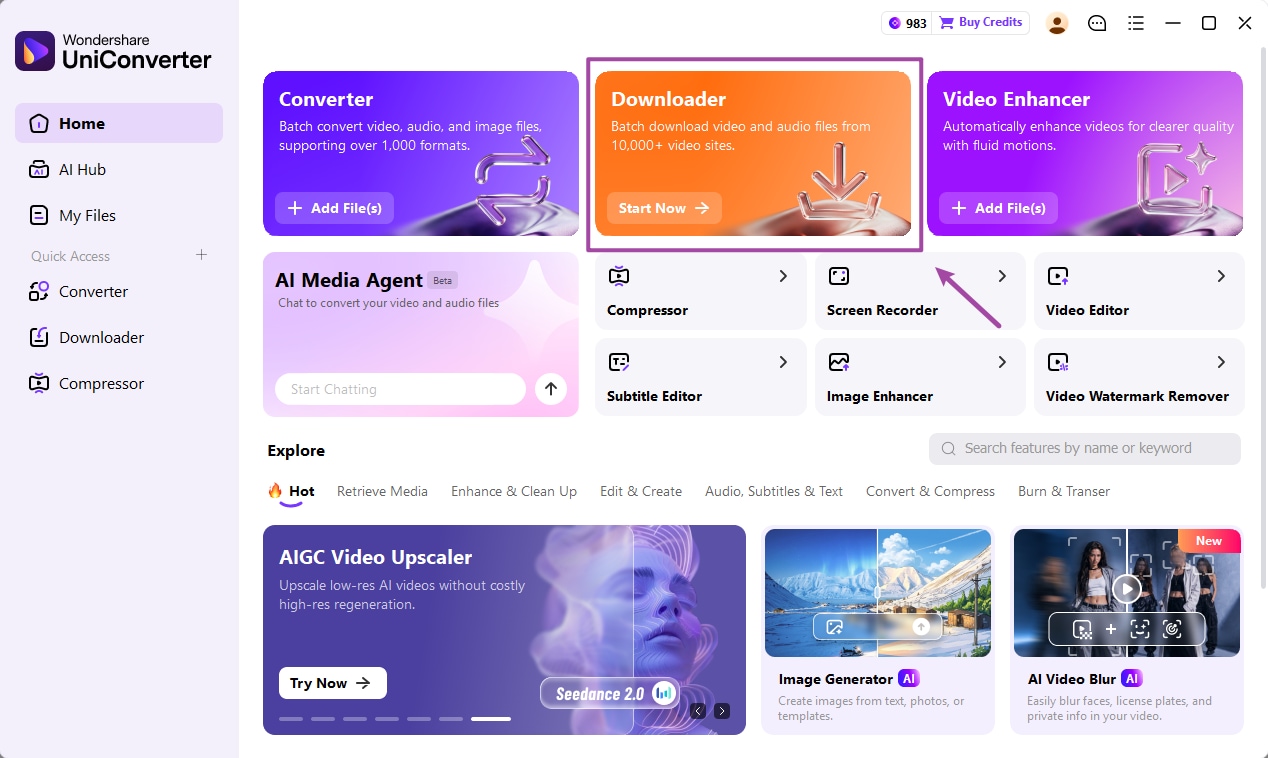
Wondershare UniConverter is the absolute best alternative to iTubeGo. It easily replaces your old iTubeGo video downloader. It offers a safe, official installer with zero ads. You get an all-in-one place to download, convert, and compress your files. It boasts smart AI tools and very fast batch processing, supporting over 1000 sites and platforms for video download. If you want speed, clear privacy, and great tools in one single app, this is your top choice.

Other than Downloader feature, you can manage many files at once using its Batch Convert feature. If your hard drive is getting full, the Batch Compress tool shrinks your files safely. You can also use the AI video enhancer and AI image enhancer to make your media look better. Feel free to explore a bunch of other AI tools to make your work even easier.

uniconverter box
UniConverter All-in-One Multimedia Processing Tool

Top Video Downloader & Converter

Easily batch save videos in high quality up to 8K, supporting other 1000+ sites and platforms, as well as multiple AI features like video enhancement and more.
wondershare uniconverter video downloader
Pros  
  • Puts video downloading and converting into one simple app.
  • Processes many files at high speeds with batch tools.
  • Gives you a completely safe, malware-free official installer.
  • Multiple AI features for multimedia processing apart from downloading.
Cons  
  • You have to install the software on your desktop.
  • The advanced features require a paid subscription.

Best for: Creators, teachers, and professionals who want a safe, all-in-one media toolkit.

2. 4K Video Downloader Plus

4K Video Downloader Plus is the upgraded, modern version of the classic downloading tool, perfect for grabbing high-quality videos quickly. It offers a highly reliable, built-in browser experience. It allows you to search and save huge channel playlists with ease without leaving the app. The screen is clean and modernized, making it a fantastic pick for a fast, focused, and high-resolution downloading task.

4k video downloader plus itubego alternative
Pros  
  • Features a built-in browser to search for videos directly.
  • Saves full video playlists and channels easily.
  • Has a very clean, modernized software screen.
Cons  
  • The free version strictly limits how many videos you can save daily.
  • It does not have advanced video editing or compression tools.

Best for: Users who just want to download high-quality 4K videos safely.

3. YTD Video Downloader

YTD Video Downloader has been around for many years. It offers a very basic way to save files. If you keep asking why your iTubeGo YouTube downloader does not work, YTD is a simple backup plan. You can grab a video and format it for your phone right away. It lacks fancy AI tools, but it handles everyday, standard-definition tasks with good reliability.

ytd video downloader alternative to itubego
Pros  
  • Very easy for absolute beginners to learn.
  • Has a built-in video player to watch your files.
  • Formats videos for mobile phones easily.
Cons  
  • Download speeds can feel very slow.
  • The free version shows large, annoying ads.

Best for: Casual users who just need a simple app for occasional, basic downloads.

4. SnapDownloader

SnapDownloader gives you great speeds across many different social platforms. It is perfect for heavy users who need top performance. You can save videos in stunning 8K quality. This keeps your offline files looking sharp on big TVs. If you are tired of software crashing, this premium app offers a highly stable, reliable experience for your daily tasks.

snapdownloader istubego alternative
Pros  
  • Supports super clear, 8K video resolution.
  • Has a built-in tool to trim videos before saving.
  • Gives users helpful 24/7 customer support.
Cons  
  • There is no free version, only a short test trial.
  • It uses a lot of computer memory while it runs.

Best for: Power users who need high-quality files from lots of different websites.

5. ByClick Downloader

ByClick Downloader is a fast, automated app made just for Windows computers. It runs quietly in the background and detects your copied links instantly. This saves you from pasting URLs manually. It easily handles big tasks, like saving whole Instagram pages. If you want a quick downloader substitute, this one-click program saves you a lot of time and effort.

byclick downloader homepage
Pros  
  • Detects copied links to start downloads faster.
  • Saves entire Instagram user pages easily.
  • Uses a very simple, one-click saving process.
Cons  
  • It does not work on Mac computers.
  • The design looks a little older than other apps.

Best for: Windows users who want an automated, hands-off way to save videos.

6. Any Video Converter

Any Video Converter (AVC) is a flexible tool for your desktop. It mixes downloading, converting, and basic video editing together. It supports hundreds of different file formats. This ensures your videos will play smoothly on any device. If you ever wonder "Is iTubeGo safe", AVC is a trusted, secure option instead. It is perfect for users needing specific file types.

any video converter itubego alternative
Pros  
  • Supports a huge list of different output formats.
  • Lets you clip and crop your videos easily.
  • The free version gives you plenty of great features.
Cons  
  • The setup file sometimes asks you to install extra apps.
  • Conversion speeds are just average.

Best for: Users who need to change videos into less common file formats.

7. ClipGrab

ClipGrab is a completely free, open-source program that can serve as an iTubeGo alternative. It is perfect if you are on a tight budget. It includes a handy search bar right inside the main app. This lets you find and save videos without ever opening a web browser. It is very lightweight and runs well on older laptops. It serves as a simple, basic iTubeGo alternative for everyday use.

clipgrab itubego alternative
Pros  
  • It is totally free and has no hidden paid versions.
  • Has a useful built-in search tool to find videos.
  • Runs very well on older, slower computers.
Cons  
  • Video quality usually maxes out at just 1080p.
  • The installer often includes annoying adware.

Best for: Users on a strict budget who only need standard video quality.

8. Freemake Video Downloader

Freemake simplifies how you grab videos from thousands of websites. It has a clean design that beginners can learn in minutes. You can link it directly to cloud storage like Dropbox to save space on your computer. While the free version adds a watermark, it remains a very popular choice. It handles your daily media needs quickly and without fuss.

freemake video downloader homepage
Pros  
  • Works with over 10,000 different websites.
  • Connects easily to cloud storage folders.
  • Has a very clean and simple look.
Cons  
  • The free version puts a watermark on your video.
  • Download speeds are slow unless you pay.

Best for: Users who want to send their videos straight to the cloud.

9. JDownloader

JDownloader is an advanced, free program for tech-savvy users. It easily bypasses annoying download blocks automatically. You can set up hundreds of downloads at once, and the app does the heavy lifting for you. The screens might look confusing to beginners. However, it gives you amazing control over your files. This makes it a very powerful alternative to iTubeGo.

jdownloader itubego alternative
Pros  
  • It is completely free and open-source.
  • Skips past common download blocks for you.
  • Handles huge lists of batch downloads expertly.
Cons  
  • The screen looks very complicated for new users.
  • You must install Java on your computer first.

Best for: Advanced users who want total control over large download lists.

10. SaveFrom.net (Online Option)

SaveFrom.net is a fast website option if you do not want to install software. You just paste a link on the site to get your file. It works well on all browsers and mobile phones. If an iTubeGo download fails and you need a video fast, this site is a great quick fix. It is ideal for fast, simple tasks on the go.

savefrom.net homepage
Pros  
  • You do not need to install anything on your computer.
  • Works great on phones, tablets, and computers.
  • Very fast for grabbing a single video quickly.
Cons  
  • The website has a lot of annoying popup ads.
  • Quality is mostly stuck at 720p or 1080p without audio.

Best for: Mobile users who need a fast download without downloading an app.

Part 4. iTubeGo vs Best Alternative: Feature Comparison

When you compare iTubeGo with the best alternative, Wondershare UniConverter, the differences are very clear. Here is how they match up in important areas.

compare itubego with top alternative tool

Download Speed and Stability

Do you frequently ask why does iTubeGo not work smoothly? It often times out during big downloads. UniConverter uses better technology. This makes sure your downloads finish fast without crashing or freezing up your computer.

Supported Platforms (Windows, Mac)

Both apps work on Windows and Mac. But UniConverter runs much better on newer computers, like Macs with Apple Silicon chips. It runs cooler and faster on modern machines.

Format Support (MP4, MP3, MOV)

If your last iTubeGo download failed, it might be a format problem. UniConverter supports over 1,000 different file types. Whether you need an MP4 video or an MP3 song, it converts it perfectly.

Security and Privacy

Is iTubeGo safe? It has mixed reviews online. UniConverter is made by a trusted company. It promises 100% security with no adware, no viruses, and strong privacy rules to keep your data safe.

FAQs About iTubeGo & Its Alternative

  • Is iTubeGo Legal?
    Yes, the software itself is legal. But downloading copyrighted videos without permission is against the rules of most websites. Always make sure you have permission to save the videos you want.
  • Why Does iTubeGo Not Work on YouTube?
    YouTube updates its website code often to stop downloads. When the code changes, the app cannot read the link. You have to wait for the app makers to release an update.
  • What Is the Safest YouTube Downloader?
    Wondershare UniConverter is one of the safest options. It gives you a clean installer. It protects your computer from the adware and viruses often found in free tools.
  • Can I Download YouTube Videos Without Software?
    Yes. You can use websites like SaveFrom.net. But be careful. These sites often have popup ads, lower video quality, and sometimes miss the audio track.
  • Is There a Free Alternative to iTubeGo?
    Yes, tools like ClipGrab and JDownloader are totally free. Just remember that free tools often run slower. They also might ask you to install extra adware during setup.

Conclusion

Finding the right iTubeGo alternative does not have to be a frustrating experience. If you are tired of dealing with an unexpected iTubeGo download failed error or questioning "Is iTubeGo safe", upgrading to a premium solution is the smartest move. A reliable iTubeGo video downloader replacement should deliver fast speeds, secure installations, and high-quality outputs every time.

We highly recommend Wondershare UniConverter as your primary choice. It easily outperforms standard software by offering high-speed batch processing and powerful media tools in one clean platform. Try UniConverter today and experience a flawless media workflow for your next iTubeGo download.

Christine Smith
Christine Smith Mar 12, 26
Share article: